Feature
Post

Category
Friday Focus

Friday Focus 11/30/07

Hey everyone, Friday Focus is back. I’m sure you’ve been hanging off the edge of your seat after dealing with a tough week without the focus last week. Well, no more worrying to do now. Hopefully everyone that was celebrating Thanksgiving last week enjoyed the holiday and any kind of vacation that may had have, but it is now time to get back to business. Let’s kick things off with three fresh sites.

Sites of the Week

First up is Beanstalk. This organic looking design features brown and light greens to create a simply fresh look for this hosted subversion tool.
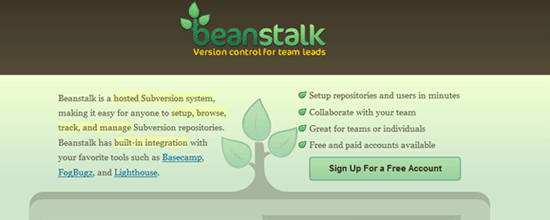
Beanstalk

Next up is Synergema. Another slick portfolio site, this one utilizing blues and greens, along with some snappy javascript to scroll between portfolio work. Plus, you have to give them points for that name.
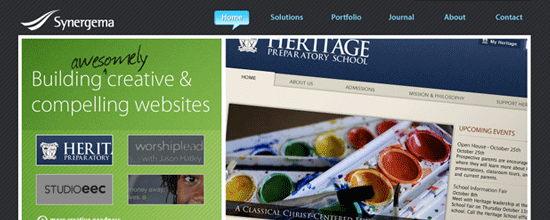
Synergema

And wrapping this week up is Come Home to a Tennessee Winter. Seeing how tomorrow is December 1st, I figured this was pretty appropriate. Falling snowflakes included.

CHTATW

Digg Weekly

Design - Pure CSS Dropdown Menu
I know there are a few of these out there, but what’s another one to add to your collection of bookmarked resources? This quick tutorial will guide you through the creation of a css-only drop down menu, without the need for JS.

Programming - 10 Absolute No-No’s For Any Freelance Web Designer
From Digg description: If you’re a freelancer, make sure you don’t make any of these common mistakes.

Hope everyone enjoys the week ahead.
Get your holiday shopping done! (or started)

P.S., If interested in what I’d like, please use the contact form. :)

Feature
Post

Category
Publishing

WordPress Blogs: Changing Hosts the Easy Way

Have you been putting off the need to change hosting companies because of dreading the move of your WordPress database? For a static website a hosting change is no big deal, but things can be a little bit more involved for a database-driven site like a WordPress blog. Fortunately, WordPress has an easy solution that can make it a fast, painless process.

When I started my WordPress blog I had no intentions or thoughts of large spikes of traffic from sites like Digg. While our inexpensive hosting held up just fine under normal conditions, it wasn’t sufficient for days with high traffic. The obvious solution is to switch to a host that can handle higher volumes of traffic, but I wasn’t very eager to move the blog.

Within the WordPress dashboard there is an import/export feature that makes this situation pretty routine. The feature was created to help WordPress users migrate a blog from other platforms such as Blogger, Movable Type and TypePad, as well as to allow for moving from one WordPress blog to another. (And even if you’re not considering a move, it serves as a great backup option).

For moving from one host to another the process works like this:

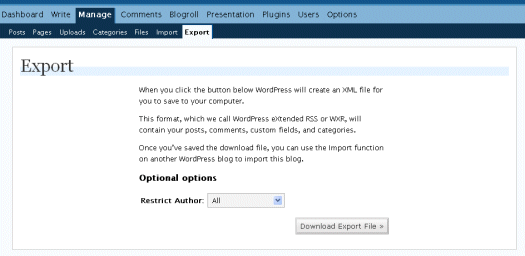
  • When you are ready to make the switch, login to your current blog and go to Manage, Export (see the 1st picture below).
  • Click on Download Export File and WordPress will create an XML file that they call eXtended RSS (or WXR) that serves as your backup. Save this file somewhere on your hard drive.
  • Once your hosting has been switched and your site is on the new server, install WordPress in the same location as on your old server.
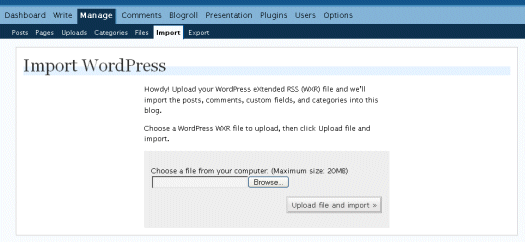
  • Login to WordPress and go to Manage, Import and choose WordPress. Then click on Browse and find the XML file that you exported (see the 2nd picture below).
  • Of course, you’ll also have to upload whatever theme and plugins you were using on the old server (and don’t forget to set your permalinks to the same setting used on the old blog).

Export:

Export screenshot

Import:

Import screenshot

The whole process for my recent switch took about 5 minutes. One additional step was needed with my new hosting company. I had to edit the php.ini file to allow for an import of this size, but this will vary from host to host. If you are having issues with this, the new hosting company should be able to help, although most hosts will provide little help for actually moving a database.

Another thing to consider is that the process is easier if you move to a host that offers a one-click WordPress installation. Most hosts now offer this, some of them through services like Fantastico. Otherwise the installation of WordPress will take a little bit more effort, but is still very feasible.

Feature
Post

Category
Design

My Design Process

I’ve been designing websites since 1996, albeit them not being very pretty at the time, of course. None were, actually, something you might or might not remember, depending on your age. Most of my design during the 90s and early 00s were for my own benefit, projects I started. At one time I had 37 gaming websites running (in Swedish), which was madness of course…

Anyway, post-dotcom and I’ve found myself doing a fair share of design work for clients. This last year’s been a good one for me, so I thought I’d share my design process with you guys. Maybe it’ll help you organize your work a bit better. Or not.

First, Consider the Problem

To me, every design is a problem. That means I need to evaluate it, turn it around, and assess every possible kink in the design. This could include making decisions that I know are easy to implement code-wise, especially if it’s a time-crunched job.

This is also when I figure out what the design want to say to the visitor, and take the directions given by the client.

Second, Bring Out the Sketchbook

I do design sketches by hand, usually pretty rough ones these days, before I even fire up the workstation. Doing the sketches by hand can usually make sure you won’t run into dead ends, forgetting about important elements and things like that. It’s a very visual way to see how things fit together.

When sketching by hand, I find that it helps drawing the various parts of the design as squares. They’re not necessarily squares in the final design, but it’s a good way to see how well these element add up, and make sure there’s balance in the design. You don’t want the one side be crammed with small stuff, and the other just have one big element - unless they fit, of course.

Sketching by hand helps, and actually saves time. Still, I must confess that I fire up Photoshop right away more and more often, but that’s due to the fact that I’ve got a very clear idea of how the design should be. Sketching by hand certainly helps unless you’ve got a very clear image of what you’re doing.

Third, Do that Mockup Thing

When you’ve got a concept, it’s time to start mocking up the design. I never go straight to the code, but then again I rarely really finish the mockup either. It kind of depends on the client.

Anyway, I mockup the design, more or less. I use Photoshop for this, but some people prefer Illustrator. There are a bunch of other pieces of software that you might prefer.

Fourth, Time to Code

I might not be the one doing the actual code all the time, but most blog designs are coded by me. My editor of choice is Coda, thanks to the included FTP functionality mostly.

I get a version up and running in Firefox first, then I use VMware Fusion to bug test in the various versions of Internet Explorer, Opera and so on.

Finally, Deliver and I’m Done

That’s about it. Delivery is usually a zip file with some instructions. I rarely do implementation work myself, and if I do I make sure the pay for it is good since there’s the possibility of things going wrong that might end up not being my fault, and I really hate that.

That’s my process. How do you go about when designing websites?

Feature
Post

Category
General

Graphic Design Glossary

For those of us who are term-challenged (like me) or want to pretend like they know what they’re talking about, there is a Graphic Design Glossary that is being hosted by Lauren at Creative Curio.

Something like this is very useful as a reference, but I doubt it’ll help the non-techies. I still roll my eyes when I ask for something in a PSD, and the person replies back, “A what?”

Be sure to check out the Graphic Design Glossary and let Lauren know how you like it.

Feature
Post

Category
Strategy

Promoting Your Articles

One of the biggest questions I get pertains to promoting an article online. Once you have written something amazing, it doesn’t really matter until people read it, and the best way to get it read is to promote it on social bookmarking/networking/news sites like Digg, Reddit, and others.

Of course you have already heard this all before, and you want to know what the “secret sauce” is that gets certain people on the front page of sites over and over, and the answer is simply: connections.

The biggest weakness in all of the social promoting sites is the fact that if you have many people give a thumbs up to your story, you will move up the ranks and get a fair bit of traffic, even if you don’t make the front page.

While systems like Digg and others are wise to group voting, you can continue to build up great stories and promote them by increasing your group, and only using groups that would enjoy the story to boost it up in the rankings. If you have a friend that wouldn’t be interested in an article you wrote, don’t send it to him or her. You can then create lists of about a dozen or so people, for different sites, interested in different things and tailor your promotion list accordingly. With a big enough pool of people, you can get your best articles promoted rather easily, and then, if they are really good, the community, once they are exposed to the article, will do the rest, and sometimes bring your post to the front page, where it will then be insulted in all its glory.

How do you increase the pool of people you can call on to help with promoting your post? Make friends! Network with people in the same boat as you, and when you have written your best articles, let them know. It might not always get the response you want, but if you give them the option of promoting it through one of the social news websites, they might just do that, even if they are just doing it to bookmark it.

Bloggers are very approachable. Even us here at Devlounge love to hear the ideas you might have in regards to content we should be publishing, so say your peace on the contact page.

Promote your articles often, become part of the social news/voting community, and make friends. All systems have their weaknesses, and in this day and age, if you don’t work those weaknesses to your advantage, you won’t get noticed. It is a sad truth, but a truth none the less.

Feature
Post

Category
General

My view on freelance design today

I wrote a little commentary piece today on what I think is really hurting the freelance the design community right now. Feel free to give it a read if you’d like. In other news, I hope everyone that had a four day weekend enjoyed it. Back to reality tomorrow. Hopefully you didn’t go spending all your money on Black Friday deals.

Catch you on this Friday for a new focus.

Feature
Post

Category
Column

E-Books: Useful or Useless?

As I continue to build up my own blogs, as well as other blogs, I watch as people make a fair bit of money, through selling their content in an e-book form. After reading more than a dozen of these so-called “expert” accounts of how to increase traffic, get more RSS subscribers, boost your PageRank and otherwise build up your blog into a money making system, I realize that many of these books are completely useless.

Many are missing the context on how to enact the tips they give you, and basically give you step one, step three, and step five in the process, making sure they you make the e-book publisher more wealthy, while not really creating any real advantage to you. The information is valid, and if you had the full process, it could help you, but another thing they don’t tell you is that their ideas only work for the first people that try them out. Users, search engines and advertisers quickly get wise to new “systems” (schemes) and quickly block, remove or otherwise change their system so such tactics no longer work.

Are e-books just playing on our hopes and dreams of striking it rich online or can they provide real value?

I have gone and read some of the most prominent ones, and I have to say that there are very few that I have learned anything from. Most give out information which can be freely found elsewhere, and they really don’t convey their lessons any better than the free sources.

They question then becomes, why do people buy e-books? Does the fact that it isn’t free drive people to place value on the product? Are we all just lazy hopefuls? Or are there some e-books that are really informative, helpful and worthwhile? Not that we would ever do it, but if Devlounge became a paid site, for $25 a year, would you all pony up the cash to continue to read, or would you move on to other free sources?

Please feel free to have your say in the comments below.

Feature
Post

Category
Publishing

WordPress Tip: Disable and Remove Unused Plugins

As WordPress continues to evolve and change, and your blogs grow as well, you may no longer use certain plugins, but forget to deactivate them and this could lead to a huge security issue down the road.

WordPress 2.3 and above has been great about letting you know when there are updates to certain plugins, but if you ignore this update message, or if there is no update notification, and you leave a plugin active, you could be opening your WordPress blog to being compromised.

Plugin authors don’t always think of everything when creating their plugin, and I would hate to see anyone have their blog be hacked due to a vulnerability in a plugin, so please, if you aren’t actively using and updating your plugins, remove them, as you will be closing potential security risks.

I know it is something not widely talked about in the community, but there is no reason to have four or five dozen plugins on your WordPress blog if you are only using three or four. I try to stay away from using extra plugins as much as possible, and I also steer away from any plugin that isn’t actively developed.

If you follow my advice, you will have taken another step to protect your blog, and in this day and age, that is never a bad thing.

I also highly recommend updating your blog to WordPress 2.3.1 if you haven’t already, and making sure you back up your blog both before and after the upgrade. If your blog is compromised, a working backup can reduce the data loss.

Feature
Post

Category
General

PollDaddy 2 Released

For those of us who like to run polls on our site, there are a myriad of options. For example, with WordPress there is WP-Polls. But what about for non-WordPress bloggers? Or perhaps a blogger that wants to create a one-time poll and be done with it? That’s where PollDaddy comes in.

Setting up a poll is pretty easy. Just create an account and create a new poll or survey. Below is an example of me entering some questions for a poll attached to the end of this post.

PollDaddy 2 Options

For a complete feature set, please check out the PollDaddy Version 2 features. Some features I think others will enjoy are:

  • Localization support.
  • More answer choices (up to 100).
  • Ability to export results to CSV.
  • Ability to custom-theme poll appearance.

There is also a pro account, but for my use I think $20 a month is a bit much. See below for a sample poll created using PollDaddy.

Feature
Post

Category
General

Save Time with VMware Fusion

For some reason, I’m always short on time, and apparently I’m not the only one. There’s just not enough hours in the day, and that’s a problem for the web industry overall. Working with can be frustrating as it is when things aren’t going your way, so any time you can save is greatly appreciated.

Enter VMware Fusion, my most recent Time Saver.

Windows XP on OS X

VMware Fusion windowVMware Fusion is a virtual machine software, which means that it lets you run other operating systems (or OS) on your computer, such as Windows XP or a Linux distribution. In my case, I’m on Mac which means I’m running OS X.

That means that I, when doing web development, had to have a PC booted up, with the necessary browsers installed. Now, it may be a luxury problem since I’ve got a three monitor setup and not everyone’s as equipped in this matter as I am, but that Windows XP instance took up valuable screen real estate, which is a bad thing when being used to having plenty of space.

No more!

I bought VMware Fusion, set up a virtual machine (which was very easy, just allocate space on your hard drive), and then I installed Windows XP Pro on it. The installation runs as it always does, in a window on your computer, when working with VMware’s virtualization software, and it was a breeze. There are some quickstart files to download, but I figured I’d do the full install to make sure everything I wanted was in.

So the installation was a breeze, or as much of a breeze as a Windows XP install can be. You do need a valid license, and you do need to activate your copy, it’s just like installing on a PC, so this isn’t emulation. That means that you’ll have to buy a Windows license if you’re a Mac user.

Since I’ve been on Windows before, I had everything I need.

Unity Integrates the Windows Applications

Now, you can run your virtual machine either in a window on your computer, or you can use the Unity feature. That means that you can have VMware Fusion embed (for lack of a better word) your Windows applications (or whatever OS you fancy) in OS X! In other words, I can run Internet Explorer 6 for bug testing in a nice little OS X-like window, instead of having it confined to a big Windows XP window.

This is just great, brilliant, and marvelous!

Unity windows

I will never again run a Windows PC just for bug testing. I’ve got control of my screen real estate, and I’m very happy with not having to go through a lot of hassle to see what my code does in various browsers. Everything’s on my Mac Pro workstation, and that makes me a happy designer. The fact that I never need to wait for Windows booting up also kicks ass, I’ve just suspended it in a state with all the browsers etc. open! Lovely.

VMware Fusion recently updated to 1.1 for Leopard support, but I don’t know if there’s any real change from running 1.1 on Tiger - I haven’t upgraded my workstation to the new OS X version yet.

There are other solutions to this, such as Parallells, which basically does the same thing. Boot Camp, included with Leopard, isn’t the same though, since it only lets you install a Windows instance on your computer and choose it on startup, not run it side by side.

I recommend VMware Fusion to everyone who needs to switch to Windows every now and then, to see how code and design turns out. It’s only $79.99, which is totally worth it in my book, but then you need a Windows license as well, of course.