Feature
Post

Category
General

Conferences and Confluence

Recently, I was at the Northern Voice conference in beautiful Vancouver, British Columbia Canada, where I was able to meet up with people from a variety of different backgrounds. It got me wondering about how each conference brings in different groups of people, and how the best conferences are the ones that have a blurry line between different groups and specialties.

At Northern Voice there were people that ranged from just starting out with blogging all the way up to blogging as a full time job. Some didn’t know what tagging was, and others couldn’t stand software that didn’t allow them to use WordPress’ native tagging.

It reminded me that the gap between those that are just starting out and those that understand every nook and cranny of the growing industry that is online media. I think far too many of us are concentrating on talking about the end result, instead of teaching others how to gracefully enter the different arenas they are interested in.

If you want to capture some attention online, some of the biggest questions at the event were:

  • How do I change themes in WordPress? This includes changing header graphics, and sidebar items.
  • How can I learn to theme WordPress?
  • What are the best tools to monetize my blog?
  • How do I use tools like Flickr, Stumble Upon, Youtube to improve my blog?
  • I know PHP, but how do I make this into a WordPress plugin?
  • Should I start a blog, or is it too late?

As a developer, designer and blogger, these different questions could make great posts that would appeal to the growing group of new bloggers looking to make their mark on the world. If we take a step back, and take the time to answer these questions, we could quickly become the resource used by bloggers looking to answer these questions.

Bringing large groups of people together, from a variety of skill sets and backgrounds was interesting, but I think it is the knowledge shared between everyone that was the most amazing part of the event.

What conferences have you attended, and what did you think of them? Let me know in the comments below.
Feature
Post

Category
Column

How Do You Pick a Standard or Format to Stand Behind?

So, now that the HD DVD versus Blu-ray is basically considered over, with Blu-ray the winner, it made me wonder how people chose one over another. How do you decide you are going to learn PHP over ASP, WordPress over Movable Type, Windows over Linux? What drives your decisions to chose one format over the other?

I almost have a fear of choosing one. I know a little ASP and PHP, WordPress and Movable Type, Windows and Linux. This means I am definitely no expert, and have always been a huge generalist when it comes to acquiring knowledge. I am always worried that I will chose the wrong format, or the wrong standard, and waste my time and money.

As for picking up knowledge in certain topics, it was mostly because of how easy it was to learn rather than how useful it was. I grew up on Windows, but found out that Linux was the cool geeky thing to learn, as well as being a required course in my college course. I have almost always waited though until whatever format war was complete, or at least properly entrenched into society that it isn’t going to go away for a long time.

Did you get burned by the HD DVD versus Blu-ray war or did you buy both formats or were you like me and chose neither format?

Feature
Post

Category
Friday Focus

Friday Focus 02/15/08

I wanted to showcase some cleaner designs this week, and I hope you will like them. I also found it easier to find Digg related items this week as the design and programming community picked up over the last two weeks.

Designs of the Week

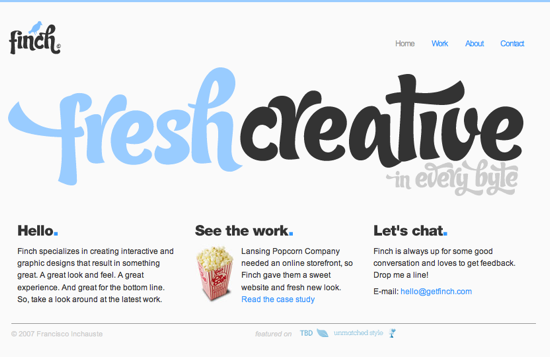
Finch // Fresh Creative
The simplicity, yet style really appealed to me, as well as the colours. This is one of those sites that doesn’t add more than it has to, but is still very visually stunning. I wish they had a contact from on their contact page, but that’s just nitpicking.

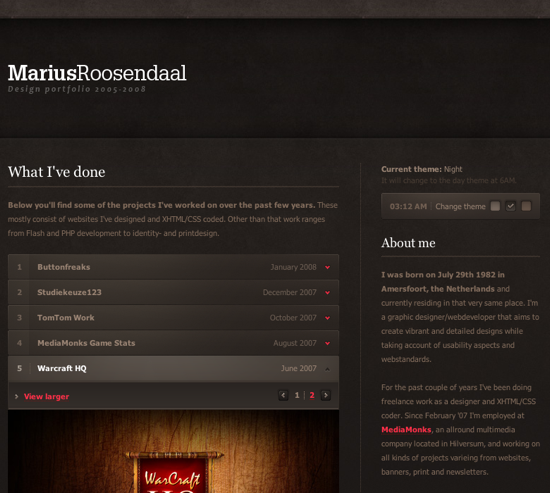
Marius Roosendaal
While this has a stone/grunge look to it, there is something about the whole presentation that really was striking. The darker tones create a heavy contrast to the portfolio items, which are really the main focus of the site. Very well put together in my opinion.

Digg Weekly

Design - 10 Mistakes in Icon Design
There are so many sites using horrible icons, and unfortunately operating systems aren’t much better. If you are a designer that makes icons for web designs, applications, or even operating system themes, please take a look at these ten mistakes and avoid them the best you can. I hate ugly icons.

Programming - 9 Practical Ways to Enhance your Web Development Using the Firefox Web Developer Extension
There are few Firefox extensions that make my must install list, and the Web Developer toolbar is one of them, and for good reason, its useful! The post on Six Revisions gives a great list of the stuff that can be done via this extension. Definitely worth a look, and even more so if you want to convert others to using the toolbar.

Feature
Post

Category
Column

Generalist or Specialist?

A friend of mine recently asked me if he should learn JavaScript and AJAX or PHP? He is already really good with xhtml and css to the point where he could write some fascinating articles about the subject, but he is finding that his pay rate is limited because of competition. I told him that if he wanted to avoid a fair bit of competition he should learn JavaScript and AJAX rather than jumping on the PHP bandwagon. What he noticed though is that as a freelancer, there are many more jobs for PHP. I told him that maybe he should try learning both and be good at each.

He didn’t really like that idea, as he is the type of person that spends the time and effort becoming and expert at something before moving on. He enjoys being a specialist, and being able to fix problems that others cannot.

I have always been more of a generalist. I like to learn a bit of everything, so that I have a wide arsenal at my disposal, but I always have to research or contract out on the more difficult bits.

It started me wondering what is better, especially from the point of view of a freelancer. Should you be a specialist, and focus on one subject that you are the best at, or a generalist, and load your brain up with bites of knowledge from hundreds of disciplines?

Have your say in the comments below.

Feature
Post

Category
Code

Permalink Issues When Moving from Typepad to WordPress

So, you have finally decided to take the plunge and move from Typepad, a hosted service, to WordPress’ self-hosted solution, but you don’t want to lose your permalinks that everyone has linked to?

See, when you export from Typepad it doesn’t keep your post slugs intact, so WordPress generates some of its own, based on the title of the post. This means the URL you had before is no longer correct. Firstly, Typepad added a .html on all of your post related links. WordPress doesn’t do this by default.

To change this, all you need to do is go to the Options -> Permalinks section, and select date and name based. In the custom box, it will fill in:
/%year%/%monthnum%/%day%/%postname%/

From here, change the ending to:
/%year%/%monthnum%/%day%/%postname%.html

This should now make your permalinks to your posts similar to your TypePad settings you had, but with one glaring difference. TypePad truncates the link to fifteen characters, while WordPress allows you up to two hundred characters. This is an important difference when your post title is something like “Permalink Issues When Moving from Typepad to WordPress”.

In TypePad that would be shortened to:
permalink-issue.html

Whereas in WordPress it would be:
permalink-issues-when-moving-from-typepad-to-wordpress

To fix this issue, there are many different things you can do. I have seen tutorials that require some complex, though interesting SQL queries that unfortunately don’t always work for the non-programmer/SQL expert.

Here is an example from Mo Jebus:
UPDATE _posts SET post_name = INSERT( INSERT(post_name, LOCATE(’.html’, post_name), 5, ”), 1, 9, ” ) WHERE 1

When I read this, I scratched my head. Surely, there must be an easier way to truncate the post slugs in WordPress to be fifteen characters, thus fixing most, if not all, of the permalinks so any links to the posts you once had, are still valid.

What about altering the table, so that the post_name, which is where WordPress generates its permalinks, is no longer than fifteen characters long? I then used an SQL query in phpMyAdmin to alter the table and shorten the post_name which worked perfectly for Sarah in Tampa, the site I was working on. Once we completed the first query, we re-ran it again, changing the field back to WordPress standard.

Here’s what I used:
ALTER table wp_posts modify post_name varchar(15)

After which I then changed it back by running:
ALTER table wp_posts modify post_name varchar(200)

That was it. Sarah had her permalinks the same as they were on Typepad, and so anyone clicking an external link should be brought to the correct post on her new WordPress powered blog.

Feature
Post

Category
General

Where I’ve Been

I’ve been very busy and have seemingly disappeared from Devlounge lately. If you’ve been wondering where I’ve been all this time and our looking for some good opinionated things to read, stop by my new blog. Hope all is well. I hope to return to the Devlounge scene sometime soon.

AJ

Feature
Post

Category
Code

Danger Will Robinson! ~Status Bar Alerts~

The text that appears in the bottom left corner of your browser are called status bar alerts. Normally these are just messages that come from the browser it self pertaining to the functions of loading the website but it is good to look at what would be normal, boring functions of technology and come up with ways for it to communicate with your audience and further your brand.

I will show you how to throw in a static message in the bottom left corner of the browser but keep in mind that this only works in Internet Explorer as we are using the window.status object.

For a static message on the status bar we will use this piece of Javascript code:

HTML:
  1. <title>Status Bar Alert</title>
  2. <script language=”JavaScript”>
  3. <!–
  4. var statusbarmessage=”PUT YOUR MESSAGE HERE”;
  5. function statustype()
  6. {
  7. window.status = statusbarmessage;
  8. }
  9. >
  10. </script>
  11. </head>
  12. <body onload=”statustype()>
  13. </body>
  14. </html>

First the message is thrown into the variable statusbarmessage which is used as the parameter by window.status in statustype. The code activates in the body using onload and everytime that the page is displayed.

You can also do the same thing by deleting the variable var statusbarmessage and chucking the "PUT YOUR MESSAGE HERE" within quotes straight into the window.status.

E.g: window.status="PUT YOUR MESSAGE HERE"

However that is not good programing practice as future requirements could not be incorporated without having to re-write the code. I hope this helps you if you ever wondered how in the heck other designers were able to put messages down there!

Feature
Post

Category
Code

Controlling Ads in WordPress: Older Posts Only

A friend of mine on a forum was curious on how to make the in-text popup advertisements only show up on older posts. Kontera, among others, supply those advertisements that are special links that show a content box when you hover over them. He found it too intrusive for his everyday readers, and so only wanted to show it on posts older than a week.

I had a script handy which I showed him, and it worked out fine. I am not saying this is the best script and everyone should use it, but it is my solution. If you have a better one, as always, I'd love to see it.

PHP:
  1. <?php
  2. /*
  3. Show your in text ads on posts older than 7 days.
  4. Put this around the Javascript they give you.
  5. */
  6.  
  7. $older = date('YMD');
  8. $days_since = floor((date('U') - get_the_time('U')) / 86400);
  9.  
  10. if($days_since>= 7) {
  11. $older=1;
  12. }
  13.  
  14. if ( is_single() && $older==1 ){ ?>
  15. <!-- Put your JS code from the company here -->
  16.  
  17. <?php } ?>

Basically the script says, look at today's date. Look at the post we are on and its date, and if it has been more than seven days, show the advertisement JavaScript.

You could use this code for all sorts of things. I have used it to show larger advertisements on older posts, as well as part of a script that shows advertisements only to those that are from search engines. It can be very useful to be able to manipulate WordPress in these ways.

Let me know what you think, especially if I have messed up. And I hope this helps those of you that have been wondering how to do this with WordPress and without any sort of plugin.

Feature
Post

Category
Design

Design Mold Status: Broken!

Remember the Break Your Design Mold post? If you haven't read it, please do, it's all about trying to evolve as a designer.

I decided to take my own advice on a client project that suited it, and made something dark. People used to my design know I like it light and sober, so making something dark was a way for me to challenge myself. I think the last real dark design I did was back in 1998...

Anyway, Have Laptop Will Travel (a Splashpress site by the way) is the result, and while the implementation in my design have changed it in some ways, you still get the general feel.

Below is a screenshot, it might look differently now since they're fiddling to make room for an ad campaign:

Screenshot

Here's a picture from my Photoshop mockup:

Mockup

What do you think? Did I break my design mold? In some ways, sure, but not in all of them of course. I could, I guess, but since this is client work there was things to consider, paths to take, and the actual site's history to think of.

Still, I did do something that I normally wouldn't, and I did it without compromising the client work.

Have you broken your design mold yet?

Feature
Post

Category
Friday Focus

Friday Focus 02/01/08

Continuing on last week's success, I figured I would give the Friday Focus another go, and will hopefully be continuing until told otherwise.

I hope you enjoy my picks of the week.

Designs of the Week

evaneckard.com
Lately, I have been seeing many designs implementing space or star images to their designs. The design is darker than I usually like, but for some reason the contrast seems really strong, and I love the use of red and blue to make certain elements "pop". This is my favourite of the week.

ashwebstudio
I am really enjoying sites that use green effectively, and ashwebstudio integrates the colour nicely. The content area is really nice and clean. Everything looks fairly balanced and the design is not overstated. I wish the navigation hover effect was stronger, but I love the little icons they used to emphasize their items.

Forest River Timber Homes
I had a really hard time finding a third design that I enjoyed. I wanted something that was pleasing to the eye, and interesting to look at. I wanted something that wasn't blue and orange, and the Forest River Timber Homes site fit the bill. I don't really like their sub-pages as much as their main page, but overall the style is interesting, and the strong contrast of the green on the dark brown works really well.

Digg Weekly

Design - 8 Web Design Mistakes That Developers Make
I have made more than one of the mistakes mentioned in the Wake Up Later post, but I continually hope that others will wise up and deal with their design and usability mistakes. Hopefully they will all read the post.

Design - Old Websites Sure Are Funny and Internet '96
On the same line of thinking, there are some great articles on what the web was like twelve years ago now. It is funny to look at what corporate budgets bought online back then. Apple, McDonald's and others all looking really ugly by todays standards.