Feature
Post

Category
Webapps

Your Online Life As Content

Today we’ve got a bunch of great services online, some blog related, others just tools that help us in our everyday life. If we really wanted to, we could have more or less everything accessible, or at least replaced, by online tools and services. Think about it: e-mail and calendars have already moved online permanently for a lot of people, and nowadays the office apps are getting decent, you’ve got collaboration software, and even an online version of Photoshop! Add your bookmarks, web radio and music, online movies and TV, there’s a lot.

Why not share it? And give your site more life and flair at the same time?

Share Your Life

That way, colleagues and friend can keep up with your schedule, and you can link it easily.

If you’re using Google Calendar, and have public content in it, you can add it to your site using simple embed code. That way, colleagues and friend can keep up with your schedule, and you can link it easily. Other online calendars, including applications you install yourself, will probably let you do this as well, but my 100% non-scientific research shows that the Google app is the most used one.

Likewise, you can help people find you in the physical world, using Google Maps for instance. That way, driving directions are always available online, with zooming functionality and everything. Embed a map including important places on your blog, maybe with restaurant tips and directions to good bars? Or just get a map showing where your offices are located, either way will do. You can even do stuff with the street view these days!

Add Your Online Existence

I personally advise against displaying microblogging content as regular content

Do you Twitter or Jaiku, or perhaps Pownce? Why not share that content on your site? Bloggers can use one of the numerous plugins available, including the popular Twitter Tools for WordPress, although I personally advise against displaying microblogging content as regular content. It’s better to put one of the available badges (for Twitter and Jaiku) in the sidebar, showing your current status, or why not just pull the latest updates via RSS? Better yet, mash them up with Yahoo Pipes and serve your microblogging content live, using RSS.

Bookmarks are great, and you should share your finds. The most popular way to store bookmarks online today is del.icio.us, and you can of course get your latest additions for your site, or pull it with a plugin or via RSS. The latter goes for all good online bookmarking services.

Speaking of RSS, why not share your list with everyone? Either just link to the OPML file, which can be imported into any good RSS reader, or to a public showing. Google Reader users can display a clip of their shared items on their blogs, or just link the public page. If you’re a Bloglines user, you can create your own blogroll badge, or you can link to a public page there as well. I’m sure other online RSS readers have similar solutions.

My Leisure Time

Why not share what your do on your free time, for leisure? Using last.fm, you can tell everyone what you’re listening to, and even display it with a nifty little widget. Or why not start your own last.fm music channel, playing good music only? If you, like me, are in the Spotify beta, you can link your playlist, which is more or less the same as last.fm but cooler, and only for us privileged ones…!

We all love YouTube, so why not slip in a link to your YouTube favorites, or even a playlist? There are several ways to get YouTube on your site. Sure, you can always post the videos you like on your site, but that’s not always appropriate, and besides, if you’re an avid YouTube watcher then it would men a ridiculous amount of YouTube videos, right? Link your channel!

What about Hulu, South Park Studios, Comedy Central and such? Well, they just don’t offer anything besides embedding videos, and sometimes not even that. But you can always link your favorite shows, right?

What About Privacy?

Be sure to consider the privacy aspect of sharing your online life carefully

Obviously, there are numerous ways to let people into your online life. The question is, do you want to do that with everything? Maybe your bookmarks are private, or perhaps you don’t want to share your schedule with everyone? Also, do you want to let people know where to find you in the physical world?

Ask yourself these questions. You certainly shouldn’t share anything online that matters a lot to you, because it could get exploited and leave you in a fix in the future. Be sure to consider the privacy aspect of sharing your online life carefully, before starting to embed and share content from these great web services (and others) on your site.

That being said, it is certainly nice to get automatic content for your blog, for instance, just by using a service you would be utilizing anyway!
Feature
Post

Category
Friday Focus

Friday Focus 03/28/08

Designs of the Week

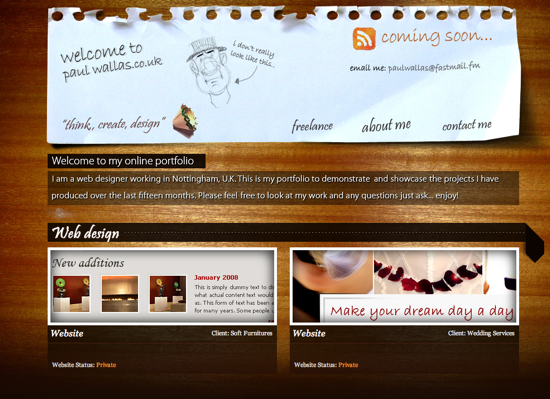
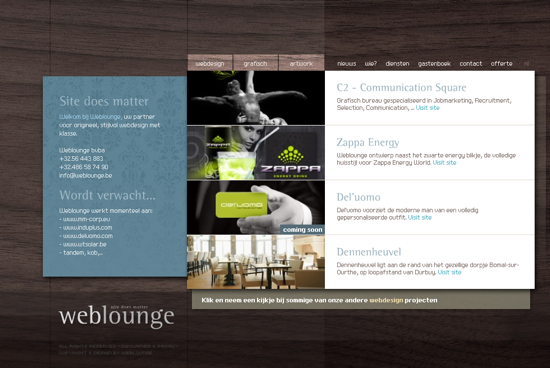
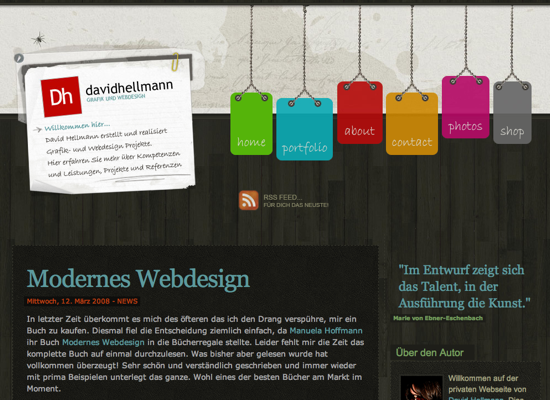
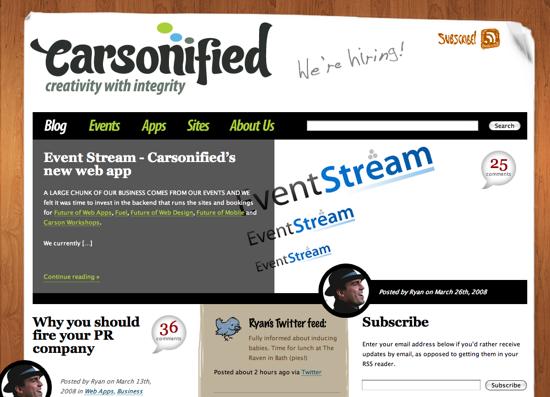
Sorry about the delay everyone, but this week’s Friday Focus took me an extra bit of time as we are going to have many more design inspiration images this week. Can you tell me what the common thread is?

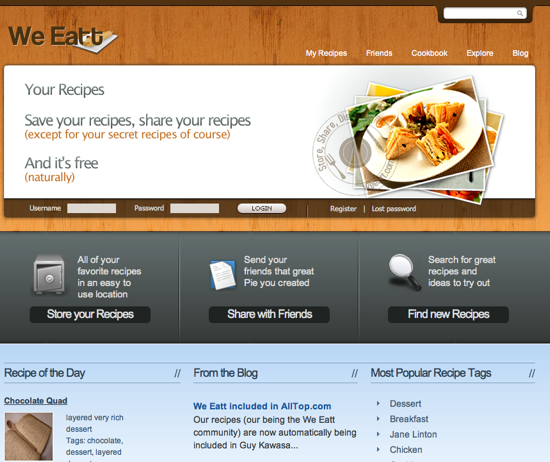
We Eatt

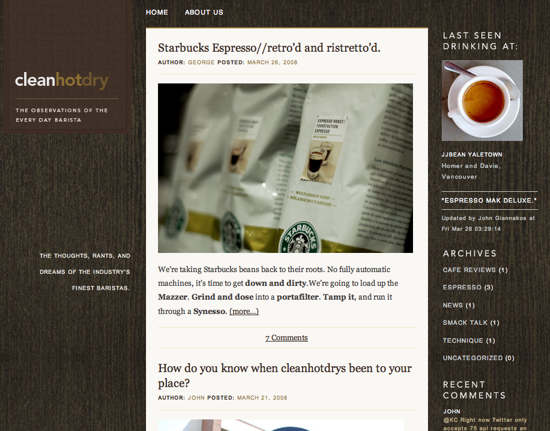
cleanhotdry

Paul Wallas

Webdesign Weblounge

Nanamiart Art

David Hellmann

Carsonified

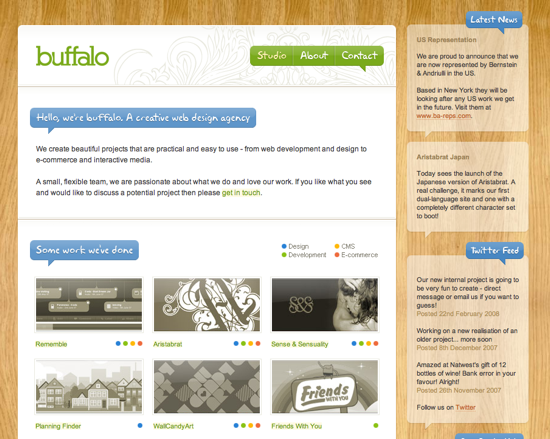
Buffalo

Feature
Post

Category
Code

Mashing Up Feeds Using Yahoo Pipes

Yahoo Pipes may just be in beta, but it's already a great tool for web publishers that wants to add a bit of more flair and life to their websites. It's in no way hard to mash up RSS feeds using Yahoo Pipes, and I'll walk you through the most basic way of using the service in this tutorial.

But first of all, why would you want to mash up several RSS feeds into one? Let's do a list of reasons, shall we?!

  • You've got a bunch of sites you like and would like to monitor all in one. Mash them up!
  • You publish a handful of sites and wants your users to subscribe to them all. Mash them up and offer the feed, through Feedburner if you like!
  • You'd like to display relevant stories in your sidebar. Nab the feeds and mash them into one!

That latter one is exactly what we'll be doing here on the next version of Devlounge, and something I'm adding to the new Wisdump design as I'm writing this.

Yahoo Pipes

Let's Mash Those Feeds

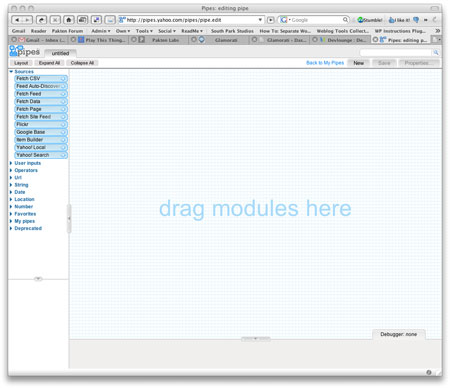
It's really easy. Go to http://pipes.yahoo.com, click Create a pipe, and sign in with your Yahoo ID (get one if you don't have one). You get a big grid, a debugger, and stuff to the left for inclusion using drag and drop. Yikes!

Yahoo Pipes - the big grid

So let's get started then. We want to mashup these feeds:

  • Devlounge's RSS feed (http://feeds.feedburner.com/Devlounge)
  • The Blog Herald's RSS feed (http://feeds.feedburner.com/blogherald)
  • Performancing's RSS feed (http://feeds.feedburner.com/performancing)
  • Blogger Jobs' RSS feed (http://feeds.feedburner.com/blogger-jobs)

We could add more, but that'll do for now. I've collected the feeds as you can see.

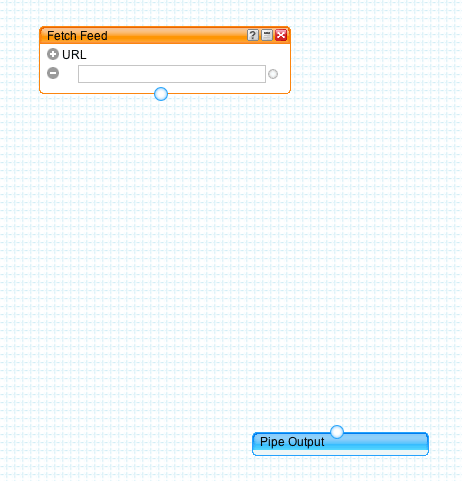
Now, let's add them. Grab the Fetch Feed badge under Sources in the left menu, and drag it top the big grid. A box gets added, and we also get a second box called Pipe Output. That's where we want the feeds to land.

Elements in Yahoo Pipes

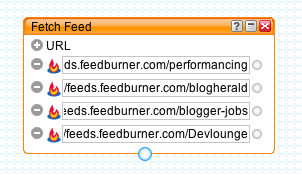
Let's add the feeds. Paste the feed URL in the input field within the Fetch Feed box. Then click the + sign thrice beside the URL to get three more input fields. Add the RSS feed URL:s in these.

All these feeds are powered by Feedburner, as you can tell by looking at their URL:s, and the little icon to the left of them.

Yahoo Pipes - four feeds added

Good.

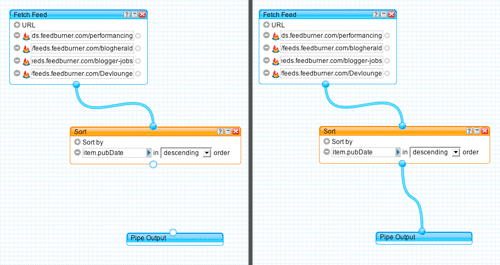
Now let's sort them so that the most recent one is on top. Click Operators to the left, and drag the Sort field to the grid. For this we want to sort by item.pubDate (when the items in the mashed up feeds where published) so we'll pick that from the first dropdown in the Sort box, and we want it in descending orders so we'll select that in the second one.

Let's make something off this! Click the circle in the bottom of the Fetch Feed box, and drag it to the top circle in the Sort box. Voilá, they're connected! Now do the same from the bottom circle in the Sort box, to the Pipe Output box.

Attaching pipes

There we are. If you want to test it you can click the Refresh link in the debugger below the grid.

Now click Save in the top right, and name your pipe. When it has finished saving, click Run Pipe at the top of the screen. A new window opens, where you can do stuff with your pipe.

Looks good? Then click Publish to make it accessible. Now, what we want is the pipe's RSS feed, so click the More options link to the right and Get as RSS.

There you go, one mashed RSS feed containing the latest from four different feeds!

Adding The Feed To Wisdump

So let's add the feed to Wisdump's sidebar then, shall we? The pipe's feed is this: http://pipes.yahoo.com/pipes/pipe.run?_id=bntjQkH73BGSmXmSjknRlg&_render=rss

So how do we add it? With a RSS parsing plugin? We could, but since Wisdump is powered by WordPress, why not just use WordPress' built-in feed parser? Let's do that.

This little code snippet is well known, several blogs have reported variants of it. It's snatched from the RSS feeds in WordPress' admin.

HTML:
  1. <?php
  2. require_once (ABSPATH . WPINC . '/rss-functions.php');
  3. // insert the feed URL here
  4. $rss = @fetch_rss('http://pipes.yahoo.com/pipes/pipe.run?_id=bntjQkH73BGSmXmSjknRlg&_render=rss');
  5. if ( isset($rss->items) && 0 != count($rss->items) ) {
  6. ?>
  7. <?php
  8. // set the number of items from the feed to display (10)
  9. $rss->items = array_slice($rss->items, 0, 10);
  10. foreach ($rss->items as $item ) {
  11. ?>
  12. <a href='<?php echo wp_filter_kses($item['link']); ?>'>
  13. <?php echo wp_specialchars($item['title']); ?>
  14. </a>
  15. </li>
  16. <?php } ?>
  17. <?php } ?>

This will spit out a list where each item in the pipe's feed is a li list item, so you'll probably want to insert an ul around it.

The key is:

HTML:
  1. // insert the feed URL here
  2. $rss = @fetch_rss('http://pipes.yahoo.com/pipes/pipe.run?_id=bntjQkH73BGSmXmSjknRlg&_render=rss');

...where you insert the feed's URL, and:

HTML:
  1. <?php
  2. // set the number of items from the feed to display (10)
  3. $rss->items = array_slice($rss->items, 0, 10);
  4. foreach ($rss->items as $item ) {
  5. ?>

The number of items you want to display. I went with 10 here.

Here's the code used in Wisdump's sidebar:

HTML:
  1. <ul class="network">
  2.     <h2>News From The Network</h2>
  3.     <?php
  4.     require_once (ABSPATH . WPINC . '/rss-functions.php');
  5.     // insert the feed URL here
  6.     $rss = @fetch_rss('http://pipes.yahoo.com/pipes/pipe.run?_id=bntjQkH73BGSmXmSjknRlg&_render=rss');
  7.     if ( isset($rss->items) && 0 != count($rss->items) ) {
  8.     ?>
  9.     <?php
  10.     // set the number of items from the feed to display (10)
  11.     $rss->items = array_slice($rss->items, 0, 10);
  12.     foreach ($rss->items as $item ) {
  13.     ?>
  14.     <li>
  15.     <a href='<?php echo wp_filter_kses($item['link']); ?>'>
  16.     <?php echo wp_specialchars($item['title']); ?>
  17.     </a>
  18.     </li>
  19.     <?php } ?>
  20.     <?php } ?>
  21. </ul>

You can see it in action over at Wisdump (down a bit in the sidebar), which incidentally has got a new design, so check that out too.

Pipes in action over at Wisdump

Good luck with your feed mashing!

Feature
Post

Category
Friday Focus

Friday Focus 03/21/08

Designs of the Week

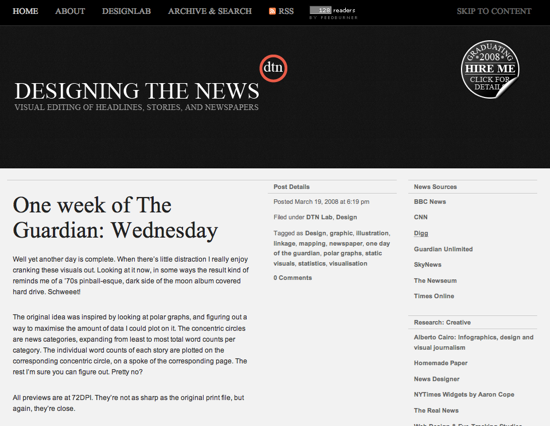
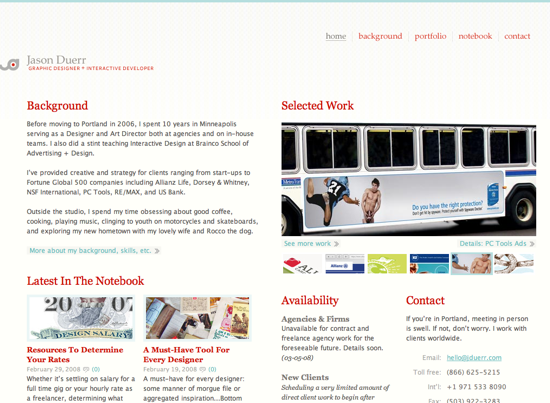
I had a hard time finding designs I enjoyed this week for the Friday Focus, but what is really strange about the two I present to you today is that I can't put my finger on what I like about them. Usually I wouldn't include either of these designs based on some personal issues I have with how they have spaced items, font size, and colour usage, but here they are. Feel free to let me know if you like or dislike them, and why.

Designing the News

Jason Duerr

Digg Weekly

Design - 16 of the Most Extreme & Modern Beds You’ll Ever See
Sure, this isn't web design, but it proves that no matter what you want to do, thinking differently, even about the most boring of things can create stunning works of beauty. Does navigation always have to be how it is currently displayed? Try something new, push the envelope. If they can do it with beds, you can do it with design.

Programming - 10 AJAX Effects to Boost Your Website’s Fanciness Factor
I am the type of person that breaks JavaScript even when copy and pasting it directly from a working example, but I have to admit to really enjoying some of the effects that people are using on their sites, as long as they aren't being over used. Check out these ten AJAX effects that might raise some visitor's eyebrows.

Feature
Post

Category
Design

The Next Devlounge Design: Mockup #2

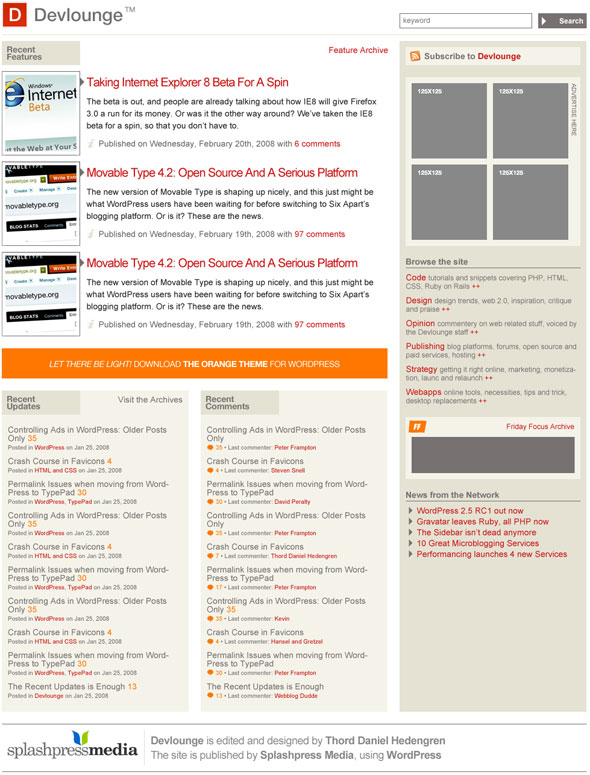
It's time for another mockup of the next Devlounge, a wee bit later than planned due to me moving house, and everything being as messy as humanly possible of course. Since they're cutting the power at the office any minute now, I'll just get this new mockup up there, and let you guys say what you think!

The Second Mockup

Some notes about the second mockups:

  • It's still the front page.
  • I'm not too fond of the three top feature listings, due to dragging too many images around and changing too much. To put a long story short, it should look better than it does...
  • Editorial info should be added to the sidebar.
  • The footer isn't done! I just took the one from the next Wisdump for now.

Here we go!

The Second Devlounge Mockup

There you have it. Do compare with the previous mockup, which this one is built directly upon. Have I tackled the problems like you wanted? Please let me know what you think in the comments!

Feature
Post

Category
General

Perfect Pagination

I recently saw a post on Woork where they talked about the perfect pagination using CSS, and the first thing I noticed was that they were showing off what they label as the Digg-like structure that I use on most of my blogs.

I have always hated the previous, and next page links that most WordPress themes come with, as it doesn't tell anything about which direction you will be going once you are off the front page.

Will previous bring me to where I was previous, or to even older posts? It has always been something that has annoyed me.

The tutorial on how to structure the xhtml and css of the navigation is really interesting for those of us building our own applications, but if you want to add such a navigation to your WordPress blog, you will want to check out WP-PageNavi, a WordPress plugin that adds the pagination navigation to your theme.

It is good for your users, and for search engines to pour through when indexing your site.

If you are developing your own web based application or website, please make sure you include pagination through your posts, data or other information and check out Woork and their Perfect Pagination post.

Feature
Post

Category
Friday Focus

Friday Focus 03/14/08

Designs of the Week

One of my biggest issues when doing a design is how I manage the content area. The header, and footer aren't too difficult to do, but creating an effective content area just seems to be beyond my skills. I have two examples today of content areas that work well in their design, and they are both darker designs, creating a bigger challenge in my opinion.

Ed Merritt Studios

Eston Bond

Digg Weekly

There won't be a Digg weekly this week since the Design and Programming areas of Digg aren't getting many new front page contributions. Is this due to the change in the voting algorithm of Digg or the lack of submissions?

Feature
Post

Category
Column

Can CAPTCHA be Saved?

There are many different ways to secure areas of your site that are open to users, and one of the most popular methods for years have been CAPTCHA's. They are images that have distorted text which you then write in an input field to verify you are a human and not a machine.

One of the worst things about CAPTCHA's is how inaccessible they are to those with visual impairments. Heck, I am only twenty-five, and while I do wear glass, even I find myself unable to read some of the letters and numbers on the more complex CAPTCHA images.

Over on SearchEngineWatch there is a great post talking about how CAPTCHA systems are under attack and losing the war.

There are really only two results to this battle. Either the spammers will win or accessibility will lose. There really doesn't seem to be a happy ending to the whole CAPCHA scenario.

According to this post on TMCnet spoke with Russian researchers who claim to have algorithms that can correctly read CAPTCHA screens 30 to 35% of the time. While these tools are currently only in the hand of some high end folks, over time, it is reasonable to expect that they will get more widely disseminated.

When this happens, the flood gates will really let loose, because a 30 to 35% success rate is a gold mine to a spammer. They don't care about the failures, as they happily will take the successes. Spam bots will have open season on all email systems, blogs, and social media sites that are protected by CAPTCHA

When this happens, the flood gates will really let loose, because a 30 to 35% success rate is a gold mine to a spammer. They don't care about the failures, as they happily will take the successes. Spam bots will have open season on all email systems, blogs, and social media sites that are protected by CAPTCHA.

When creating applications, we have to continually come up with new and better ways to deal with the spam issue, and it looks like it is time for a new innovation with CAPTCHA quickly becoming more and more inefficient and less accessible to those with any kind eyesight issues.

What could replace CAPTCHA that spammers would have a hard time defeating but at the same time not be too difficult for humans to decipher? Is there a solution to this problem, or will all of our applications be overrun with spam in the near future?

I think it is an interesting problem that not enough developers are taking the time to think about. How many of you rely on a CAPTCHA service or something similar?

Feature
Post

Category
Publishing

Blogging Software for Mac Users

If you like me are sometimes updating multiple blogs, then you know how annoying it is to jump between admins. I'm a WordPress user myself, but I could find myself using other platforms, which would further add clutter to my workflow. I don't like clutter one bit.

Enter blogging software, programs that let you post to several blogs (or just one, should you want to do that) using one interface. This post focuses on blogging software for Mac.

The good and the bad

There are both pros and cons with using blogging software for your everyday blog posting. Some might seem a bit over the top, but assuming you take pride in your blog, and perhaps make money maintaining it, I think these issues are important.

Pros:

  • Easy to manage several blogs.
  • Offline writing, often including drafts.

Cons:

  • Uncertainty. Did it really work?
  • General program design means that it might not be optimized for your blogging platform of choice.
  • Blog platform updates might break your blogging program's functionality.
  • If you're doing custom stuff, like fields or cool plugins, you're stuck with your blog platform's admin.

That being said, here goes!

MarsEdit

MarsEdit

MarsEdit's been around for a while. It costs $29.95 and there's a 30-day trial available. This isn't the program for people using the WYSIWYG editor in their blogging platform of choice, since there's nothing of that here. What you have is a simple dropdown that lets you input standard tags (strong, link tags, blockquote, and so on), much like the traditional editor in WordPress. This might not be enough for everyone, but personally I find it doing its job, then again I always turn of the visual editor since I speak html fluently.

A good thing is that you can setup your own templates for previewing posts, and you can also store macros so that you don't have to type the same thing over and over again, a good feature. There's also support for AppleScript, but I don't know much about that.

Uploading images is easy, and should you be the type who likes to nab photos from Flickr, then you can have your account integrated into the MarsEdit Media manager.

As for compatibility, MarsEdit works with most blogging platforms, be it WordPress, Movable Type, Blogger, Vox, or even Drupal. Tagging is supported.

MarsEdit

I did find one annoying bug, or whatever you want to call it, though. When writing posts that you want to split up using the more feature (we're talking WordPress again), then you type in two different boxes (Body and Extended). Everything in the Extended box is after the more link. However, the more link will be inserted on its own row, and not directly after the last character in the Body box, which makes it look a bit weird on sites where the read more link is designed to just follow the content.

Overall MarsEdit is a great choice, as long as you know your html. I do, so I love it!

Ecto

Ecto

Ecto is the most stylish blogging program that I'm writing about in this post. It costs $17,95, and there's a 21-day trial available so that you can play around for yourself. At the moment, only Ecto 3 beta supports Leopard, but on the other hand the beta is stable so you can play around with it.

Unfortunately, Ecto's got a reputation of having problems with WordPress, although it's mostly something for the version 2 branch. There are some weirdness in Ecto 3 as well, most importantly the fact that you can't add new categories in the program. Tagging works though. This might be something that will work once Ecto 3 leaves beta, but right now it's buggy.

One selling point for Ecto is that it looks good, and it's got a visual editor, as opposed to MarsEdit's html code one. You can swap between visual and code in an instant, and Ecto doesn't seem to output too much unnecessary code, if any in the simpler cases. Certainly a good thing.

Ecto

Ecto works with more or less any blogging platform, just like MarsEdit. There's support for AppleScript, and there's also a few plugins available, including a Flickr one, and support for posting tweets to Twitter. That's really cool.

However, although Ecto looks a bit better than MarsEdit, I think it falls short. Keep in mind that I'm not interested in the visual editor, though, so you might prefer this one after all. Beta is never a good thing, but I believe Ecto will deliver in the end.

Blogo

BlogoBlogo is a newcomer, costing $25 and offering a 21-day trial. It's got a very straight forward design, not exactly leaning on the OS X look, if you know what I mean. Either you like it, or you don't. I'm fine with it. The full screen mode, more or less doing the same thing as the popular WriteRoom application, is genius!

However, Blogo fails on a very crucial aspect, and that's categorization of your posts. You've got no category nor tag management, and while you can add tags in the "categories" box below the body, you'll find that, with wordpress.com blogs, these will be saved as tags. This is not acceptable, and I do hope that it will be remedied and then remade for a future version.

There are good things in Blogo for sure, especially the image manager which let you crop and position images with ease. Drag and drop is very nice when it's working. The fact that Blogo isn't giving you tons of options when writing isn't always a good thing, but it sure makes you focus on the important thing, being the content. However, a handy code editor would've been nice.

I'll be keeping an eye on Blogo, and if you like the straight forward style you should too.

Blogo

Final words

My trial periods have expired, and I'm hooked. The most expensive blog software, MarsEdit, is also the one I've decided to go with in the long run. I realize it's not for everyone, and there are flaws (which I'll point out to the developers of course), but it certainly saves me time. I'm fluent in html and css though, so this might not be the obvious solution for everybody.

Make good use of the trial periods offered, and do share what your blogging software you're using for the Mac.

Feature
Post

Category
Friday Focus

Friday Focus 03/07/08

It is time for another Friday Focus. Sorry that I am a bit late today, but I have been busy doing some blogging and development work elsewhere that has been keeping me super busy.

I have some great picks for both design and articles I found on Digg. I hope you enjoy this week's installment of the Friday Focus.

Designs of the Week

This week I am going to try to hand out some criticisms as well as my normal "wow, look at this" banter. All of these designs are great, but there is something a little off about them, at least in my mind.

Good Barry
Simple, effective and easy to navigate. If I had one criticism for this site, it would be that the front page presents me with too many navigational items, thus confusing where I should go next. I love that there is a humorous flair to the site, and the sliding panels on the front page to show more content without taking up more space.

Chyrp
Simple, with a wide range of colours distinguishing different areas of the site. I love the front page, but the rest of the site falls a little flat. I hope they go back and look at their very nice front page and integrate the rest of the site better.

Brightbox
A very dark design with a decent amount of contrast on the elements that matter. Simple looking design and navigation. Definitely not your typical hosting design. The big issue I had with this site is that the logo area feels almost too big. Like they dedicated all that screen real estate to the logo and title of the company and after that, things feel a little squished in by comparison.

Digg Weekly

Design - Seriously Cool Photoshop Explosion Effect
I really enjoy PSDTuts as there are some easy to replicate but beautiful things you can do with Photoshop, even if you are a wannabe designer like myself. This effect covers creating an explosion, and while I probably wouldn't use it as they did, I could see ways in which I could use the effect, and that's what makes it great.

Programming - Powerful CSS-Techniques For Effective Coding
I love resource posts, and Smashing Magazine is definitely good at those. The latest one covers a variety of great links that will help you do some stunning things with CSS.