Feature
Post

Category
Strategy

3 Principles for Turning Your Site Into a Brand

About a month ago, Aaron Wall published a landmark blog post where he showed that Google was placing a lot more emphasis on brands in their search engine results pages (SERPs). In the post, he showed examples of well known brands that started ranking for popular keywords.

At this point, the algorithm change seems to only be affecting short keywords with a high search volume instead of long tail keywords.  Still, this could be an important trend in the SERPs.

Consider Google CEO Eric Schmidt’s comments about brands back in October (also from Aaron’s post):

The internet is fast becoming a “cesspool” where false information thrives, Google CEO Eric Schmidt said yesterday. Speaking with an audience of magazine executives visiting the Google campus here as part of their annual industry conference, he said their brands were increasingly important signals that content can be trusted.

“Brands are the solution, not the problem,” Mr. Schmidt said. “Brands are how you sort out the cesspool.”

“Brand affinity is clearly hard wired,” he said. “It is so fundamental to human existence that it’s not going away. It must have a genetic component.”

With Google’s new emphasis on brands, it’s important to have brand building as one of the pillars to your SEO strategy. Here are 3 principles to keep in mind.

1. Have a long term mindset.

Famous brands like Nike and Coca-Cola were not built quickly. Brands take time to build.

It will take consistent quality effort for at least a couple months, if not years, to turn your site into a brand. However, the payoff will be huge when you hit the top rankings. Plus, your rankings will be hard to overtake since most people don’t do this hard work of brand building.

2. Create viral content.

A site becomes a brand when it receives enough mentions on the web that a huge number of people take notice.

The most efficient way to get mentions is to create content that people will naturally pass around.  You as one person can only do so much marketing.  Therefore, get your visitors involved by creating useful and/or entertaining content that they’ll want to share on the web.

Here’s one way to do this.  Check what’s popular on social media sites like Digg, StumbleUpon, YouTube, and Twitter, and then create something similar for your own niche.

By the way, when I say content, I’m talking about apps, videos, podcasts, and even your product. Adding viral component into your product is a great idea.

3. Network with other webmasters online.

You can create an awesome piece of content but if no one knows about it, it won’t spread. You need to give it a little push.  That’s where being friends with other webmasters comes in.

If you have these online friends, they can promote your content and get the ball rolling.  Not only that, but having other webmasters promote your stuff builds up the credibility of your brand.  It’s more credible if someone vouches for you than if you vouch for yourself.

So, how do you find and build these friendships?

That’s for another blog post but the main principle to realize is that profitable partnerships require “give and take”. For example, you can promote their stuff (links, tweets, social media votes, forum posts, etc.), let them know about it, and they’ll often reciprocate.  Also, try taking interest in their work.  They might check out what you’re doing.

Your Turn

Obviously, there’s a lot more to developing a brand than these three things.

What other principles do you have for turning a site into a brand?
Feature
Post

Category
Friday Focus

Friday Focus 03/27/09: Twitter Mania

Twitter has just turned three but it it’s still the most talked about webapp in ages. That’s because people are constantly coming up with ways to extract, arrange, and present its data. Let’s take a look at some nicely designed 3rd-party websites that harness its power.

Designs of the Week

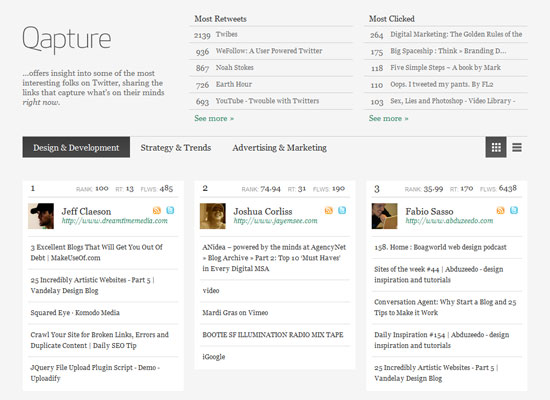
Qapture

Elegant, clean, and easy to use, despite a relatively large amount of information you’ll find on this site. It’s great that there’s a summary of the most popular items on the page right at the top. Scrolling downwards you can switch between grid and list views—again, to control information overload. Third, I like that the actual titles of the webpages being linked to are displayed instead of the tweets themselves, which show up only when you hover over the links.

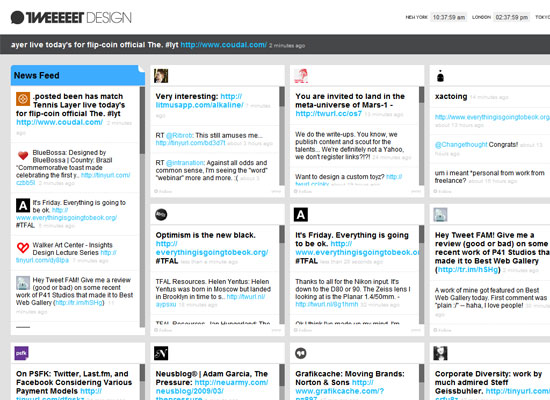
TWEEEEET Design

The site’s modern touches match its theme (“design”) but I have several concerns. One, I’m not fond of the marquee scrolling: it’s very choppy and whether it’s a JavaScript effect or an HTML <marquee> tag, it has fallen out of favor a long time ago. Two, the tiny pixel fonts: it would’ve been better if it were used in more elements other than the header and footer. Three, the left-aligned layout: I really don’t see a reason why it can’t be centered.

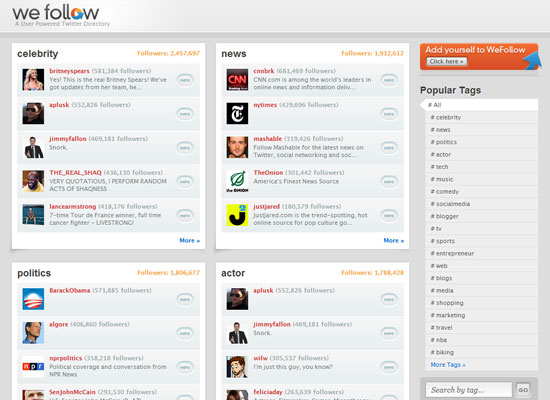
WeFollow

Despite very muted hues, the logo, avatars, and call to action button on the right are colorful and break the monotony. And even though the design elements are clearly Mac-inspired, they’re very subtle and not overpowering. This is a Twitter-related site after all, and not an Apple one.

Which leads me wonder: why are there no bird graphics, gratuitous use of light blue, and cutesy rounded typefaces in the above websites? Have people gotten tired of carrying over Twitter’s branding to their projects?

Social Media Weekly

DesignDesigning from the inside out: Part 1 – Content Before Design

ProgrammingDiscover the “Cool” of CSS: 25 Advanced CSS Techniques

Feature
Post

Category
Code

Rare HTML Tags: Help Your Readers

Over on Nettuts, there is a post about rare HTML tags that people should take the time to learn and use. Some of them are rare for a reason, but others might help you create a post that is more useful and engaging for your readership.

Web developers these days are often expected to know and work in multiple languages. As a result, it’s tricky to learn everything a language has to offer and easy to find yourself not utilizing the full potential of some more specialized but very useful tags.

Unfortunately we haven’t been tapping into the full potential of these more obscure HTML tags as of late. But it’s never too late to get back into the game and start writing code that taps into the power of some under-used tags.

Out of all of the tags listed, I think the acronym tag is the most underutilized, and most useful in the list. If you are tired of writing out the full form of certain words constantly, you could easily use the acronym tag to help users in an easy way, understand what you mean.

SEO rather than Search Engine Optimization.

Unfortunately, not ever browser supports the more “rare” HTML tags, and this must be taken into account when planning out the user experience and the tags you are able to use. These limitations of support can definitely be frustrating, and have always been an issue for web developers.

Do you use any of the tags listed? What do you find are the most underused, but useful tags, and is the browser support slowing down your use of it?

Feature
Post

Category
Design

Three Free Lifesaving Programs

The hard drive on my trusty Macbook died on me yesterday, which means that I’m forced to use our old desktop PC for the next few days. This PC runs Windows XP, and is used mostly for browser testing and- of course- gaming. That means no Photoshop, no Dreamweaver, no Transmit… you get the picture. Work, naturally, must go on- so what’s a web designer with a temporary PC to do?

Fortunately, all our files are kept on several external hard drives- so although the nice man at Apple support told me all my Macbook data was irretrievable, there was no great loss there. Also, I made the leap from an email client to using Gmail exclusively a long time ago, so no lost emails either. Important documents for current projects are in Google Docs, important dates and to-dos on Google Calendar. My biggest problem, as you can probably guess, is not having my favorite Apps available to me for the next couple of days. Thanks to a few hours searching and downloading, however, I’m back to work with the help of these three programs:

Image Editor: Gimp
First up, of course, was finding a good image manipulation program. I had heard of Gimp before, but hadn’t tried it until now- and wow. Gimp blew my expectations out of the water- from layers to brush modes to opening my PSDs without a hitch, the program works beautifully.

Text Editor: Notepad Plus Plus
Next, I needed a good text editor for my HTML and PHP code. I usually use a combination of Dreamweaver and TextWrangler, but since I just needed a temporary solution, I figured Windows’ built-in Notepad would be good enough. Then I downloaded and tried out Notepad Plus Plus, which is like Notepad on steroids.

FTP Program: GoFTP
Finally, I needed an FTP program. I’d been using Transmit on OSX for so long, I’d forgotten what Windows FTP program I used to use. A quick Google search brought up the snappily named GoFTP, and I’m glad I tried it out. The program is fast- and I mean, really fast. Small. Unobtrusive. Just what I need from an FTP program.

And there you have it: three free programs that’s gotten me back to work quicker than you can say “failed hard-drive”.

Has this ever happened to you? What programs saved your life?

Feature
Post

Category
Strategy

3 Common Link Building Mistakes and How to Avoid Them

Many webmasters have realized that a big part of SEO is getting links to their site. Armed with this knowledge, they make an effort to build links to increase their traffic from the search engines. However, their link building efforts are often ineffective because they make common mistakes. Here are three of those mistakes.

1. Quantity over quality

If one link is great, then five links is better, right? Not so fast. Search engines place a lot of emphasis on the quality of the links. A link from a popular site is much better than 20 links from low quality, spammy sites. In fact, no amount of low quality links can be as effective as a link from an authority site in your niche.

You could even get penalized for having too many low quality links. Don’t take the easy way out. Go after quality links and ignore low quality sites in your link building efforts. Think of it this way: the harder it is to get a link, the more effective that link will be. Do the hard work (networking, creating great content, guest posting, etc.) to get those links from quality sites.

2. Not using relevant anchor text

If you have a chance to choose the anchor text, use keywords instead of your site name. For example, instead of this link devlounge.net, use this one web design info.

Now, if someone links to you without them asking, don’t ask them to change their anchor text. That’s annoying and bad practice. They already linked to you. No need to bug them. But if you submit an article to an article directory or write a guest post, you’ll usually have control of your anchor text.

Many people will link using the titles of your pages, so try to add keywords in your titles.

Also, don’t use the same anchor text for each link. If you vary your anchor text, you’ll rank for more keywords.

Update: My friend, Ryan, left this useful comment.

I would like to just throw in the idea that with Google’s recent shift towards Brand emphasis, it can actually be a good thing to get lots of links with A) your site name and B) your site domain as the anchor text. Obviously its also good to mix things up and get varied anchor text, but I think that if there is too high a concentration of varied anchor text it looks unnatural.

I think Ryan has a great point. It’s a good idea to repeat anchor text if your anchor text is your site name or your site domain. Many people naturally link this way anyways. Plus, you’ll get more mentions on the web for your name and domain, which will make your site look more like a well known brand.

For more info about Google’s brand emphasis, check out this article.

3. Only linking to the home page

If you just link to the home page, then your home page will have a chance at good rankings. But what about the other pages on your site?

Each page including the home page can only target a few keywords effectively. You need links to the other pages to rank for a lot of keywords.

Also, I like getting links to the other pages since they are usually better pages for your visitors to land on. The other pages have more specific information than the home page and that information can make a great first impression to your visitors.

Finally, it can be easier to get a link to the other pages. For example, you could create a really great piece of content, give it its own page, and then email other webmasters and ask them to link to it if they like it. This could be hard to do for the home page.

Over to You

These mistakes are not the only ones. What link building mistakes have you seen?

Feature
Post

Category
Code

WordPress Snippet: Display Posts by Tag Frequency

Blogs just aren't the same as they used to be. In the old days a blog was characterized by time and personality—chronology was important, and you read the blog because of the author, not the information he could give you.

Nowadays blogs are used more for short bursts of information about a single topic—typically a blogger's expertise. The personality behind a site barely matters. "Content is king!" as you may recall.

So if chronology is no longer important, why post by date? I think part of the answer is that WordPress displays dates by default in most themes. Let me propose an alternative way of displaying content in WordPress. By tag frequency.

Making tags useful

Tags provide wonderful meta information about a post, but sadly this information is typically relegated to an ugly list in the sidebar. I say, if you're going to go to the work of tagging all those posts, you had better use those tags for something useful!

By adding a couple snippets outside "The Loop" in WordPress you can display N number of posts by X tag. Here is an example to help make it a little more clear:

Imagine you have 20 posts tagged Home and Garden, 10 tagged Clearance, and 13 tagged Hardware. With a bit of PHP we can get WordPress to display posts from each tag in order of most popular to least popular. We can even take it a step further and limit the number of tags to display. The end result might look something like this:

HOME AND GARDEN
* Tag 1 Post 1 Title
* Tag 1 Post 2 Title
* Tag 1 Post 3 Title
* Tag 1 Post 4 Title

HARDWARE
* Tag 2 Post 1 Title
* Tag 2 Post 2 Title
* Tag 2 Post 3 Title
* Tag 2 Post 4 Title

CLEARANCE
* Tag 3 Post 1 Title
* Tag 3 Post 2 Title
* Tag 3 Post 3 Title
* Tag 3 Post 4 Title

Now that is a usable list of tags that makes the content readily available. A great side effect of displaying posts by tag frequency is that your site become much more dynamic. For example, maybe you go to a plumbing conference and blog 30 posts about it, all tagged Plumbing. The content on the site will automatically start displaying the posts tagged with Plumbing at the top of the list. I call it the "bubbling" homepage.

Enough rambling, here's the code:

PHP:
  1. <?php
  2.       $noOfTags = 10;
  3.       $noOfPosts = 4;
  4.      
  5.       $cloudRight = get_tags("orderby=count&order=DESC&number=$noOfTags");
  6.       foreach((array)$cloudRight as $tagRight) : ?>
  7.          
  8.           <?php       
  9.           $postsRight = new WP_Query();
  10.           $postsRight->query("tag={$tagRight->slug}&showposts=$noOfPosts");       
  11.           ?>           
  12.           <?php if ( $postsRight->have_posts() ) :?>
  13.             <dl class="xoxo">
  14.               <dt><?php echo $tagRight->name ?></dt>
  15.            
  16.               <?php while ( $postsRight->have_posts() ) : $postsRight->the_post(); ?>
  17.               <dd><a href="<?php the_permalink() ?>" rel="bookmark" title="Permanent Link to <?php the_title_attribute(); ?>"><?php the_title(); ?></a></dd>
  18.               <?php endwhile;?>
  19.            
  20.             </dl>
  21.           <?php endif; ?>           
  22.          
  23.       <?php
  24.           unset($postsRight);
  25.       endforeach; ?>

Just paste this bad boy outside The Loop in your index.php file and there you have it, clutter free, bubbling posts by tag frequency.

Feature
Post

Category
Friday Focus

Friday Focus 03/20/09: Fun, Illustrated Personalities

This week's featured designs have great personalities and stand to remain etched in your brain thanks to generous use of illustrations. You'll definitely want to meet them!

Designs of the Week

Springs & Struts Engineering and Design

Taking cues from the company's name and branding, this design is a joy to look at. I can only wish it had more pages so I can see how they can take the construction theme further. I love how the text moves around the design, and not the other way around. Sometimes it's good for function to follow form, isn't it?

The Amazing Idea Machine

A snarky website deserves an over the top concept, so here you go. Is that Obama on the left and Einstein on the right?

The Great Bearded Reef

We've seen so many one-page websites with AJAXy scrolling effects with cute illustrations with an ocean theme, and yet seeing a new one like this doesn't bore me. This design brings several new things to the table, like some texture and grunge to match his scruffy beard and future island job. Take a few things from a concept that works, then add a few touches that make it your own.

Social Media Weekly

Design - 25 of the Best Designed Twitter Homepages
Because the current king of illustrated branding can give you lots of design inspiration too.

Programming - Chrome Experiments
Google's site for demonstrating the power of its browser. Lots of ideas for harnessing JavaScript for neat tricks.

Feature
Post

Category
Column

Facebook: Advancing and Failing

Depending on what side of the fence you sit on, you might think Facebook is making the right moves, or think it is totally going in the wrong direction. Facebook has tried, since the beginning, to open up its system to various application developers, advancing the functionality, features, and draw of the site, all the while trying to make its developers and itself wealthy. In this equation, little thought is given to the users except what new "trend" can be taken advantage of, and this is what people are currently complaining about as Facebook's front page starts to mimic Twitter and other micro-blogging tools more and more.

In a world that barely understands blogging, can the masses take advantage of, and enjoy micro-blogging through status messages and whatnot that Facebook now employs?

Talking to many Facebook faithfuls, and Twitter users alike, most seem unhappy with the changes, one of my friends recently saying that Facebook has, in its latest version lost what made it interesting and worthwhile.

In the last design change, Facebook relegated most applications to other pages, rather than the single profile page, we all had before the redesign, and in doing so, they greatly reduced the application development ring that was so large earlier in Facebook's history.

But with Facebook creating and managing relationships through Facebook Connect, and other application sharing models that are coming to fruition, from a developer's perspective, Facebook seems determined to attract attention to its platform and user base.

Facebook Connect is the next evolution of Facebook Platform - enabling you to integrate the power of Facebook Platform into your own site. Enable your users to...

  • Seamlessly "connect" their Facebook account and information with your site
  • Connect and find their friends who also use your site
  • Share information and actions on your site with their friends on Facebook

What is it about Facebook that has made it so addicting to millions of people, and has it made a mistake in its recent redevelopment, refocus and redesign? Could someone now take over as the new-Facebook, as Facebook did against MySpace according to many people?

Or as a developer, is it just a chance to get in on the fbFund that attracts you to the platform?

From TechCrunch:

Facebook will choose 50 teams based on app metrics, developer talent and potential to succeed. From those teams, a subset will later be chosen and offered the opportunity to receive up to $100,000 in equity investment and an invitation to participate in an incubator program in Silicon Valley later this year. While there, the teams will be able to meet with Facebook engineers, venture capitalists and other tech executives.

I think Facebook is interesting, but as an early adopter when it comes to the web, and technology, I am ready for the next big thing, aren't you?

Feature
Post

Category
Design

What Drives Your Website?

For designers, there's always the danger of putting form before function, of providing dazzle without enough substance. I know I've been guilty of this more times than I care to admit- even to myself. The truth is, it's just easier, less of a challenge to pretty something up and leave it at that.

But designs, like so many other things in life, only work when they truly serve their purpose. A website should fulfill its goals and look great while doing it. I like to think of this as the motivation behind the design, and find that it helps to keep a few questions in mind when working on a new website:

What does the visitor want?
Always, always put yourself in the shoes of the person viewing your page- whether for the first time, or the tenth. Ask yourself what he wants, why he's looking at your page in the first place, how he got there. This progresses naturally to the next question...

What does the visitor need?
I once read that the secret behind the luxury Four Seasons Hotels' impeccable service is that their staff is trained to anticipate their guests' needs. That's something you should strive for when creating your website. Will your visitor need to contact you after visiting a page? Make sure you include a contact form there (or place an obvious link to one). This way, you give them what they need before they even know they need it.

Why does this page exist?
For example, your front page: it exists to highlight important elements, to link to the various sections, to establish the design feel of the site. Ask this of every new page you create, whether it's an About page or a Site Map or a Privacy Policy. Asking why a particular page or section exists is also a great way to keep to the essentials: how important is it? Remember, if it's necessary, it'll always be useful.

Feature
Post

Category
Strategy

How Helping Other Bloggers Can Increase the Traffic of Your Blog

One of the things that has helped me get traffic and links to my blog is simply helping other bloggers.

I often link out to other blogs and sometimes I'll get a link back. One day, I took this linking out strategy a little bit further. I did some SEO on a post where I linked out to a popular blogger. This post got a number #1 and sent him a lot of traffic over the next couple of days.

Next thing you know, I checked my logs and I saw a lot of traffic coming from his blog. He had published a post welcoming my readers and included a link back to my blog in the post. Also, he added me to his small blogroll. I get a good amount of traffic every month from the blogroll link.

What's great is that I didn't ask him to do any of those things. I just helped him out and he returned the favor.

In another instance, I found a useful WordPress plugin for blogs in my niche. I emailed a few WordPress bloggers about it and one of them wrote about the plugin and linked back to me.

Now helping others doesn't always work. Some bloggers are too busy to help you. But you'll find that many bloggers will reciprocate and help you. As humans we naturally feel obligated to help those who help us.

Some Actions to Consider Doing

Here are some ideas for helping bloggers.

  • If you have a influential account on a social media site like StumbleUpon or Twitter, try promoting another blogger's post. Make sure to compliment them on their post and tell them that you promoted it.
  • Create a really good guest post and send it to a blogger. If your post gets published, do your best to promote it.
  • Bloggers will often talk about their goals and projects. Think of ways you can help them accomplish their goals and projects and then take action on one of those ways.
  • Buy a product through their affiliate link and thank them for recommending that product.

Your Turn

What are some other ways you can help your fellow bloggers?

Feature
Post

Category
Design

Sites Without Menus: Do You Really Need a Main Nav?

Is Navigation Useful? Jakob Nielsen posed that question in an Alertbox article from 2000. He came to the conclusion that "users look straight at the content and ignore the navigation areas." In essence, navigation is not as important as most designers make it out to be.

That was a major paradigm shift for me. I always thought that the main navigation would be one of the most important elements of a website. I couldn't believe it, so I set off to look for minimalist websites that didn't use navigation. Sure enough, I found plenty.

Thanks to reader Leon Paternoster who got me started down this path. After a flurry of emails and a couple of all nighters I even redesigned my own site (now with less, less, LESS!). Of course I had to purge nearly 600 posts and change platforms, but I would guess that you could go sans-menu with much less effort.

Screenshots and commentary

Click a thumbnail to view a larger screenshot and additional commentary. Links below.

Visit the sites

  • Oranges
  • Information Architects
  • dtsn
  • The Binary Bonsai
  • Absenter
  • Marius Roosendaal
  • Brett Nyquist
  • Serial Cut
  • Maniacal Rage
  • Inca Un Calator
  • Seed Conference
  • Ch/ma Inc.
  • 80/20
  • Five Simple Steps
  • Jamie Gregory
  • Feature
    Post

    Category
    General

    W3-Markup: Making My Life Easier

    I have developed, designed, and had sites developed and designed by various people and companies, but there is just something special about knowing who to trust online when it comes to getting work done on time, and for me, W3-Markup continues to be, one of those companies.

    W3-Markup

    Some of the simple things that make their PSD to HTML service a breeze is the fact that they have live chat available. There is nothing worse than filling out a form, and realizing the options you need, aren't part of the form. With live chat, you can update W3-Markup, and they'll make sure to get things done to your specifications.

    This allows you to go above and beyond what is, in my opinion, a comprehensive ordering page, that leaves little space for "details that don't fit". If you have ever looked at their "additional options" section, you'll know what I mean. You can select a myriad of different options that change the final price, but will also help you get exactly what you are looking for.

    One thing that they offer, that I don't use, is the various option selectors for implementation. While they do offer WordPress themes, Drupal templates, as well as other options, I usually stick to xhtml and add in all of the compatibility and accessibility options. The results, always delivered on time, are beautifully done, and work on all modern browsers without question.

    This means that I don't have to be frustrated with someone's code, searching out browser hacks, or hoping that those with disabilities can properly see my site. If you have ever tried to get your design to work under xhtml strict, you'll know what I mean about how frustrating it can be.

    Some other options that they allow, include Blogger, Movable Type, Shopify, Dreamweaver, and even e-mail templates, which is far more than most PSD slicing and coding services offer today.

    Another interesting note is their ability to allow you to select which JavaScript library you would like them to use for any JavaScript items on your site. This is beneficial for programmers that already know a certain library, and would be frustrated to have to adjust to using a coders preferred library. I have had this happen to me before, and with my limited JavaScript skills, I was pulling out my hair. If only they had used Mootools, instead of jQuery. With W3-Markup, you can select from seven popular libraries.

    In the end, it is all about details, and W3-Markup pays attention to every detail, even the small ones. If you so choose, they will even create a favicon for your site, and make sure to include it, giving you that extra bit of personalization when it comes to modern browsers displaying your site.

    If you want a great example of the type of code that W3-Markup have done, check out what they did for Mashable as well as the rest of their recent examples.

    The Process

    You fill out the order form, supply your files, making sure to include an un-flattened PSD, pay for the project, and communicate any other details with the staff. Then, once complete, you'll receive details on how to get your completed files. It couldn't be simpler. I recommend trying it out if you ever have the need. If you aren't satisfied, they do offer a money back guarantee, as well as stated goals to try everything to make clients happy, but I've never hit a hitch in the process with W3-Markup before.

    Other Reviews

    Of course, you can't just take one bloggers thoughts and opinions about such things, you should always do your research.

    Here are four other articles about W3-Markup's PSD to HTML service.

    Snook.ca
    Joe Dolson
    Kailoon
    Tubetorial (another Splashpress Media website)