Feature
Post

Category
Friday Focus

Friday Focus 02/03/12: Scrolling & Sliding for Good

Happy February Friday Focus! Our featured websites of the week highlight informative, for-good topics in a vertical storytelling format.

Designs of the Week

Need help in promoting your site? INeedHits has been in the search engine marketing since 1996!
Coca-Cola + McDonald's 2011 Stewardship Report website

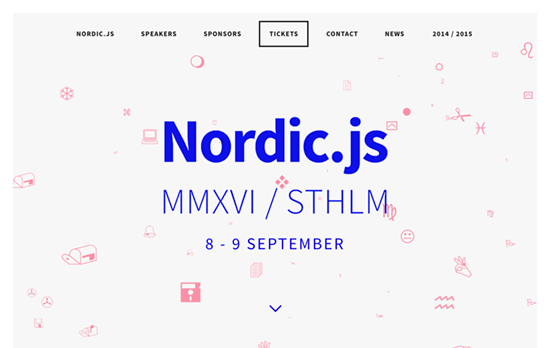
Coca-Cola + McDonald's 2011 Stewardship Report

The combination of hand-drawn illustrations and photos and the parallax animations that “lift off” each object drives home the charm and quirk of this design. The backgrounds are very bright so the small text is a little difficult to read at times but other than that, a fun little ride.

Dangers of Fracking website

Dangers of Fracking

Some sites like to do their storytelling with different slides per screenful but in this case it’s one long connected trail, from roads going through factories all the way to underground tunnels. And aside from the usual navigation marker, you’ll see icons pop up and stay at the top of the screen as a summary of the facts you’ve scrolled through so far.

6 Steps to Responsible Paper Purchasing website

6 Steps to Responsible Paper Purchasing

This one’s also colorful but on a warmer, more “organic” palette. Aside from the large graphics, the different paper textures at work, it’s the typography that gets the message across effectively, with every screenful easy to read.

Make Headway, make intuitive layouts, make it your WordPress theme of choice!

Social Media Weekly

AccessibilitySkip links and standards?
“Q: Are there any standards associated with skip links? A: Yes!”

HTML5The best of <time>s
“Avid HTML5 watchers will know that the <time> element was dropped from HTML, then re-instated, with more New! Improved! semantics.”

CSSCSS Specificity
“Some people are confused by CSS Specificity, especially with all of the (not-so) new CSS3 Selectors. The image below may help make sense of CSS Specificity.”

Debugging, User ExperienceSupport Details
“Tech support management.”

Accessibility, User ExperienceDid we lose track of the big picture?
“Let’s think Responsible Design before anything else.”

Feature
Post

Category
Friday Focus

Friday Focus 01/27/12: Solid Color Coded

Welcome to the last Friday Focus of the month! This week we’re featuring sites employing blocks of color as a dominant part of their designs. Who says we need to use gradients in everything we do? See how it’s done.

Designs of the Week

Get solid WordPress themes, plugins, and web design training from iThemes.

Medis Kök & Bar website

Medis Kök & Bar

Always a good idea to grab inspiration from your logo and and translate it directly into your design. Here you have a sumptuous photo slideshow on the homepage, but inside it’s all color blocking, with each page title in its own column, and the body copy to the left. It’s only unfortunate that background images had to be used instead of real text, and again, too much all caps.

Camp Luxe website

Camp Luxe

It looks like color coding and icon-based navigation go hand in hand in this trend. Lots of boxed in elements here, but still looks very light and breezy. I particularly like the background pattern made up of the icons you find in the navigation, but arranged in a way that’s both luxe and cozy at the same time.

Favolla Comunicação website

Favolla Comunicação

I like the paper-based forest in the background and the icon designs that mesh so well with the logo. What puts me off a little, however, is the uneven alignment of the boxes and the justified text.

Orestis Webdevelopment website

Orestis Webdevelopment

Once again, another icon-focused design, but in this case they’re quite abstract and futuristic looking. The use of very colorful hues is just right and not overwhelming at all.

Maria Helena Cunha's website

Maria Helena Cunha

Two more familiar trends here: triangles and the use of CMYK as the color palette. I find the text to the left a little too cramped and dark, and considering each block is pretty lengthy there should have been at least some hover effect that lit them up similar to the one you see to the portfolio on the other half of the page.

Dataveyes website

Dataveyes

I like how each section literally uses one bold color in its background. The visualizations and and other hover effects are also lovely. Some blocks are cut off though, as if the height isn’t calculated properly, and the typesetting is a little rough.

The Work Cycle website

The Work Cycle

Another CMYK (plus green) color scheme here. One good idea I noticed is the hover on each image puts on a slight tint based on the section it’s in. It’s a little confusing, though, that the four colors are used for both locations and the top navigation as seen in the circles above.

Social Media Weekly

Copywriting, User Experience - Not Lorem Ipsum
“We want clients and designers alike to think about their design and how it will work with the web copy, we want you think about how numbers, symbols and bullet points will look.”

TypographyOur Favorite Typefaces of 2011
“The idea is simple: I invite a group of writers, educators, type makers and type users to look back at 2011 and pick the release that excited them most.”

BusinessWhy I don’t do “mates rates” projects
“It’s almost a certainty that at some point in your career, you’ll be asked by a friend or member of your family to work on a project and feel you should only take a nominal “mates rates” fee. Try not to.”

Typography, Accessibility, SemanticsA better way to use icon fonts
“What do you think about this issue? Is speak:none the Holy Grail of icon fonts? Or could we use SVGs to archive similar things?”

Get solid WordPress themes, plugins, and web design training from iThemes.

Feature
Post

Category
Friday Focus

Friday Focus 01/20/2012: Round and Round We Go

Where we stop, nobody knows! This week’s Friday Focus showcases designs that spin around. First it was the fascination with rounded corners, and circles, and now it’s rotating objects that’s all the rage these days.

Designs of the Week

vlog.it website

vlog.it

Every video is displayed in one of the three concentric wheels turning in opposite directions against one another. Clicking on the image loads a lightbox, one of two black-and-white transition animations, and plays the video. You can pick from either Vimeo or YouTube, as these are the designer’s liked/favorited ones on each site. This concept is quite the feat and a bit intensive of some computers, but that’s how experimental websites roll (pun intended). I guess my only comment would be that when you’re not doing anything on the site, i.e. the static state, it’s not animated, and you miss the movement between the welcoming animation and the ones that appear when you do clicks.

Alpis Design website

Alpis Design

Not visible here but: the logo sports a stylized teardrop/lowercase ‘a’ shape pointing to the lower left, and this form is echoed in the navigation at its right, every link corner except the bottom left is rounded. Aside from the large images in the portfolio section which resize with the layout accordingly, there’s this secion which contains large circular icons that turn when you hover on them.

Ralph Van Rentergem's website

Ralph Van Rentergem

Lots of strong imagery in this one-pager; for a baby announcement site it’s very mature with lots of browns and rough textures and its overall imported coffee theme, mixed with this carousel and a rocketship a couple of screenfuls below. Another thing I noticed here is that the anchor links use period (.) instead of the usual hashes (#), which is quite surprising.

Youandigraphics website

Youandigraphics

There’s another animation going on in this site and it’s one of a pointing hand pressing a button behind an array of stripes. There are only two images laid on top of the other (the stripes and the hand graphic) but a simple horizontal movement creates the optical illusion of something more. Now, these section headings have several more layers of shapes piled on, rotating in different directions and speeds when you scroll past. All fun ideas and the only concern I have is semantics in the markup.

Pagelines lets you build WordPress websites and it’s as easy as drag and drop, go check it out!
Social Media Weekly

CSS, JavaScriptMaking Love To WebKit
“This idea started with an accidental discovery: if you put a CSS perspective on a scrollable <DIV>, then 3D elements inside that <DIV> will retain their perspective while you scroll. This results in smooth, native parallax effects, and makes objects jump out of the page, particularly when using an analog input device with inertial scrolling.”

CSSCSS1K
“A demonstration of what can be accomplished with only 1 K (Kibibyte) of CSS.”

User ExperienceFive skills you need to make AB testing work
“Multivariate and split testing can be crucial for sales conversions but how do you get the most out of it?”

Build on DIYThemes’ Thesis Framework for rock solid SEO and great layout customization options.

Feature
Post

Category
Friday Focus

Friday Focus 01/13/12: Keeping It Trim

This week’s featured designs are staying fit and trim with these not-so-wide layouts. Happy Friday the 13th Focus!

Designs of the Week

BBQWar website

BBQWar

Having a one-column site champions focus. Blogs often get cluttered with unnecessary information (I’m not even talking about ads) so here’s it nice see that’s not the case. Dashed lines repeat everywhere, and so do the raw treatment to the graphics, from the bulls in the background to the rough borders running form top to bottom (neat idea to use tire tracks too).

SeaChange website

SeaChange

The right column illustrations appear in full color upon hover. I like the idea of cutouts in the “paper” to signify separate sections of text. You can also see flecks both in the background and foreground.

The Design Cubicle website

The Design Cubicle

There’s also a bit of paper metaphors going on here, from the texture to the illusion of folds. I like all the tiny little patterns used on this page, both the linework and grainy ones. And then there’s a neat little ribbon for the monthly archives to the right side.

Matt Puchlerz's website

Matt Puchlerz

Notice how the background of the typographic heading and the background are both clouds. I also like how the four corners of the page are cut inward (a nice-to-have in CSS3 someday). There are also some stylings in the section headings and the contact form at the bottom. I guess the thing I wanted was an anchor navigation but perhaps one thinks that because it’s a one-page site, it’s no longer necessary?

Adrian Le Bas's website

Adrian Le Bas

Moving your mouse around the page move the blue circle behind the logo. That box also contains more information on its “flip side”, like a business card. Below it are icons that AJAXically loads the other sections of his site. It’s also a responsive design: when the window becomes very narrow the background image disappears and the icons grow larger, becoming more touch-device friendly.

Rivers and Robots website

Rivers and Robots

The combination of the blurred background and its lomo filter coloring topped with a subtle parallax effect makes this site for a calming browsing experience. I also really like the almost completely transparent background in the slide-out boxes under each button (not to mention the button style itself).

Want your site to be as good-looking and inspirational as these? Start by choosing a well-designed theme from ThemeForest.

Social Media Weekly

User ExperienceStepping Out of Line
“Nature has no “visual design” phase. Why do we?”

Mobile Web Design“Mobile first” CSS and getting Sass to help with legacy IE
“Even if you want to don’t want to use any of the Sass or Scss syntax, the pre-processor itself can help you to write your CSS in a “mobile first” manner (with multiple breakpoints), provide a “desktop” experience for IE 6/7/8, and avoid some of the performance or maintenance concerns that are sometimes present when juggling the two requirements.”

Ready to go out and design your next website? Try building with the Catalyst Framework.

Feature
Post

Category
Friday Focus

Friday Focus 01/06/12: Look Alive!

Our first Friday Focus for the New Year is all about animated designs, a bit on the subtle side but sure to pique your interest nonetheless.

Designs of the Week

WEAREEMPIRE website

WEAREEMPIRE

The page first loads the logo, then clicking on it displays a trail of circular navigation items for each section of the site. Hovering on each runs a vertically scrolling animation in the background, each unique to the item. Clicking then loads the content area either in the huge half-circle background sliding out from the top, or another slide-out area from the bottom. Nothing too crazy, but lots of fun, casual touches from the heading font choice to the scarcity in straight edges. There’s also a nice little bounce/delay effect in the portfolio slider, where the MBP screenshot “stops” before the iMac one.

RainyDay Interactive website

RainyDay Interactive

The gray droplets of rain appear to stagger diagonally downward, just as slowly as the ferris wheel turns—it’s not my usual expected behavior for rainfall and almost seems to be creeping instead of falling. Clicking around the area (wait to see your cursor change) reveals people holding black umbrellas appearing out of thin air and floating away. You might even chance upon a dinosaur. The portfolio items are arranged one after the other so it’s a tall website, and scrolling past the first screenful reveals a cloud menu affixed to the left, replacing the original one.

Reverend Danger website

Reverend Danger

This site plays two different animation modes in each section, which you can select by dragging the slider at the top: the pleasant “Reverend” and the more violent “Danger”. Also featured are tree stumps that pop up as you scroll past, and a slider with an added bouncing effect. All areas use simple animations—slides, flips, easing—but it’s the story and visuals that make them special.

Colin Grist's website

Colin Grist

There’s only one small animation here and it’s the smoke coming out of the cowboy’s gun. I like how it looks random or unpredictable enough although it does look just a little pixelated at some points. The slanting text in the top navigation gives a small, old-style touch, while the four circles repeat in the social icons at the bottom.

Harrison Pensa LLP - Season's Greetings website

Harrison Pensa LLP - Season's Greetings

Here’s another on a very short list of sites with the scroll-to-zoom effect, and in this case it’s zooming out instead of zooming in. But that’s only half the story, below it is a shooting game of snowmen and snowballs. I think I only gripe is the two things kind of handicap the scrolling so once you’ve gone down you won’t be able to go up unless you use the “Top” link, which actually reloads the page instead of jumping upwards with an anchor.

Create Digital Media website

Create Digital Media

Here the animations occur in the slider, albeit one you can’t control (at least a pause on hover would be nice). I like the concept of using CMYK colors for each graphic (also on other pages), tying everything together. Other sections remain warm and neutral.

Social Media Weekly

DesignKetchup Bottles & The Physicality Of Design
“You may not immediately notice these little details, but they make digital interfaces appear more valuable, like little hand-crafted executive paperweights: expensive, heavy and solid.”

CSSSeven things still missing from CSS
“CSS has come a long way but it’s not perfect (yet). Molly Holzschlag, passionate standardista and open web evangelist, quizzed her peers to find out what they see as the most frustrating aspects of CSS.”

User ExperienceA plea for progressive enhancement
“For this ubiquity to truly benefit all of us (not just those of us with a high income, or the latest phone) we have to start building sites using solid, future friendly principles such as progressive enhancement…not just when it’s handy or simple, but all the time.”

CSS, OptimizationProfiling CSS for fun and profit. Optimization notes.
“As our pages/apps become more interactive, the complexity of CSS increases, and browsers start to support more and more “advanced” CSS features, CSS performance will probably become even more important.”

Tools, HTML, CSSAnimatable
“Create, serve and track HTML5/CSS3 animations for desktop, Android, Blackberry QNX, iOS and WebOS mobile devices.”

MobileTest on Real Mobile Devices without Breaking the Bank
“Mobile is the future of the web, so it’s time to start investing in some mobile devices. “

Feature
Post

Category
Friday Focus

Friday Focus 12/30/11: Blast from the Past

The last Friday Focus of the year goes back in time before we move into the future. Happy New Year to everyone!

Designs of the Week

Celebrate Christmas at Biltmore website

Celebrate Christmas at Biltmore

Beautiful graphic touches and type. This site is first split into “Day” and “Night”, then into “Awe”, “Inspiration”, “Joy”, and “Stories”. Each is further broken down into sub-slideshows. Every section on this site slides into the framed panel either vertically or horizontally.

Ramiro Delgado's website

Ramiro Delgado

I like the bold colors and the big graphics put together, but I’m not too sure about using two different script fonts on the same page.

The Cottonseed Oil Tour website

The Cottonseed Oil Tour

Another strong set of colors at play here, not to mention lots of different things grabbing your attention at once, which could be a bit of a turn off for some.

Alien Abduction Lamp website

Alien Abduction Lamp

The texture/quality of the text isn’t quite the same as the photo but I like the skewed edges on the boxes and the lighting effects everywhere.

AdPacks website

AdPacks

Lots of elements that drive the look home such as the sparkles, sunbursts, 3D box, and of course the cursive font. I really like the arrow/button although the alignment of the text is a little off.

Maratona Makeover website

Maratona Makeover

Love the idea of using patterns to replace the hair sections! There’s quite a bit of folding going on here, as well as stripes as backgrounds and shadows, and the blue that grounds everything makes the photos pop all the more.

Lather Bee Rich website

Lather Bee Rich

Even the slideshow and dropdown menus carry the dirt and smudges you see all over the page. There’s also a significant number of typefaces being used here in a way that’s not chaotic at all.

Shipment App website

Shipment App

There’s not a lot going on here, but it’s a wonderful look. The background illustration is perfect while the signup form in the foreground has a good number of details to look like a real ticket. I think my only question is if it’s a good choice to keep that form up there instead of the usual center alignment you see on “coming soon” pages. Once you hit submit (Notify) the whole box flips over to signal confirmation.

Social Media Weekly

User ExperienceBeyond Bandwidth: UI Performance
“UI performance tips have been disseminated throughout the community for years, but often as an aside, with bandwidth and latency concerns much more at the forefront.”

DesignA simpler and faster alternative to wireframes
“In my opinion there’s a better, faster, and easier way to accomplish that goal: prioritized lists.”

TypographyPublic Service Announcement: Watch Your @font-face font-weight
“The problem is the font is muddier than you originally saw it, and it’s all about font-weight.”

Feature
Post

Category
Friday Focus

Friday Focus 12/23/11: Happy Holidays!

It’s that time of the year once more, so let’s soak up some Christmas cheer with these designs. Happy Christmas Friday Focus!

Designs of the Week

Occupy North Pole website

Occupy North Pole

This is a wonderfully decked out design from the logo to the interface elements to the themed graphics in each blog post. The cookie charts look yummy and the Twitter/Facebook widgets blend in perfectly, and it’s all topped off with subtle falling snowflakes.

A Real Letter from Santa Claus website

A Real Letter from Santa Claus

Site’s defunct now but still worth mentioning for the lovely look it has. Deep red and gold hues combined with classic type make for a warm and elegant seasonal website.

A Very Warwick Christmas website

A Very Warwick Christmas

Deep blue and white is typical for a snowy night scene but this site adds a touch of not red but hot pink for a more funky, modern touch. Each slide of the screen loads a few animations in the background and invites you to click on the ribbon button which loads a lightbox fashioned like a scroll.

You Better Not Stress website

You Better Not Stress

Simple but striking (you can never go with red and white!) and packs a responsive web design punch. Each red box shows a subtle background on hover, then loads a white box that’s the exact width of the grid. Beautiful type, photography, and concept.

It's A Shape Christmas website

It's A Shape Christmas

Another red and white design but takes the color scheme in a bolder direction: pretty much all of the text is in red on white, while other areas  simply flip the colors around. That, combined with the thin diagonal line pattern in the background makes this page a little challenging on eyes, but it’s certainly bright and cheery.

Christmas Cracker App website

Christmas Cracker App

The only design in the bunch that does not use typical Christmas color combinations, or typical color combinations at all! Also taxing for the eyes, especially with the non-stop animations in each box, repeating several screenfuls down, but it’s a fun concept.

Social Media Weekly

HTML, AccessibilityThe Hidden Nuggets of WCAG2: When Not to Use ALT Attributes
“Hopefully, that’s going to help you make the right choice as to when to give an image an empty ALT attribute so that screen readers ignore it, or one that has meaningful information that will help the user.”

BusinessFrom Side Project to Not So Side Project
“There still seems to be something of a disconnect between having a side project and turning it into something that is moderately successful; in particular, the challenge of making enough money to sustain the project and perhaps even elevating it from the sidelines so that it becomes something not so on the side at all.”

Web StandardsIE to Start Automatic Upgrades across Windows XP, Windows Vista, and Windows 7
“Today we are sharing our plan to automatically upgrade Windows customers to the latest version of Internet Explorer available for their PC.”

Feature
Post

Category
Friday Focus

Friday Focus 12/16/11: Under Fire & Water

This week on Friday Focus: designs that use two opposing elements found in nature: fire and water.

Designs of the Week

Zindustry website

Zindustry

Everything is burning in here, from the wooden background to the strips and sheets of paper—not overdone at all. I really like the little area of blue flames whose color echoes as accents throughout the rest of the site. All in all a striking look.

Made By Points website

Made By Points

Here pink is the accent color as seen in the logo, navigation, footer, and the loading screen—which seems to be growing popular in non-Flash sites with lots of graphics. Another parallax-driven site with some translucent backgrounds and some very thin arrows.

Liquid Torch website

Liquid Torch

I like the splashes of water everywhere and the lighting that seems to imply an underwater environment (although I’m leaning towards an aurora in the sky). The top navigation is also fixed and the layout breathes easy.

Family of Fish website

Family of Fish

This site prides itself in beautiful photography, and another round of parallax and fixed background peekaboos take advantage of that. The later not just piles on one full-screen image after another though, there are some interesting effects to be had when you make certain areas of a photo transparent. What is unfortunate, though, is that the descriptions in each page are images.

Social Media Weekly

Web DesignWhat I Learned About the Web in 2011
It’s time to look back on the year that was and see how far we’ve grown as designers and an industry as a whole.

CSSSix CSS Layout Features To Look Forward To
Several proposed featured by the CSS Working Group to make our laying out webpages easier.

Web StandardsOn HTML and CSS best practices
Strive for the best quality possible.

User ExperienceGive Your Users A Hollywood Experience
Learn to build for your audience with film metaphors.

Feature
Post

Category
Friday Focus

Friday Focus 12/09/11: Hello, My Name Is

This week’s featured designs business card websites, some of them looking literally like cards containing contact information of their owners. That means very minimal layouts but still all compelling experiences.

Designs of the Week

Tim Van Damme's website

Tim Van Damme

First up, the site that started this trend. The design may be over a year old but the graphical details are still all the rage today. One of the most important features for this genre of a site are the vCard download link and the social media links, accompanied of course by the colorful icons for each site. No tabs here, but each section in the menu loads with a vertically sliding animation, while the hover effects use horizontally sliding effects.

Mehmet Aksoy's website

Mehmet Aksoy

The shooting star in the background is actually animated with Flash. So are the stars which twinkle. There’s a touch of the Aero (Windows Vista/Windows 7) interface in this design (particularly the avatar) but I feel it’s the custom font used on this page that gives a different look to the whole site.

Benjamin De Cock's website

Benjamin De Cock

This site greets you with the owner’s name then displays a closed box, which you click on so it pops open to reveal this card. The animation even contains accompanying smoke effects. Other visual treats to enjoy on this page: an icon-based website tooltip on the text link for “interface designer”, glowing hover effects on the bottom icons, and a slider for his three avatars.

Chris Rowe's website

Chris Rowe

Not the usual boxed in layout but it’s all only contact information in here. Hovering over the initials reveals the full name and occupation. Same goes for the links below it.

Margot Dowleska Dyer's website

Margot Dowleska Dyer

A nice earthy look with icons that blend in and a slideshow running in the polaroid frame to the left. There are some portions though where the graphics make the text a little difficult to read and are competing for attention with the foreground.

Maximilian Schoening's website

Maximilian Schoening

The closest thing to the business card metaphor translated to a webpage, complete with an animated flip done with CSS3 transforms when you click on the top right blue corner. The background uses another CSS3 property, radial gradients. The other side contains nothing but tiny social icons.

Social Media Weekly

CSSThe CSS profilers are coming!
“Back in August I talked about the lack of benchmarks or performance tools for CSS. In the meantime, the fine folk we call browser makers have been working hard on new developer tools to do just that: measure CSS performance.”

CSSTruncating text using only CSS
“It works in IE 6+, Safari 4+, Firefox 7+, Opera 11+ and Chrome 10+”

Design, Business - Warm Gun: Design for Continuous Deployment
“In his Design for Continuous Deployment presentation at the Warm Gun conference in San Francisco, CA Randy Hunt shared how Etsy’s development process allows designers and developers to collaborate at scale on production code.”

CSSKnyle Style Sheets
“Inspired by TomDoc, KSS attempts to provide a methodology for writing maintainable, documented CSS within a team.”

Feature
Post

Category
Friday Focus

Friday Focus 12/02/11: Like A Modern Day Leonardo

Happy December Friday Focus! This week’s featured designs contain sketches and diagrams with a scientific slant, quite reminiscent of the drawings that Leonardo Da Vinci was renowned for.

Designs of the Week

Metaphiziks website

Metaphiziks

Nice icon-based navigation although I wish the whole circle were clickable. I also wish the up/down arrows scrolling from one screen to another were in the same place, but I see how the layout affected the positioning.

Growcase website

Growcase

This design looks swell, there are so many nifty details that went to it, especially how the social media icons were fashioned at the footer—as part of an atom! probably the best idea I’ve seen—but there seems to be too much uppercase styling here.

Carsonified website

Carsonified

Every page uses an ivory-colored foreground on a very strong colored background—orange, green, purple, you name it—and remains highly readable while gunning for maximum impact. The key to this design is definitely great illustrations and typography.

Paolo Cavanna's website

Paolo Cavanna

There’s a section that runs text a little too long but I really appreciate the use of old style fonts and graphics. There’s no horizontal menu, just the vertical one opposite the head diagram. Looks straight out of an old anatomy textbook.

Joshua Turner's website

Joshua Turner

Beautiful grid-based, black and white design with a pop of red here and there. The one thing about anchors and one-page sites is that if a section isn’t tall enough, it won’t be apparent that you’ve skipped to that place once you click on the link. Here, when you click on the Contact link, it doesn’t place that section in focus because there’s no more space to scroll down.

Social Media Weekly

HTML, JavaScriptThe Script Tag
“I’ve noticed that on a <script> tag, there are all kinds of variations that all seem to work cross-browser. What is necessary and what isn’t?”

Web StandardsMove the Web Forward
“You love web standards. You want to give back to the community. Curious about where to start? We’re here to help.”

DesignStitches – An HTML5 sprite generator
“Drag and drop image files into the space below and click “Generate” to create a sprite and stylesheet.”

Mobile Web DesignA Look Inside Mobile Design Patterns
“Although these patterns are based on best practices in mobile application design, they may also be inspiring for mobile web design.”

Feature
Post

Category
Friday Focus

Friday Focus 11/25/11: Diamonds

Hope everyone had a lovely Thanksgiving! This week’s (black) Friday Focus shines the spotlight on sites that use diamonds (or rhombuses) as a major graphic element in their designs.

Designs of the Week

Tofutask website

Tofutask

There are only a few elements on this page because it’s still in “coming soon” status, but it looks pretty compelling nonetheless. There are floating diamond particles moving upwards in the background, then the two blue blocks link out to Facebook and Twitter respectively. Clicking on the bottom diamond expands it and hides the other three. I still wish there were a preview of the product somehow though.

Gleb Leksikov's website

Gleb Leksikov

What I really like about the diamond trend is that it appears to turn websites on a 45-degree angle and lets you play with some cool views. Here though the use of a slideshow is still necessary for displaying the portfolio images. There’s an interesting interaction going on where each slide scrolls to a particular section of each image instead of just statically letting it appear. I’m just a little iffy about the semantics though, cause nav items and portfolio items are all wrapped in paragraph tags, so there’s a lack of hierarchy there.

Jessica Caldwell's website

Jessica Caldwell

The initial state of this site is actually much more sparse, just the outlines are visible. Hovering over them displays different items from her portfolio in a sliding door animation. Clicking then loads a larger view of the work, but still masked inside the boundaries of the diamond “fence”. Simple but stunning effect, a far cry from the carousels and lightboxes of yore!

Mark Lawrence's website

Mark Lawrence

Another enjoyable parallax ride at play here, but there are a couple of things that take away from it: first is the Like and +1 buttons that are just randomly sitting at the bottom right corner, and the Blog link that goes to a blank page (some styling even for an non-existent site would be nice).

ResumePower website

ResumePower

Like Designer Gleb there’s a diamond pattern on this page. I like how the word “shine” lights up when you hover over, and that it’s connected by wire to the top left logo. The double border continues in several other elements for this formal, plated effect, although the “most popular” label in one of the boxes looks a little oddly placed.

Manca Gracar's website

Manca Gracar

Not too sure about the use of gray when there are a few cute, vintage elements on the page but I love how the QR code was turned into a Pac-Man maze.

Kikki Festival 2011 website

Kikki Festival 2011

It’s not a completely crazy looking layout but one little step out of the box does a world of difference. The slideshow is not a rectangular affair but this geometric mountain that changes color while the list of speakers is a vertical strip to the right. The purpose becomes more apparent (and amazing) when you go to the Programme page: hovering on an item in the schedule highlights which speakers figure in the talk, appearing in the same row as the location in the table.

Social Media Weekly

CSSSimple Styles for Horizontal Rules
“You could get a lot fancier with an element like a <div> that can hold content, but I like the semantics of a horizontal rule. It’s an emphatic break between two sections of content.”

CSSImage Tint With CSS
“In this post, I’ll offer a few solutions for mimicking a CSS image tint or semi-transparent color overlay.”

CSS, TypographyIcon Fonts are Awesome
“I’ve created this page to attempt to convince you. It shows examples and lists six reasons why it’s a good idea and three common arguments against them (some of which I refute).”

HTMLPattern primer
“That’s the way I’ve been starting most of my projects lately: beginning with the atomic units of content and styling them first before even thinking about layout.”

Web DesignThe ALA 2011 Web Design Survey
“Set aside ten or fifteen minutes and take the survey!”

Feature
Post

Category
Friday Focus

Friday Focus 11/18/11: Moustaches for Movember

Last week we celebrated 11/11/11; this Friday Focus we’re looking at inspiring moustache-themed designs in celebration of Movember or men’s health awareness month.

Designs of the Week

Movember website

Movember

Lovely use of varying textures as backgrounds to the equally grungy icons. Even the boxy graphic items employ rough edges to break up the straight lines.

Gallery of Mo website

Gallery of Mo

Hilarious seeing moustaches in the background wallpaper of this gallery style site. It doesn’t stop there, either: hovering on the donate button shows a moustache as an arrow/marker replacement, while the left and right arrows for sideways scrolling use curly braces instead of the usual sharper brackets or triangles. I also like that the gallery frames vary from portrait to portrait.

Octavo Designs Movember website

Octavo Designs Movember

Very few elements on this page, but it’s notable how the layout is responsive and adjusts to smaller screens. Also, animated GIFs seem to be making a comeback.

Lambert Street Handlebar Club website

Lambert Street Handlebar Club

Brown seems to be the predominant color in all these designs, not to mention an adaptation of vintage elements and typography. This site’s spiced up a bit with collages and a brighter than usual color for its wooden background.

Movember Austin website

Movember Austin

This tumblelog actually uses a slightly modified theme but I thought it would be nice to feature its look here, especially the bento-style menu I’m growing to love more and more. Too bad the drop-down menu doesn’t look as rugged!

No Shave History website

No Shave History

Love the idea of the logo matching the background for a masked look. The hover effects on the photos are also a snazzy little idea (read on below for similar ones).

Social Media Weekly

CSSOriginal Hover Effects with CSS3
“We are going to create some thumbnail hover effects with CSS3 transitions. On hover over a thumbnail, we will reveal some description of the thumbnail, using a different style in each example.”

HTMLInteractive Typography Effects with HTML5
“I will go over the development of dynamic, and generative banners to give your website that little extra wow!”

Interaction DesignThe 10 principles of interaction design
“Chad Vavra, interaction design director at The Barbarian Group, rounds up 10 key rules that make good interaction designs and designers and that you need to understand before you can break them”

JavaScriptExploring JavaScript’s Logical OR Operator
“With the || (OR) operator, since values don’t need to be explicitly true or false (they can be truthy or falsy), the operator can return non-boolean results when evaluated.”

User ExperienceA Brief Rant on the Future of Interaction Design
“Our hands feel things, and our hands manipulate things. Why aim for anything less than a dynamic medium that we can see, feel, and manipulate?”