I usually view a lot of sites when trying to come up with inspiration for a new design. After recently re-designing a site and creating a WordPress theme from scratch, I thought I’d share a couple design decisions I found annoying. It should be noted that this article is a combination of two articles I wrote over at the Reader Appreciation Project regarding annoying design decisions, so a lot of the annoyances mentioned here are directly from reader feedback.
Pop-Ups

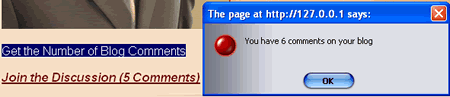
Let’s face it. In-text advertising is annoying. Not necessarily because the ads get in the way, but because of the pop-ups that routinely show their face. Now I’m not talking about pop-up ads; I’m talking about pop-ups that show up when you hover over a link.
An example I came across (unfortunately no screenshot) is when you hover over a link and it displays, “You have the nth most popular outgoing link.” I could really care less how many people have clicked on my link. It’s also demoralizing when you come in last.
Another example of pop-ups is in-text advertising. Daniel from Daily Blog Tips mentions to stay away from in-text advertising. Part of this is because of the annoying pop-ups that come up when “accidentally” hovering over an ad-link.
Turning Off the Time Stamp on Posts
Erica says,
When I find a blog with no time stamp, I feel conned.
Read the full comment.
Rory Sullivan lays it out when he tells his readers that taking the time stamp off on a blog post is like public speaking with one hand in your pocket. Of course, the argument for turning off timestamps is to make the content “appear” more timeless.
Shouldn’t it be the readers — and not the bloggers — who decide which content is timeless and which content is not?
Pop-up Windows
In the age of IE7 and Firefox tabs, pop-up windows are growing even more annoying. It is becoming common for users to open pages in new tabs, not new windows. Readers should not be forced to view pages in new windows. It should be the reader’s choice. You can never force a reader to stay on a page, so why annoy them with a pop-up window?
Let readers navigate the way they want to navigate. Don’t ever force a reader into anything.
Snap Preview Pop-ups
MT says,
The Snap preview popup is one of those ideas that sounds good, but is very annoying in practice. I’d rather a small option to see the preview popped up. Read the full comment.
Snap Shots allow a reader to view a website’s design by simply hovering over a link. The feature is annoying for several reasons:
- Readers have no choice in the matter. Now a reader can opt-out. Opting out still sucks, however.
- Snap Shots are obtrusive.
- Snap Shots are arguably unnecessary. What is the value of knowing what a blogger’s site looks like anyway?
Having the Subscribe Box Higher Than the Search Box
Having a search box towards the top of your theme is a given, or at least it should be. A search box should be visible and simple according to Jakob Nielson.
Arguably, a search box should also be above the fold and towards the top of any theme. While a designer should have the freedom to place the search box wherever he/she chooses, having a search box in an unpredictable location will just confuse readers. It should also be noticed that having the subscribe box higher than the search box will just result in more confusion, especially since said subscribe boxes often launch pop-ups after inputing a query.
Having a Dark Background
I personally am very fond of dark backgrounds. However, some users do get annoyed by darker backgrounds. There are some that have the firm stance that all websites “must” have white backgrounds and plenty of “white” space.
I of course do not agree holistically, but I have seen some designs where the darker background hindered reading. When I do design for a darker background, I make a considerable effort to ensure that all of the text is readable.
Examples of sites with dark backgrounds which I think look awesome are ShawnBlanc.net and also Larissa’s site.
Auto-Play Music
Snoskred says,
If a site plays music at me I find out which site it is, close it down ASAP, and if that site was in my google reader I choose to unsubscribe right away. Read the full comment.
May all MySpace users who have music be sent to a special place in hell. Okay, maybe that’s a little harsh. MySpace users don’t really know any better, right?
However, a serious website owner should know that readers should have a choice in the matter whether music plays on a site or not.
Not only do you have people browsing from work, but you also have people who aren’t very technical who can be really confused when the music starts blaring. Music on a website should be an opt-in affair.
Not Separating Trackbacks from Comments
Not separating trackbacks from comments can hinder a conversation going on in a blog. Trackbacks and pingbacks are there to say to the blogger, “Hey, I’ve talked about you on my blog. Check it out.” To a regular commenter and/or reader of the post, the trackback is not really part of the conversation. To me, a trackback interspersed with regular comments is more of an interruption than a continuation of discussion.
I’m a big fan of readers leaving a comment adding to the current discussion, and then also saying, “Hey, I also wrote about this on my blog.” Those types of comments add a lot more value than a trackback in my opinion.
For WordPress bloggers, I use this technique for separating trackbacks from comments.
Talking Advertisements
Congratulations. You’ve just gone to a site where there are talking advertisements. You’ve won a month supply of Viagra as well as Trojans (good combination, no?).
Too bad all of your co-workers heard what you have just won. Avoid embarrassing the readers. Do not ever let ads that “talk” onto your site.
Obtrusive Subscription Requests
MT says,
As for examples of the subscription-nags… I keep running across blogs with big outlined boxes at the top of posts, noting that I look new, and asking me to subscribe. They just annoy me — especially since often I’m already subscribed. (I think this is due to a cookie/ip checking plugin/script, intended to show only to new readers — but I’ve got a dynamic IP, and I use Firefox (which frequently updates and resets) so I’m often getting messages intended for first time users). Read the full comment.
You’re new here, right? Why not subscribe (sorry, couldn’t resist) to our feed?
A better phase might be, “Yo, dude… check out the feed NOW! If you don’t subscribe, I’ll keep nagging you. Even if you do subscribe, I’ll still nag you. HA!”
Hidden Subscription Options
Another thing the readers pointed out as annoying were hidden subscription options. I, myself, have personally been annoyed when I would go to a blog and couldn’t find anywhere a subscription option. I don’t like going to blogs anymore ever since I’ve discovered my lovely and handy feed reader.
If I can’t find your subscription options, guess where I go? I’ll give you a hint: It’s not back to your blog.
This is a point for debate, but I say that subscription options should be as prominent as search. It’s one of those things that readers (albeit, more technical readers) look for when coming to a blog.
Failure to Interlink Posts or Show Related Posts
As with any website, it should be easy to find related content, posts, products, and more. Part of this can be solved by some intelligence behind the scenes like Amazon.com where it recommends products. Another example is the WordPress extend plugins directory where it recommends other plugins based on what you have just downloaded.
Here at Devlounge, there are related posts for every article. All of our content is also organized by articles, features, and sub-categories. How do you help readers find relevant content?
I am personally fond of a nice sitemap, easy to navigate archives, and a prominent search bar.
Obtrusive Advertisements
InspirationBit says,
Lately I stumble more and more upon websites with the dynamically flowing ads, that slide right on top of the article and stay there until you click on an obscure “close” button. That annoys the heck out of me. Read the full comment.
Every now and then when I browse to CNET News or Slate, I get a full-page view of an ad where I must click a “close” button to view the page content. I also get the same treatment at MySpace or RottenTomatoes when I must “continue to the page” or continue viewing the ad.
Obtrusive advertisements are detrimental to the readers. If I had my choice, I would just read CNET and Slate from a feed reader, but they don’t offer full feeds. So I’m “forced” to view these ads if I want to view the content. And it’s a wonder why sites like these are losing their popularity.
Readers should have a choice in all things and should never be forced into anything, including viewing or clicking on ads.
In-Text Advertisements
DailyBlogTips had a post that discussed avoiding in-text advertising. The reason is that readers are tricked into thinking a blogger is endorsing a product.
Andrew Rickmann weighed in and said: “Snap previews, in-text advertising, and those flash adverts that are all designed to interrupt you and prevent you getting to the content properly actually work against the company. If a company that is willing to shove their product in my face that way then they must have a significant amount of contempt for the customer, or at best, think their product is so poor that no one would take notice any other way.”
I agree with Daniel (DailyBlogTips) and Andrew that in-text advertisements should be avoided, especially since pop-up advertisements are so annoying in the first place.
Small Font Size
Bill says,
I realize (that small fonts) are somewhat subjective, but if one’s font size makes post text look like “fine print” compared to “most” websites – it’s too small. Read the full comment.
Simonne Matthew wrote a post a while back that explained things that make her nervous when reading your blog. Her first point was to avoid small font-sizes. So why should small font sizes be avoided and why is a small font-size an annoying design decision?
Small fonts are hard to read. And as Simonne pointed out in her article, not all readers are aware of the tools necessary to increase text size. Furthermore, a lot of designs break when text is increased, so it is best to design from the start with a larger font-size in mind.
Conclusion
Within this post I laid out fifteen design decisions that annoy end users. Readers such as yourself contributed to a lot of the annoyances mentioned in this article. All of the points mentioned are open for debate and should be debated.
My hope is that this post provides some food for thought next time you make that design decision that may be annoying to some of your readers.