jQuery is one of the best-known development tools available, and since its emergence just 10 years ago, it’s exploded in popularity. In fact, it powers roughly 65 percent of the top 10,000 most popular sites on the Internet. So what exactly is it, and is it worth learning? [Read more…]
Make your site more sociable with OpenGraph markup

These days, before people click on your site they will probably see it through a link shared on your social network of choice, such as Facebook, Twitter, Google+, and so on. Usually these sites are smart enough to extract descriptive information about your page and display that so followers already get a good idea of what they’d be clicking on, but wouldn’t it be great if you could optimize that information to ensure you get more engagement?
With a bit of HTML knowledge (and perhaps some programming knowledge, depending on what website templates you’re using), you can make more sites more “sociable” by adding these tags to the <head> portion of your site. Text in {CURLY BRACES} are placeholders for the values you need to insert.
og:url
<meta property="og:url" content="{URL}">
Use this to show the canonical url of your page, free from various query variables or tokens. If you use a CMS like WordPress, this can be automatically generated for posts and pages through a function like the_permalink()
og:title
<meta property="og:title" content="{TITLE}">
Use this to show the title of your page. By default sites like Facebook usually get the text from the <title> tag, displayed on the browser title bar or tab name, but that usually contains extra stuff like the site description. With a custom OG tag you can opt to modify that to your liking.
og:type
<meta property="og:type" content="{TYPE}">
Use this to indicate the type of content your link is all about. Of course all links are websites, but they can also be more specific things like articles, products, books, movies, restaurants, and more.
og:image
<meta property="og:type" content="{IMAGE}">
A lot of times the images that displays with your link can encourage or prevent people from clicking, so make sure that you define this. There are optimal sizes for what Facebook, Twitter, and Google+ recommend, so be sure to check their individual documentation on that.
og:description
<meta property="og:type" content="{DESCRIPTION}">
Similar to title and image, you’ll want to optimize the description of your webpage since there is only so much text social networking sites can include in their link previews.
Closing note: on Twitter and Testing
When you’ve plugged in the above tags, you’ve pretty much guaranteed Facebook and Google+ to display your website links the way you customized it. However, Twitter has a couple more tags you might want to integrate, including twitter:site, where you can plug in the Twitter handle of your website, and twitter:creator, a different person or organization that is behind the website.
Twitter also has content types called Cards, which lets you specify the most appropriate layout for a link preview—whether it’s a summary card, a summary card with a large image, an app card, or a player card. Each card type emphasizes different data, so choose wisely or switch things up as you see fit.
Finally, it’s always the best practice to test things before rolling them out. Check out the links below for more detailed documentation and tips for sharing content on each social network:
- Facebook Debugger Tool
- Facebook Guide to Sharing for Webmasters
- Google+ Platform for the Web
- Twitter Cards Guide
- Twitter Card Validator
How to add Pinterest’s “Pin It” button on your WordPress and Genesis Framework site
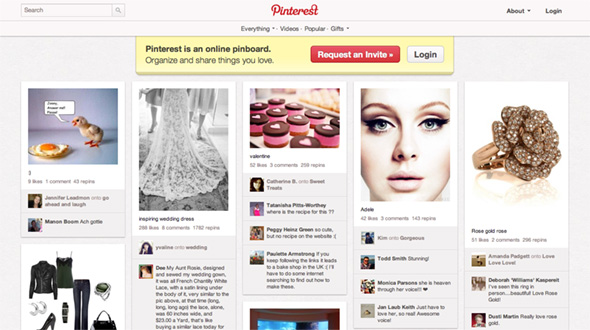
Pinterest is probably the hottest sharing and organizing social network today, and if your website’s community has jumped on the pinning bandwagon, make sure it’s easy for them to share and save your stuff with the “Pin It” button. Here’s how you can add it to your WordPress site (including Genesis Framework-powered sites).
Install a Pinterest Pin It WordPress Plugin
The most painless route would be installing a Pinterest WordPress Plugin. There are already a few competing ones available at the official plugin repository such as Pin It On Pinterest (by bahia0019) and Pinterest “Pin It” Button (by pderksen).
If you’re using an existing social button service like AddThis, Slick Social Share Buttons, or Social Linkz, you’ll be happy to know that these plugins support Pinterest already.
Add the Pinterest Pin It button to your WordPress Theme
The button code which you can get from the Goodies page requires an image URL in addition to the usual post URL, so in this case we’re using the built-in Post Thumbnails feature.
In single.php and places where you call The Loop, add this code:
[php]
<?php $pimage = wp_get_attachment_image_src(get_post_thumbnail_id(get_the_ID()));
if ( $pimage ) { ?>
<div class="pinterest"><a href="http://pinterest.com/pin/create/button/?
url=<?php echo urlencode(get_permalink()); ?>
&media=<?php echo urlencode($pimage[0]); ?>
&description=<?php urlencode(get_the_title()); ?>"
class="pin-it-button" count-layout="horizontal">Pin It</a></div>
<?php } ?>
[/php]
Depending on the type of button you want, you can change the value “horizontal” to “vertical” or “none”.
In footer.php, add this code to the bottom, right before </body>:
[code lang=”js”]<!– Include ONCE for ALL buttons in the page –>
<script type="text/javascript">// <![CDATA[
(function() {
window.PinIt = window.PinIt || { loaded:false };
if (window.PinIt.loaded) return;
window.PinIt.loaded = true;
function async_load(){
var s = document.createElement("script");
s.type = "text/javascript";
s.async = true;
if (window.location.protocol == "https:")
s.src = "https://assets.pinterest.com/js/pinit.js";
else
s.src = "http://assets.pinterest.com/js/pinit.js";
var x = document.getElementsByTagName("script")[0];
x.parentNode.insertBefore(s, x);
}
if (window.attachEvent)
window.attachEvent("onload", async_load);
else
window.addEventListener("load", async_load, false);
})();
// ]]>
</script>[/code]
Insert the Pinterest Pin It button to your Genesis Framework WordPress site
If you use the Genesis Theme Framework, just add the above JavaScript to the footer script text box in the Genesis Options page, then add this to the functions.php file in your child theme:
[php]
add_action( ‘genesis_post_content’, ‘pinterest_pin_it_button’ );
function pinterest_pin_it_button() {
$pimage = genesis_get_image( array(‘format’ => ‘url’) );
if ( $pimage ) { ?>
<div class="pinterest">
<a href="http://pinterest.com/pin/create/button/?
url=<?php urlencode(get_permalink()); ?>
&media=<?php echo urlencode( $pimage[0] ); ?>
&description=<?php echo urlencode(get_the_title()); ?>"
class="pin-it-button" count-layout="horizontal">Pin It</a>
</div>
<?php }
}
[/php]
This adds the button after the entry text. You can also choose from other Genesis Hooks for a different location on your blog.
CSS Layout Techniques
Not everyone is busy daily with CSS, which makes it understandable you don’t know CSS layout structure and code by memory. It’s good to have some good sources providing ready basic code to get started on a new website. The pro of using these layout is that they are already tested and bug free. [Read more…]
17 Miscellaneous WordPress Plug-ins for 2011
Time to revise those WordPress plug-ins. WordPress is still the most common used publishing system by experts an amateurs alike. Which means also the most targeted by hackers, spam, bots, etc. I compiled a list of new and older, still popular and useful plug-ins for you to try out.
Some plug-ings have been around since last year and this is the first time I come across them. Goes to show how much option there is for WordPress that one can still be surprised by what there is available plug-in wise.