Feature
Post

Category
Design

Color Choices for Better Readability

When I started designing websites twelve (!) years ago, I did an embarrassing large number of them in black with white text. Fast forward to 2010, and now I’d say that 99% of the sites I design have black- or dark gray- text on white backgrounds. I’ve read the studies, of course- accessibility and readability studies stating over and over again that anything but black on white is difficult to read and possibly headache-inducing.

But what really matters here aren’t necessarily the colors themselves, but how they contrast with each other. Take the following example:
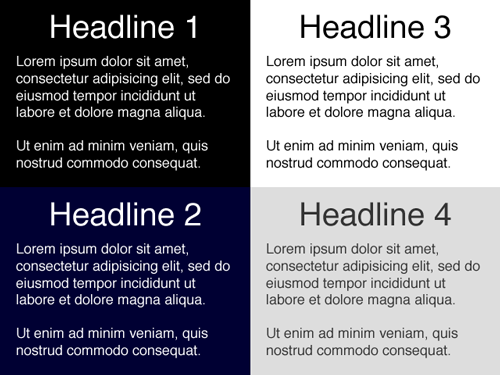
Of all these, Headlines 1 (black background, white text) and 3 (white background, black text) have the highest contrast. While these could arguably be the easiest to read, some people actually find the lower contrast examples in Headlines 2 and 4 more pleasing to the eye- myself included (note: I have bad eyesight, probably from spending too many hours in front of a computer for the past 12 years!) Which is why many designers would rather use #333 for text on a white background rather than #000.

This is also interesting:
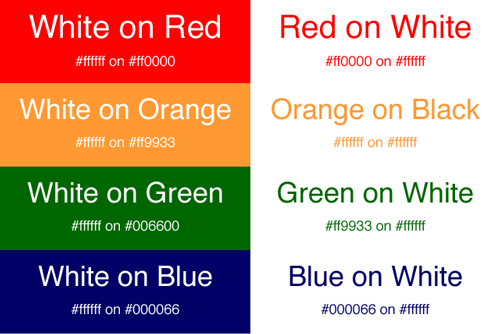
I’m not sure about you, but my eyes naturally gravitate to the boxes on the left because of their bold colors. Now I wouldn’t recommend these for long paragraphs of text, but it’s certainly something to keep in mind when choosing colors for things like banners, mastheads and advertisements.

What color choices do you make in your designs? Do you stop and think about how they relate to readability?

  1. By Thomas Plastino Martin posted on January 20, 2010 at 7:43 pm
    Want an avatar? Get a gravatar! • You can link to this comment

    I think there is an error in your second image.

    Shouldn’t this:

    Orange on Black
    #ffffff on #ffffff

    be this:

    Orange on White
    #ff9933 on #ffffff

    Color choices that I make are very similar to what you have outlined here. I much prefer #333 to #000 on a white background because it reduced the contrast between background and text.

    The idea I go by seems to be outlined pretty nicely here. I make sure that a color pair looks good whether the background is colored or not. I especially like the green and blue that is shown here.

  2. By Victoria Blount posted on January 21, 2010 at 10:25 am
    Want an avatar? Get a gravatar! • You can link to this comment

    This is an interesting post, as long as the colours do contrast i think that the slightly softer shades like a grey on white are more soothing to read. Coloured text on white is easier on the eye also.

  3. By Stacy posted on January 21, 2010 at 2:57 pm
    Want an avatar? Get a gravatar! • You can link to this comment

    For long paragraphs, I would also choose Headline 4. If I encounter a site that will cause imaginary black lines to be burned into my eyes after reading it, I will turn off the CSS.

    I always keep this in mind when developing a site.

  4. By Long Island Web Design posted on February 5, 2010 at 7:49 pm
    Want an avatar? Get a gravatar! • You can link to this comment

    Thanks for the great tips because color are designer’s eye

  5. Trackbackウェブデザインに伴う色の考察 | NutspressFour Tools for CSS Optimization & Compression | Devlounge