Feature
Post

Category
General


Save Time with VMware Fusion

For some reason, I’m always short on time, and apparently I’m not the only one. There’s just not enough hours in the day, and that’s a problem for the web industry overall. Working with can be frustrating as it is when things aren’t going your way, so any time you can save is greatly appreciated.

Enter VMware Fusion, my most recent Time Saver.

Windows XP on OS X
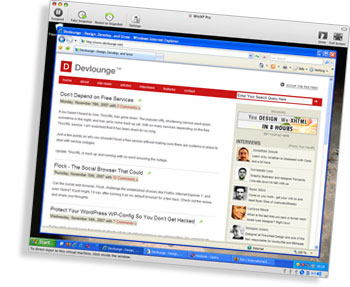
VMware Fusion windowVMware Fusion is a virtual machine software, which means that it lets you run other operating systems (or OS) on your computer, such as Windows XP or a Linux distribution. In my case, I’m on Mac which means I’m running OS X.

That means that I, when doing web development, had to have a PC booted up, with the necessary browsers installed. Now, it may be a luxury problem since I’ve got a three monitor setup and not everyone’s as equipped in this matter as I am, but that Windows XP instance took up valuable screen real estate, which is a bad thing when being used to having plenty of space.

No more!

I bought VMware Fusion, set up a virtual machine (which was very easy, just allocate space on your hard drive), and then I installed Windows XP Pro on it. The installation runs as it always does, in a window on your computer, when working with VMware’s virtualization software, and it was a breeze. There are some quickstart files to download, but I figured I’d do the full install to make sure everything I wanted was in.

So the installation was a breeze, or as much of a breeze as a Windows XP install can be. You do need a valid license, and you do need to activate your copy, it’s just like installing on a PC, so this isn’t emulation. That means that you’ll have to buy a Windows license if you’re a Mac user.

Since I’ve been on Windows before, I had everything I need.

Unity Integrates the Windows Applications

Now, you can run your virtual machine either in a window on your computer, or you can use the Unity feature. That means that you can have VMware Fusion embed (for lack of a better word) your Windows applications (or whatever OS you fancy) in OS X! In other words, I can run Internet Explorer 6 for bug testing in a nice little OS X-like window, instead of having it confined to a big Windows XP window.

This is just great, brilliant, and marvelous!
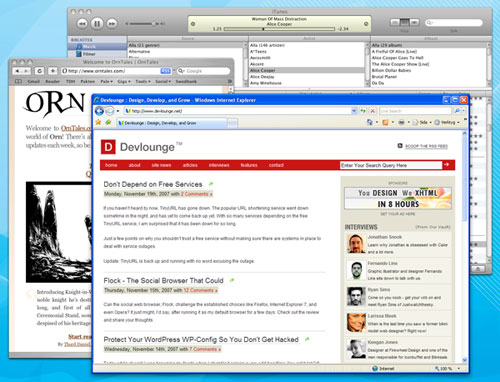
Unity windows

I will never again run a Windows PC just for bug testing. I’ve got control of my screen real estate, and I’m very happy with not having to go through a lot of hassle to see what my code does in various browsers. Everything’s on my Mac Pro workstation, and that makes me a happy designer. The fact that I never need to wait for Windows booting up also kicks ass, I’ve just suspended it in a state with all the browsers etc. open! Lovely.

VMware Fusion recently updated to 1.1 for Leopard support, but I don’t know if there’s any real change from running 1.1 on Tiger – I haven’t upgraded my workstation to the new OS X version yet.

There are other solutions to this, such as Parallells, which basically does the same thing. Boot Camp, included with Leopard, isn’t the same though, since it only lets you install a Windows instance on your computer and choose it on startup, not run it side by side.

I recommend VMware Fusion to everyone who needs to switch to Windows every now and then, to see how code and design turns out. It’s only $79.99, which is totally worth it in my book, but then you need a Windows license as well, of course.


  1. By Squawk posted on November 20, 2007 at 6:50 am
    Want an avatar? Get a gravatar! • You can link to this comment

    I tried an older version of Parallels, which sometimes got painfully slow. It’d be interesting to compare these two apps: Parallels and VMware.. Anybody?

  2. By Paul posted on November 20, 2007 at 9:51 am
    Want an avatar? Get a gravatar! • You can link to this comment

    This is the second article about VMWare Fusion I’ve seen that really sounds like a paid review. The other was on The Apple Blog… I’m just saying, if you’re not being paid for this, at least try not to sound like it so much.

  3. By Ronald Huereca posted on November 20, 2007 at 8:02 pm
    Want an avatar? Get a gravatar! • You can link to this comment

    I use Parallels instead of VMware, and so far I don’t regret it. I haven’t used the two side-by-side, but they seem to be comparable products with near identical features.

    I know with Parallels you don’t actually have to own a full license of Windows to install. You can use an upgrade ISO (make one using Disk Utility) and an ISO of an older version of Windows to do an install. Not sure if you can do this with VMware fusion.

  4. By Darren posted on November 21, 2007 at 12:20 pm
    Want an avatar? Get a gravatar! • You can link to this comment

    I have recently been thinking about this. I run Ubuntu but as much as I enjoy open source it doesn’t have the fleet of applications that windows has (at the same quality any ways). This would be the perfect solution but whether I will get the right use out of it after paying is the question. Is it worth it?

  5. By whit posted on November 21, 2007 at 12:46 pm
    Want an avatar? Get a gravatar! • You can link to this comment

    we use this at work and WOW isn’t it nifty! don’t you just love it?!

  6. By thomas posted on November 22, 2007 at 1:02 am
    Want an avatar? Get a gravatar! • You can link to this comment

    Good post.

    I haven’t used Parallels yet, but I have been using Fusion since it was in beta (and other virtualization products for 4+ years). It’s very stable and works well.

    VMware also has a beta application (called ‘Importer Beta’) that allows you to easily import Parallels VMs into Fusion.

    I wrote a quick post on my blog about the 1.1 release of Fusion. You can find it here.

  7. By TDH posted on November 26, 2007 at 8:39 am
    Want an avatar? Get a gravatar! • You can link to this comment

    Paul, I don’t do paid reviews, and certainly not without disclosure, so the answer is no. I’m sorry if I sound to positive for your taste, but VMware Fusion is that great. ;)

  8. By Chad Crowell posted on November 27, 2007 at 12:54 am
    Want an avatar? Get a gravatar! • You can link to this comment

    I actually have both installed right now on my MBP Core Duo 2.0, 2mb RAM and VMWare is clearly faster. However,t he old VMWare version lacked a lot of polish- so be sure to use the latest release. Also, Parallels is still struggling to work with 10.5 perfectly, while VMWare runs flawlessly.

    Also don’t forget, your virtual machine will start slowing down the more you install, just like on a PC, so keep it as lean as possible. I just have a bunch of browsers for testing, XP tweak UI to speed up the menus, and thats about it.

  9. By Walid El Herpha posted on November 9, 2008 at 3:39 am
    Want an avatar? Get a gravatar! • You can link to this comment

    Fusion is the best as I found in it one feature that will not be in parallel for sure
    I have windows vista on my MAC using the bootcamp and as I can boot it alone or boot my Mac osx alone
    I even can boot mac and fusion read it from inside the mac and boot it for me as an Image file
    its a wooooooow feature for me

  10. TrackbackVMware Fusion and Raping Widgets « TDH @ WordPress.comSearching for the Ideal Workstation Desktop | tdhedengren