Flock 1.0 have been out for a while now, and I’ve been using it as my primary browser, both on the laptop and on my workstation, for a few days now. These are my impressions.
The Social Web Browser
First of all, Flock markets itself as a social web browser, and integrates with a number of social services, such as Facebook, Twitter, del.icio.us, YouTube, Flickr, Blogger, TypePad, WordPress.com, and so on. The list is extensive, but far from complete. Where’s Jaiku, MySpace, Digg, and so on? Maybe that’ll arrive later on.
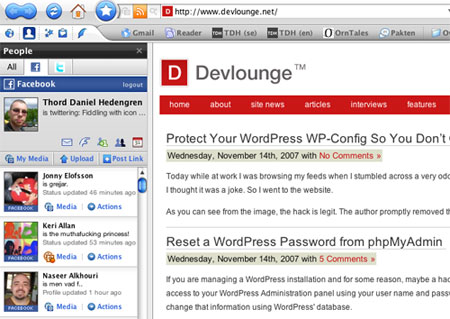
The social stuff works in a few different ways. For instance, your media browser opens between your tabs and the toolbars, while the People sidebar handles text-based social services, such as Facebook or Twitter. This means that you can check out what your Facebook friends are doing, or post tweets, right in the sidebar in Flock. Nothing particularly new for people used to pimping their Firefox installs with wicked extensions, but still cool and nifty.
Get Blogging
There’s support for publishing to both blogging services such as Blogger and WordPress.com, but also self-hosted blogs. The blog writing tool is easily configured and pretty accessible, just a button in the small social toolbar (configured in my screenshots) to the top left. It looks nice enough, with a wysiwyg editor, and the opportunity to edit the code. I’ve done a few posts with it, and it does the job, but this one’s not for me. Sure, it’s very handy to have a blog editor in your browser, when reading something that pisses you off and makes you want to rant, but at the same time I can see a lot of weird things happening, especially if you have multiple blogs. A post could be published on the wrong blog, for instance, and I doubt the Devlounge readers would like to get the recent big black latino asses I’ve scavenged from the web. Not that I’m into that sort of thing, of course…
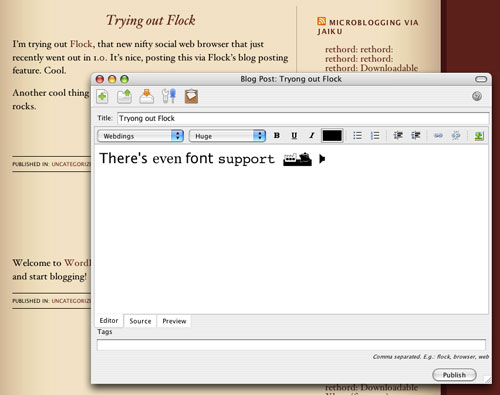
Seriously, I can see the blog posting tool working out for a lot of users. It’s not for me though, but it’s there and that’s fine.
Web Clips and Bookmarks
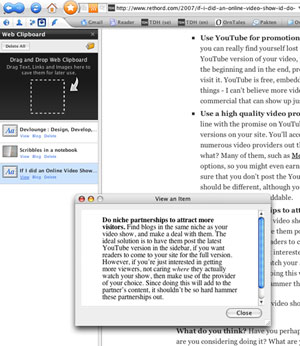 The web clips, however, could be something I got around using. It’s another sidebar, to which you can drag text, links or images, for latter use. Just mark the text, or drag the image, and drop it in that little box, and it’s stored in the sidebar, easy to access. I haven’t gotten used to doing this yet, but I’ll definitely give it a go and see if this is something that works in the long run.
Bookmarks’ got support for del.icio.us of course. At first I looked around after that nifty little tagging button that the del.icio.us plugin gives you for Firefox (and others), but couldn’t find it. Well, turns out that all I had to do was bookmark a page, and I got a nice little dialog asking me how I wanted to store my bookmark. Very nice, and great for someone like me as well, who use both del.icio.us, and the bookmark bar, as you can see from the screenshots.
Not 100% Bug Free
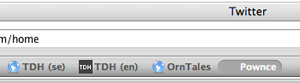 Speaking of the bookmarks bar, among the few bugs I’ve encountered, there’s this cute little thing. “Pownce” is a bookmark added to the bar, but as you can see there’s spacing before the first letter (it’s hovered in the screenshot). This occurs every now and then when you create or drag a bookmark to the bookmarks bar, but there’s nothing visual to remove when editing it. Delete and redo. An annoying, but not very dangerous, little bug.
Worse is the URL bug. Sometimes the URL field just isn’t updated, so I can surf Twitter, and suddenly realize that I’m over at some unknown person’s Twitter page, but the URL still says twitter.com/rethord. If I mark this and press enter, it loads twitter.com/rethord as well, so it’s not just a visual thing. Surfing via links or bookmarks while this occurs works as usual, but it’s really annoying. Hopefully this is something they’ll come to terms with pretty soon.
Can You Browse The Web With It?
So how’s the browsing then? Well, Flock is built on the same engine as Firefox (Gecko) and seems to render everything the same way. The browser is responsive and fast, and it doesn’t seem to leak memory in the same crazy manner that Firefox does (or used to do, it’s gotten better, although it still hogs those valuable megabytes). I’ve yet to experience a crash as well, which is very positive.
 However, despite Flock being based on the same engine as Firefox, your old extensions for the latter won’t work. That means no Firebug, which means that Flock still have a way to go before it really can push Firefox out of the way for web developers out there. Likewise, extensions available for Flock is a mere nothing compared to what’s out there for Firefox, which tweakers are sure to dislike.
For now, Flock is my default browser – a great verdict by itself. At least when just browsing the web, sending e-mails, doing social stuff, and for blogging research. When it comes to development, I need my Firebug extension and then I’ll boot up Firefox again.
Check it out over at flock.com, and make sure you take the tour if you want to learn more.