Custom Reading Containers
For those who have been following Devlounge for a while, you'll know that I wrote a script called Custom Reading Width. Custom Reading Width allowed users of a particular site to adjust a container's width. Soon after publishing the article, it was suggested to me that I write something similar that allows a user to drag the edge of a container in order to adjust the container's width. In an effort to write that script, Custom Reading Containers was born.
In all honesty, I've only tested out the script in Firefox 2.0, IE 6, and Opera 9. I should have labeled the script as a beta, but I'm taking Andrew Faulkner's advice and leaving the beta out of it.
What are the Features?
- Custom Reading Containers (CRC) does not rely on any third-party JavaScript library. The script is lightweight and portable.
- The script will work on as many containers as your heart desires.
- The script saves the width of the container automatically. Custom Reading Width needed user interaction.
- CRC is hidden and unobtrusive.
- CRC works just as if you were resizing a window.
What are the Applications?
- CRC can allow users to adjust the reading width in full-width websites.
- CRC can potentially control containers in a web application.
- And more...
See the script in action. Demo1 | Demo2
How Does It Work
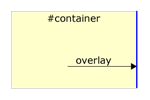
Custom Reading Containers works by laying a small overlay over the container you wish to resize. As you can see from the image below, the overlay is placed on top of the container.

The overlay's width and appearance is controlled by CSS. If you like, you can make the overlay transparent, wide, skinny, or whatever style you prefer.
When a user hovers over the overlay, the cursor changes to indicate that the container can be resized.

The user resizes the container by clicking on the overlay and dragging the mouse to the left or to the right.

Once the user has finished resizing, the script saves the data to a cookie. When the user returns back to the page, a small PHP script calls the cookie and sets the width of the container to the user's preferred width.
Where Can I Try It Out?
Here are two locations that you can try out. The first location demonstrates how the script reacts to multiple containers. The second example shows how the script will behave when used on a full-width layout.
Where Can I Download it?
Give Custom Reading Containers a try. Download Custom Reading Containers version 1.
Customizing the Script
The test script includes these three files: crc.js, crc.css, and test.php. I will stick to covering them for simplicity.
Make Sure the Container is Relative Positioned
The first thing to note is that any container having the overlay must be relative positioned. This can be accomplished quite simply in CSS by doing: position: relative; in your CSS file.
Modify the crc.js file
You need to modify the crc.js file to include your containers. Towards the bottom of the file, you'll see code such as this:
For each container added, give the container a unique variable name such as container1 in this example. There are five things to pass to the containerCollection.Add() function.
- The container name. In this example, the container name was "sidebar."
- The default width of the container. My default width for the "sidebar" container was 30 percent. Since the value must be a string, I entered in "30%". You could have easily have put in "300px".
- Whether the container is fixed or fluid. If the container is fixed, the value should be
true. If the container is fluid, the value should befalse. - The minimum width of the container. This is an integer value and can be in pixels or percentages.
- The maximum width of the container. This is an integer value and can be in pixels or percentages.
- Whether the min and max width of the container are in percentages or pixels. If the widths are in percentages, the value is
true. Otherwise, the value isfalse.
You repeat the above steps for each container to be resized.
Insert the PHP Code
The following code must be inserted on any page utilizing Custom Reading Containers. The code is in PHP, so a PHP file is needed to run the script. The PHP script reads in the cookie set by the JavaScript and sets the styles up accordingly. The code needs to be inserted within the head tag.
if (isset($_COOKIE["customContainers"])) {
$ReadingArray = explode(",", $_COOKIE["customContainers"]);
$ReadingWidth = "";
for ($i = 0; $i <= sizeof($ReadingArray); $i++) {
if ($i % 2 == 0) { //if the number is odd
if (preg_match("/^[-a-zA-Z0-9]+$/", $ReadingArray[$i])) {
$ReadingWidth .= "\n#" . $ReadingArray[$i] . " {";
} else { $ReadingWidth .= "\n#ABCDEFGHIJKLMNOPQRSTUVWXYZ {";
}
} else {
if (preg_match("/^\d\d*(px|%)$/", $ReadingArray[$i])) {
$ReadingWidth .= "width: " . $ReadingArray[$i] . ";}";
} else {
$ReadingWidth .= ";}";
}
}
}
if (sizeof($ReadingArray> 0)) {
?>
<style type="text/css"><?php echo $ReadingWidth ?></style>
<?php }
}
?>
Modify the StyleSheet
The code in crc.css is more-or-less setup to control the overlay. You can easily just paste the overlay code into your existing CSS file. As stated earlier, you can control the overlay's appearance using your StyleSheet.
display: block;
position: absolute;
right: 0px;
top: 0;
width: 5px;
cursor: e-resize;
z-index: 100;
background-color: #000066;
}
Conclusion
Hopefully Custom Reading Containers can help you out, whether it is assisting your users in adjusting the reading width, or perhaps controlling some function of a web application. If you have any feedback or bug reports, please leave a comment.
If you like this script, or would like to show your support, please help out with a Digg.


Want an avatar? Get a gravatar! • You can link to this comment
Works very nicely, however the I question the usefulness of this in web layouts. Shouldn’t we be using the built in ability of the browser that allows people to change reading widths, ie resizing the window?
I can see great potential in this, however, in allowing you to change the widths of columns (or panes), particularly in complex web apps. Would it be possible to do this with this script?
Want an avatar? Get a gravatar! • You can link to this comment
Tom H,
Changing the browser width would be ideal, but that would require resizing the browser window each time for each full-width layout. If you read my “inspiration” post (under Related Posts above), you’ll see why I wrote the script.
The script does have the potential to be used in web apps. I’ll try to add some functionality and update the article this weekend so that the containers can talk to eachother. Right now, each container is independent.
Want an avatar? Get a gravatar! • You can link to this comment
I like it! I modified the script to take a linked container that would be resized in the opposite direction when the main container was resized. This gives the illusion of a movable divider between the two containers.
Want an avatar? Get a gravatar! • You can link to this comment
Nice Chris. Do you have a working example?
Want an avatar? Get a gravatar! • You can link to this comment
Hi, I really like the idea.
Some modification in the code to stop warnings:
Checks if array item is not empty:
if (isset($ReadingArray[$i]) && preg_match(“/^\d\d*(px|%)$/”, $ReadingArray[$i])) {
and
if (isset($ReadingArray[$i]) && preg_match(“/^\d\d*(px|%)$/”, $ReadingArray[$i])) {
I would like to see re size in height too (right-down corner) and possibly drag and place so it can remember positions of containers.
Oh yes this is very useful and great feature for website users as they can decide how to display the website.
Thanks for this great idea!

Second Comment, corrected email address!