Today while at work I was browsing my feeds when I stumbled across a very odd headline: You got h4ck3d!
I thought it was a joke. So I went to the website.
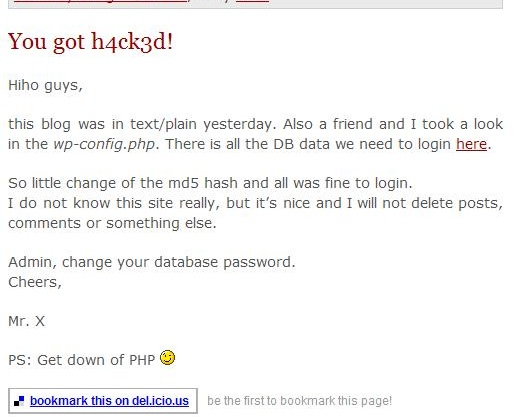
As you can see from the image, the hack is legit. The author promptly removed the post within a few hours and it was like nothing ever had happened.
The way the hacker got in was through the “wp-config.php” when it was readable as plain text. From that, the hacker can get your database name, and your database username and password. This could’ve have easily been prevented, even if the hacker could read the “wp-config” file.
Protect it the .htaccess Way
Josiah Cole wrote a nice htaccess tutorial on modifying your .htaccess to protect the wp-config.
Here’s the code he used:
[php]
# protect wpconfig.php
order allow,deny
deny from all
[/php]
Protect the WP-Config by Moving the File
Now one can move the wp-config to an unpredictable location and change the code in the source, but that would be a pain to do with every WordPress upgrade.
How about creating a separate PHP file in a non-WWW accessible location and use the WP-Config to include that file.
Say for example that your web include path for your server was /home/yourname/public_html/. You can actually save a file in the /home/yourname/ area and it won’t be web accessible. Meaning that even if somebody were able to read your wp-config, they wouldn’t get anything valuable.
Here are the steps that I took.
Create a “config.php”
Within this config.php file I included the following:
[php]
[/php]
I uploaded this file to a non-WWW readable location. Normally this should be the directory before “public_html” or “www”.
Modify the WP-Config
I then modified the “wp-config.php” file to include the file. If somebody were to somehow read the contents of my WP-Config, all they would see is this:
[php]
[/php]
Please note that the include paths change from server to server, but hopefully you get the idea. Save your sensitive information in a non-WWW location, and have the WP-Config file read it in. This way you won’t have to change anything if you have to upgrade WordPress.
Conclusion
If a person with malicious intent finds your WP-Config file and can actually read the contents, your website is exposed. Devlounge wrote an article earlier today that revealed how easy it is for a hacker to change your password (and get admin access to your blog) using phpMyAdmin.
You can never be too careful about these things, so protect your WP-Config and make sure you have a recent database backup.
If there are any more ways to protect the WP-Config that I didn’t already mention, please feel free to add them in the comments.