For some reason, I’m always short on time, and apparently I’m not the only one. There’s just not enough hours in the day, and that’s a problem for the web industry overall. Working with can be frustrating as it is when things aren’t going your way, so any time you can save is greatly appreciated.
Enter VMware Fusion, my most recent Time Saver.
Windows XP on OS X
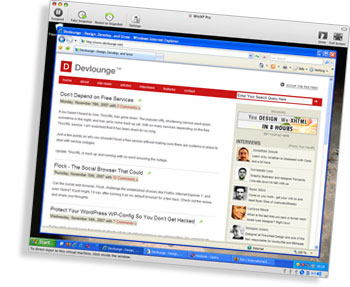 VMware Fusion is a virtual machine software, which means that it lets you run other operating systems (or OS) on your computer, such as Windows XP or a Linux distribution. In my case, I’m on Mac which means I’m running OS X.
That means that I, when doing web development, had to have a PC booted up, with the necessary browsers installed. Now, it may be a luxury problem since I’ve got a three monitor setup and not everyone’s as equipped in this matter as I am, but that Windows XP instance took up valuable screen real estate, which is a bad thing when being used to having plenty of space.
No more!
I bought VMware Fusion, set up a virtual machine (which was very easy, just allocate space on your hard drive), and then I installed Windows XP Pro on it. The installation runs as it always does, in a window on your computer, when working with VMware’s virtualization software, and it was a breeze. There are some quickstart files to download, but I figured I’d do the full install to make sure everything I wanted was in.
So the installation was a breeze, or as much of a breeze as a Windows XP install can be. You do need a valid license, and you do need to activate your copy, it’s just like installing on a PC, so this isn’t emulation. That means that you’ll have to buy a Windows license if you’re a Mac user.
Since I’ve been on Windows before, I had everything I need.
Unity Integrates the Windows Applications
Now, you can run your virtual machine either in a window on your computer, or you can use the Unity feature. That means that you can have VMware Fusion embed (for lack of a better word) your Windows applications (or whatever OS you fancy) in OS X! In other words, I can run Internet Explorer 6 for bug testing in a nice little OS X-like window, instead of having it confined to a big Windows XP window.
This is just great, brilliant, and marvelous!
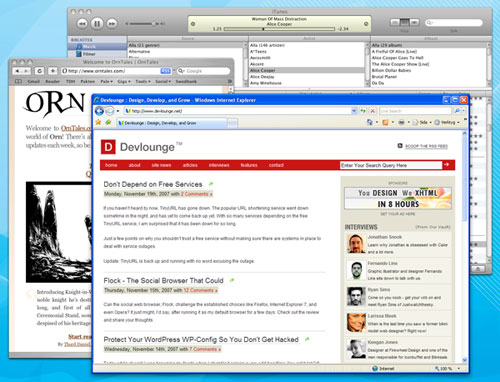
I will never again run a Windows PC just for bug testing. I’ve got control of my screen real estate, and I’m very happy with not having to go through a lot of hassle to see what my code does in various browsers. Everything’s on my Mac Pro workstation, and that makes me a happy designer. The fact that I never need to wait for Windows booting up also kicks ass, I’ve just suspended it in a state with all the browsers etc. open! Lovely.
VMware Fusion recently updated to 1.1 for Leopard support, but I don’t know if there’s any real change from running 1.1 on Tiger – I haven’t upgraded my workstation to the new OS X version yet.
There are other solutions to this, such as Parallells, which basically does the same thing. Boot Camp, included with Leopard, isn’t the same though, since it only lets you install a Windows instance on your computer and choose it on startup, not run it side by side.
I recommend VMware Fusion to everyone who needs to switch to Windows every now and then, to see how code and design turns out. It’s only $79.99, which is totally worth it in my book, but then you need a Windows license as well, of course.