Are you running WordPress 3.0 yet? If so, you might have come across a nifty little addition called Menus. You’ll find it on your admin Dashboard in the Appearances section, and here’s a little screenshot of how it looks:
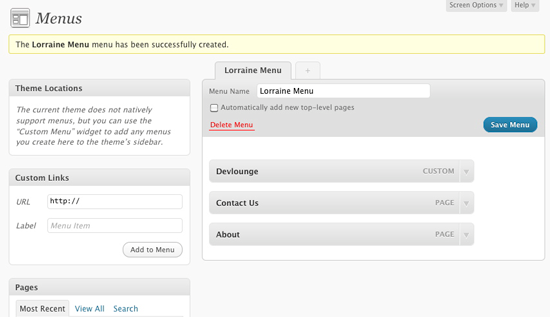
As you can see, I’ve set up a new menu named “Lorraine Menu” here, and added various things to it by selecting from the elements on the left side of the page: a link to Devlounge, links to some pages, and so forth.
Also of note is the message beneath Theme Locations that states:
The current theme does not natively support menus, but you can use the “Custom Menu” widget to add any menus you create here to the theme’s sidebar.
So how do I make sure my theme supports these new menus? There are two methods:
The Easy Way: Widgets
If your theme is already widgetized, you probably don’t have to do anything- especially if the menu is meant to go in the sidebar. A user simply needs to add a “Custom Menu” widget from the Widgets screen. If your design includes navigation elsewhere, just add another widgetized area in your functions.php and specific theme template (header.php or sidebar.php, for example).
The More Complicated Method: Native Support
I suspect that most WordPress theme authors will want to add native support for menus in their themes, though- and it’s really not that hard. Here’s how to do it:
Register Menu Locations. The first thing you want to do is add this code to your functions.php file. Let’s set up 2 locations for menus, making sure to replace the “menu-name” texts with your own.:
[php]
add_action( ‘init’, ‘register_my_menus’ );
function register_my_menus() {
register_nav_menus(
array(
‘menu-1’ => __( ‘Menu 1’ ),
‘menu-2’ => __( ‘Menu 2’ )
)
);
}
[/php]
Call Menus from Theme Templates. To specify where you want these locations to be in your theme templates, use this:
[php]
‘menu-1’ ) ); ?>
[/php]
and
[php]
‘menu-2’ ) ); ?>
[/php]
You can learn more about wp_nav_menu and the parameters it supports at the Codex.
And that’s it! It shouldn’t take more than ten minutes- more with styling, of course- to update your existing WordPress themes to natively support 3.0’s Menus feature.