Protect Your WordPress WP-Config So You Don’t Get Hacked
Today while at work I was browsing my feeds when I stumbled across a very odd headline: You got h4ck3d!
I thought it was a joke. So I went to the website.
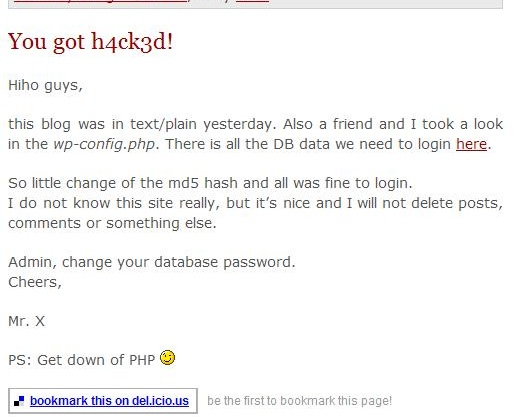
As you can see from the image, the hack is legit. The author promptly removed the post within a few hours and it was like nothing ever had happened.
The way the hacker got in was through the "wp-config.php" when it was readable as plain text. From that, the hacker can get your database name, and your database username and password. This could've have easily been prevented, even if the hacker could read the "wp-config" file.
Protect it the .htaccess Way
Josiah Cole wrote a nice htaccess tutorial on modifying your .htaccess to protect the wp-config.
Here's the code he used:
-
# protect wpconfig.php
-
<files wp-config.php>
-
order allow,deny
-
deny from all
-
</files>
Protect the WP-Config by Moving the File
Now one can move the wp-config to an unpredictable location and change the code in the source, but that would be a pain to do with every WordPress upgrade.
How about creating a separate PHP file in a non-WWW accessible location and use the WP-Config to include that file.
Say for example that your web include path for your server was /home/yourname/public_html/. You can actually save a file in the /home/yourname/ area and it won't be web accessible. Meaning that even if somebody were able to read your wp-config, they wouldn't get anything valuable.
Here are the steps that I took.
Create a "config.php"
Within this config.php file I included the following:
-
<?php
-
-
// You can have multiple installations in one database if you give each a unique prefix
-
$table_prefix = 'yourdbprefix_'; // Only numbers, letters, and underscores please!
-
?>
I uploaded this file to a non-WWW readable location. Normally this should be the directory before "public_html" or "www".
Modify the WP-Config
I then modified the "wp-config.php" file to include the file. If somebody were to somehow read the contents of my WP-Config, all they would see is this:
-
<?php
-
include('/home/yourname/config.php');
-
-
// Change this to localize WordPress. A corresponding MO file for the
-
// chosen language must be installed to wp-includes/languages.
-
// For example, install de.mo to wp-includes/languages and set WPLANG to 'de'
-
// to enable German language support.
-
-
/* That's all, stop editing! Happy blogging. */
-
-
require_once(ABSPATH.'wp-settings.php');
-
?>
Please note that the include paths change from server to server, but hopefully you get the idea. Save your sensitive information in a non-WWW location, and have the WP-Config file read it in. This way you won't have to change anything if you have to upgrade WordPress.
Conclusion
If a person with malicious intent finds your WP-Config file and can actually read the contents, your website is exposed. Devlounge wrote an article earlier today that revealed how easy it is for a hacker to change your password (and get admin access to your blog) using phpMyAdmin.
You can never be too careful about these things, so protect your WP-Config and make sure you have a recent database backup.
If there are any more ways to protect the WP-Config that I didn't already mention, please feel free to add them in the comments.



Want an avatar? Get a gravatar! • You can link to this comment
You can simply change the file permissions to local only, users get a 403 error.
Want an avatar? Get a gravatar! • You can link to this comment
Found on Stumble, excellent info. Thanks
Want an avatar? Get a gravatar! • You can link to this comment
thanks, excellent info!
Want an avatar? Get a gravatar! • You can link to this comment
Thanks for the tip, I will try this as for double protection.
Want an avatar? Get a gravatar! • You can link to this comment
Wow that’s scary. I’ma change mine right away!!
Want an avatar? Get a gravatar! • You can link to this comment
Wow…that is really scary. I’m going to try and protect it the .htaccess way. Seems like the easiest and a safe way. Thanks for the writeup!
David
Want an avatar? Get a gravatar! • You can link to this comment
Not using WP at the moment, but I’ve set up a few. This is really good for everyone out there to remember.
Don’t depend on Apache to always work with PHP, if it doesn’t it will send the file in pure text.
Want an avatar? Get a gravatar! • You can link to this comment
Thanks for the info. I found this site by searching ‘protect a config file php’. Yesterday a member of mine let me know my Amember scripts were hacked. Hacker created a superuser id flooded my database with over 3000 new payments/users. Luckily enough I backup my database daily.
In addition to what you have above, I also changed the prefix of the database tables so it would be harder for MySQL injection. The config file with database and table prefix table was moved to below www, and I removed permissions on the file that included that data. Some people’s kids…teach us to back up daily.
Want an avatar? Get a gravatar! • You can link to this comment
In 2.5 and coming you will also want to hide: define(’SECRET_KEY’,your_unique_phrase); out of web scope. You can also put .htaccess files in your directories out of web scope with the line:
deny from all
This will make sure your files are not readable in the unlikely event that these directories becomes part of the web scope.
Since wp-config.php is vital for WordPress operation, you should use require() that throws a fatal error instead of include() that only throws a warning in case of failure.
Make sure group and world does not have write permissions to wp-config.php and your file out of web scope with sensitive data. Use chmod 640. Notice the last 0 this means that world can’t read write or execute. Practically this means that the webserver will return a 403 error if you try to access the file through a browser.
Last you should turn off php error reporting preferably through php.ini but .htacces and directly from php will also work. You can include this at the top of index.php:
// Error Reporting
error_reporting(E_ALL|E_STRICT);
ini_set(’display_errors’, ‘off’);
If for some reason you need to debug your WordPress install you will want to temporarily set display errors to on. Display errors off assures that hackers can not gather sensitive information about your server environment through in example a warning thrown by a plugin you install.
If you are so concerned with security that you did all of the above you will also want to use sftp and ssh instead of ftp and set you server up to only allow connections from your ip addresses. Using ftp you will be an easy victim for eavesdropping, that means a hacker would be able to gain complete access to your server rendering the above security measures useless.
Want an avatar? Get a gravatar! • You can link to this comment
Although less of an issue in current versions, another secure recommendation that I saw somewhere else was to immediately create a new admin user that does not use the default name ‘admin’. To an extent it is security by obfuscation, but it does make it that much harder for the hacker to access your system if there are more pieces of data they have to discover. They’ll probably give up on yours and look for someone else who is more easily exploitable.
Want an avatar? Get a gravatar! • You can link to this comment
And delete that original admin user once you have done so.
Want an avatar? Get a gravatar! • You can link to this comment
excuse me, but it’s not possible to view php files from remote, you should have access to ftp to do that.
so the problem is another…isn’t right?