This post was written as part of the How to Write a WordPress Plugin series.
More and more plugins are starting to use AJAX techniques. I personally don’t see a use for most cases of AJAX, but it may be necessary for your plugin to use AJAX to accomplish a task. This post will show you how to use AJAX with your WordPress plugin.
This post will be building on the last one where we added in a JavaScript and Stylesheet file.
Set Up a new PHP File
The Devlounge Plugin Series plugin has the following directory structure:
- devlounge-plugin-series
- devlounge-plugin-series.php (main plugin file)
- js
- devlounge-plugin-series.js.php
- css
- devlounge-plugin-series.css
- php
- dl-plugin-ajax.php (new php file for AJAX calls)
Notice I have a php extension at the end of my JavaScript file. I’ll explain the change a little later in this post.
I’ve created a new file and placed it in the php directory and have called it dl-plugin-ajax.php. I have placed the following code inside the file:
[php]
showComments();
}
?>
[/php]
This code is simple enough and is used solely for AJAX calls. It makes sure that config structure is present so we can call our class object dl_pluginSeries and reference other WordPress functions and variables. However, the showComments function hasn’t been created yet, so that is the next item on our agenda.
Set up the showComments function
The showComments function is placed inside our DevloungePluginSeries class:
[php]
function showComments() {
global $wpdb;
$devloungecomments = $wpdb->get_row(“SELECT count(comment_approved) comments_count FROM $wpdb->comments where comment_approved = ‘1’ group by comment_approved”, ARRAY_A);
echo “You have ” . $devloungecomments[‘comments_count’] . ” comments on your blog”;
}
[/php]
You might recognize this bit of code from the database interaction post. This function outputs the number of comments made on your blog.
Allow JavaScript to Know Where Your Blog is Located
One pesky thing about AJAX is that the external JavaScript file has no idea where your blog is installed. I get around this by adding a PHP extension to my included JavaScript file so that I can access WordPress functions. Within the addHeaderCode function, I changed the code from this:
[php]
if (function_exists(‘wp_enqueue_script’)) {
wp_enqueue_script(‘devlounge_plugin_series’, get_bloginfo(‘wpurl’) . ‘/wp-content/plugins/devlounge-plugin-series/js/devlounge-plugin-series.js’, array(‘prototype’), ‘0.1’);
}
[/php]
to this:
[php]
if (function_exists(‘wp_enqueue_script’)) {
wp_enqueue_script(‘devlounge_plugin_seriess’, get_bloginfo(‘wpurl’) . ‘/wp-content/plugins/devlounge-plugin-series/js/devlounge-plugin-series.js.php’, array(‘prototype’), ‘0.3’);
}
[/php]
The only thing I changed was the version number and added a PHP extension to the end of the JavaScript file.
Now JavaScript has a way of finding out where our blog is for AJAX calls. Let’s now set up the JavaScript.
Setting up the JavaScript
The purpose of this script (which is located in devlounge-plugin-series.js.php) is to find the blog’s URL, call the PHP file, and return a result to the user.
[javascript]
Event.observe(window, ‘load’, devloungePluginSeriesInit, false);
function devloungePluginSeriesInit() {
$(‘devlounge-link’).onclick = devloungePluginSeriesClick;
}
function devloungePluginSeriesClick(evt) {
var url = “/wp-content/plugins/devlounge-plugin-series/php/dl-plugin-ajax.php”;
var success = function(t){devloungePluginSeriesClickComplete(t);}
var myAjax = new Ajax.Request(url, {method:’post’, onSuccess:success});
return false;
}
function devloungePluginSeriesClickComplete(t) {
alert(t.responseText);
}
[/javascript]
The above code does the following (keep in mind we are using Prototype):
- Makes sure that config structure is present so we can access WordPress functions and variables.
- After the document has loaded, the devloungePluginSeriesInit is called.
- An event is set up for the link you added at the end of a post (line 7). If you forgot, now is the time to add the link in. Simply find a post and add this code to the bottom of it:
<a href="#" id="devlounge-link">Get the Number of Blog Comments</a> - The absolute URL to the PHP file is found (line 12).
- The PHP file is called (line 14).
- The response is outputted to the user (line 18).
The Result
This next step assumes you are at the post where the link was added. When clicking on the link “Get the Number of Blog Comments“, the script uses AJAX to call a function in the DevloungePluginSeries class and returns the result to you in the form of an alert box.
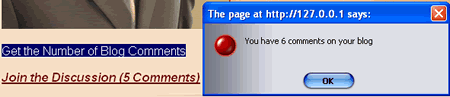
As you can see, I don’t have many comments on my local installation.
Conclusion
This post demonstrated a very bare-bones example of how to use AJAX (using Prototype) for your WordPress plugin. Please download the code used in this post: Devlounge Plugin Series Using Ajax.
Download the Code Used In This Post
For some related reading regarding Prototype, please check out the following links:
- Working With Events In Prototype
- Edit-in-Place with Ajax (uses Prototype)
Thank you for reading.