
Lounge 2
In July 2006, Devlounge released a new design, entitled simply “Devlounge 2″. This design was requested to be released as a theme over and over again, and over and over I had to turn people away. To celebrate the launch of the “last ever Devlounge redesign“, Devlounge 2 is now being released in the form of a Wordpress theme entitled “Lounge 2″, or L2 for short.
What Does it Look Like
Well, it looks like Devlounge of course! (A year ago that is). Devlounge 2 is a standard, two column design, which the usual whites, grays, and reds that long time readers have become accustomed to. For the public release of this theme, we didn’t do much to change it. We stripped out certain “Devlounge Only” images and pages, and let every else as is. Meanwhile, we did make two improvements over the original theme. First, the sidebar was widgetized, because if it wasn’t, everyone would have just requested it later on. Next, a block quote comment issue, which was ignored for a while, is fixed in this release.
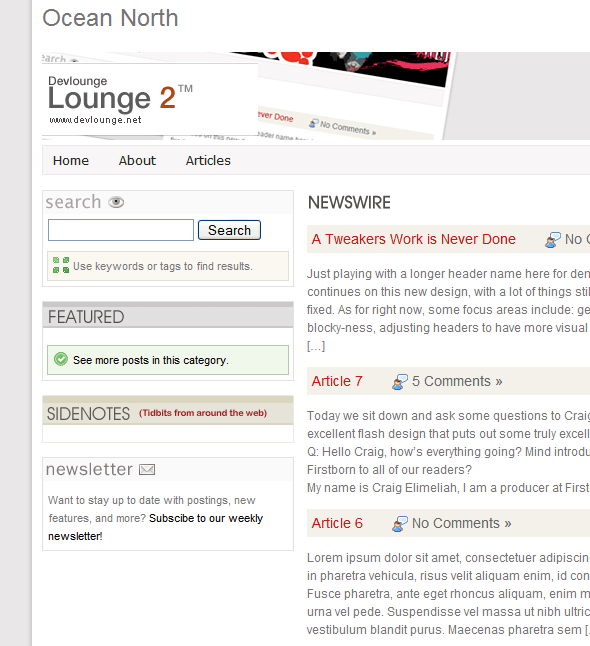
Live Demos
We finally have live demo for you to check out. Give it a try.
Installation
Installation, like always, is very simple, but it does require a few extra steps most themes do not. Please refer to the documentation “readme.html” file included in the download on how to setup homepage specific features such as Noteworthy and Sidenotes (Asides) posts.
Get It
This theme is fully compatible with Wordpress 2.0+, and, although not tested, should also run fine on Wordpress 1.5. If you run into any issues, please let us know.
Download Lounge 2.01 (V. 1 7/5/2007)
Changelog:
- Fixed documentation issue which wasn’t telling you what to do to exclude categories
Support / Bug Reporting
Limited support will be available in the form of comments below. If you discover a bug, or are not sure how to do something, please leave a comment and we will get back to you with a solution.

I am a young designer who has been doing this longer than most other people my age. I had an early start, and have built upon it over the last few years. Devlounge was my first major successful project, which I hope is the first of many. DL is now officially out of my hands, but I hope to continue contributing for as long as I can. See more posts by
First time here, or frequent flyer. Whatever the case may be, we highly recommend 


Thanks for this very nice theme mates, and I’m loving the new design on this site as well. Good job on both.
Thanks for the comments Luke
this is a neat theme but the newsletter references yours.
The index.php source has comments for removing it.
print.png & post.png are referenced from your website. I fixed it mine but you might want to update the zip.
Thanks - updated
Is it possible to move the sidebar to the right without messing up the code?
Cheers,
Mick
Awesome theme man!!
Hi, great theme. I can´t see images in post on index but I see images on single post. How can I put an images on the post of index.
Thank you.
In the index, find
the_excerptand change it tothe_contentBeen waiting for this bad boy to come out. Love your designs! They’re the BEST.
I have the query posts tag setup correctly but I’m still seeing double posts from the noteworthy and the sidenotes.. It’s a fresh install of 2.2.1, and both categories are 3 and 4.. Any suggestions?
Awesome theme by the way..
Never mind I figured out what the issue is… The code should look like this,
The = and - were swapped around and had single quotes on them. It’s working great now..
Getting ready to switch to this awesome theme, but is there any way to keep Child pages from appearing in the top menu?
when your current theme comes out…………….jk
anyway this theme is amazing. im installing it now. gonna try to figure our how to move the sidebar from left 2 right. wish me luck
hey aj, ive edited your theme but have a slight problem. in the footer area i wish to put the feature articles and sidenotes. currently ive been able to put the featured article there. but when i try to put the sidenotes they appear below the featured articles i wish them to appear directly to the right. could you expalin how to do this. much thanks.
@jake - I looked quickly at your css, the problem is your items aren’t floated. Open up style.css and make the following changes:
#featArticles {width: 250px;border: 1px solid #e2e2e2;padding-bottom: 5px;margin-bottom: 14px;float: left;}And, just a little further down..
#sNotes {width: 250px;border: 1px solid #EBEAE2;margin-bottom: 14px;float: right;}thanks man. i knew it had something to do with the css, but wasnt sure how change it. great theme by the way.
I followed the directions precisely, and it is not hiding the noteworthy and sidenotes categories from the main news list.
Fresh install, no plugins, nothing spectacular here. Any ideas?
Never mind, I figured it out. Instead of:
query_posts(’cat-=3,4′);
it needs to be:
query_posts(’cat=-3,-4′);
Sorry guys, I’m going to have to fix the documentation. I had it like this on my test blog, but I forgot the minuses in the docs. Thanks for pointing that out.
I was just wondering which font you used for the images? Like Featured, Sidenotes, Newswire…
Unfortunately I really have no clue, it was a while ago and I no longer have the psd :S
That’s cool. Thanks!
AJ–Thanks for releasing the design. It’s great.
I have one issue, though–I can’t get any of the google analytics plug-ins to work with this theme, but the plug-ins work if I switch to the default wordpress theme. Any ideas?
ryan
Hmm, when plugins don’t work, it’s usually because this
< ?php wp_head(); ?>is missing from the header. Check the header.php file and see if that is in there. If it isn’t, add it anywhere you want.That fixed it! Thanks, AJ.
No problem
Hi all just a quick question from, is there anyway on this template that i can get rid of the news wire and just have a static page in its place ? if so how would i do that .
thanks for any help
Hi,
How can I add a Page link, I saw there is none. I am a newbies with wordpress, I dont want to mess up with all the codes. For the northworthy sidebar & Sidenotes, how many post is gonna be shown? Can I set a limit? Like just show the last 2 posts..
Thanks
It’s very promising tjheme, I like it very much. Thanks a lot man!
great thanks!
Thanks so much for this awesome theme, I really like themes made by devlounge, they’re simple and elegant!
One question regarding this theme though. I’d like to know where I can edit the number of words of excerpts in both sections of newswire and noteworthy? I’ve looked through codes of the template files, I just couldn’t find out where to have a change.
Thanks! Any help is greatly appreciated!
I usually put every post into several categories, so is it possible to exclude the posts once the posts appear in a particular category?
For example, I put a post into the categories “sidenotes” and “entertainment”. The post still appear in the section of newswire as it also belongs to “entertainment”. But I just want to exclude it if it appears in “sidenotes”.
Thank you!
Great theme…!
Wondering..I had a Wp-commerce plugin running and when I installed the theme, the nav put ALL the pages in instead of just the MAIN page…
I have since deactivated the plugin, but I can’t for the life of me get the nav to clear the old pages?…
Any thoughts on how to only have my current pages show?
hey… really nice.
i got a problem even. I can’t use the nextgen gallery… can you tell me why?
I translated & adapted the theme for my blog at http://blog.cedricgodart.net/.
If you need a translator for that theme feel free. You helped me save a lot a time with this great template.
I’m having a hard time figuring out how to widen the theme. Can you point me in teh right direction?
I really like the look of this theme as well, but agree with Michael that it needs to be wider. Am keeping fingers crossed it’s compatible with 2.3
/l2/images/post.png not found
Great theme. i like this one.
Hi,
I love this theme. It’s a ferfect theme for my association. But why does this theme not function with NextGen gallery ?
Thanks for your help.
A french.
What a superb theme!
Anyways, how do I cutomise the sidebar on the main page to include things such as user login and signups?
Thanks!
Thank you for super theme
I liked this theme at first glance, it was usable and elegant, thanks for this one aj:)
However I would like to know how can I change the default “look” of the homepage. I don’t wan’t the featured and sidenotes category, just the usual blog architecture of posts…
Cheers