Particles

Particles is the newest Wordpress theme from Devlounge, released in mid August 2007. Particles is meant to be extremely lightweight, easy to build upon, and extremely fast for all browsers.

Particles Mini Logo

Introducing Particles.

The Creation of a New Theme

With all of our existing themes, we generally followed the same layout pattern, just with a different looking style around it each time. For Particles, we wanted to take a step in another direction; a rather unusual and different one for some people when they think of “normal” blog layouts. So, we went at it creating a grid based, portal style design with posts and excerpts being displayed in columns of four. This grid style layout is something I’ve used on a lot of client sites and blogs lately, and every time the design hit my portfolio’s “Testing Ground”, people would email me asking “is this going to be released?” I wanted to offer the same type layout to the Wordpress community, but without all the unnecessary baggage. That’s where Particles comes in.

Features at a glance

Particles is built with a few features in mind, particularly some of these:
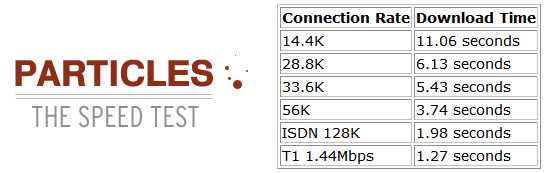
Particles Speed Test Results

  • Fully Flexible - The entire layout is fluid, and will adjust according to your screen resolution.
  • Em’s - For the fire time, I’ve finally used em’s for font sizing instead of pixels. That makes for much better accessibility.
  • 4 Seconds or Better - The Particles theme has loading time of 4 seconds or less on a minimum connection speed of 56K.
  • Images - Where are they? Particles used virtually no images, adding to the lightning fast loading process.
  • Foundation - Particles is the perfect theme to build your next project upon. With the highly flexible layout, you can turn it into whatever you please without editing code for hours on end.
  • XHTML and CSS Valid - Valid code and Wordpress go hand in hand, don’t they?
  • Widget Ready - The sidebar is widget ready and ready for action.

Have A Look

What better way to experience Particles then have a look at it or test it in a live environment? This teaser screenshot should do plenty of convincing and get you to download this theme and try it for yourself. Our feature list should be tantalizing enough, shouldn’t it? But, if you still aren’t convinced, head over to the Astereo Testing Ground to try the theme for yourself. (If it isn’t active, find the theme switcher and select “Particles”.)
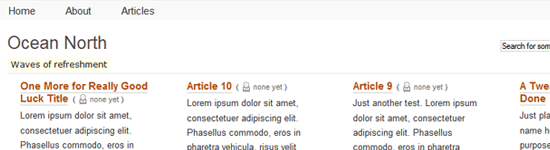
Grid Based Particle Beauty

Get It

Enough talking. Hopefully we’ve convinced you to make the jump and download the Particles theme. There are a few things to mention first. First off, when downloading this theme zip, you’ll find two folders inside. One will be called “particles” and the other will be called “plugins”. Inside the plugin folder you will find The Excerpt Reloaded, a plugin this theme relies on to cut down the size of the excerpts on the homepage. Please upload it to your …/plugins/ folder and activate it before uploading and activating Particles. Next, upload the entire particles folder to your …/wp-content/themes/ location, head to the presentation tab, and activate it. Now, start enjoying lightning fast simplicity and beauty!

Advertisement

Devlounge - Advertise in Page

If you wish to change the excerpt size, please see the Main Index Template of Particles (index.php in the particles folder) and The Excerpt Reloaded page. Or, if you wish to turn excerpts off all together and display the content or Wordpress generated excerpt, use the following: < ?php the_content(__('(Read More)')); ? > or < ?php the_excerpt(); ? >.

This theme has been tested in IE6, IE7, and Firefox with no display problems. If you encounter what appears to be a problem, please let us know in the comments, forums, or via the contact page (send it to AJ). This theme is compatible with Wordpress 2.0+, and should work on 1.5+ as well.

Download Now - Particles Version 1 (8/19/07)

Support and Feedback

Please let us know what you thought of this theme in the comments below. You can also ask support questions and we’ll try to help as much as possible.

  • Post Time August 20, 2007 at 4:14 am (permalink)

    This is an interesting perspective on a blog layout. Very refreshing at that. The layout definitely has a portal grid layout that I am starting to like more and more as it just looks like another alternative to displaying articles or blog entries.

    Nice work.

  • Post Time August 20, 2007 at 4:38 am (permalink)

    Wow very nic, I like the way you deal with index page…

  • Post Time August 20, 2007 at 11:58 am (permalink)

    Very nice and clean looking theme there. Good work AJ. My only “dislike” is the fullscreen width. Far too wide for my liking at 1680px. But that would be an easy change in the css, so not a big issue at all.

    Good stuff.

  • Comment Author aj
    Post Time August 20, 2007 at 1:32 pm (permalink)

    @Alex - All my other themes have always been of fixed width, so I wanted to change it up this time.

  • Post Time August 21, 2007 at 12:53 pm (permalink)

    Really nice, it gives me a lot of new ideas :)

  • Post Time August 22, 2007 at 7:57 pm (permalink)

    Hey.

    Theme is nice a clean, i fucking love it.

    1 Thing, can you update it, so it can support gravatars? pweese..

    Thanks, keep up the good work astereo

  • Comment Author Marcus
    Post Time August 23, 2007 at 5:23 am (permalink)

    Love the theme,

    Just wondered if you planned to include timestamps for comments (as it just got names showing in the Demo comments.

  • Comment Author aj
    Post Time August 23, 2007 at 6:32 am (permalink)

    Marcus, thanks for pointing that out.
    The download has been updated.

  • Post Time August 23, 2007 at 8:34 pm (permalink)

    I dunno if this is anything to do with the theme.

    Before i switched over.. its not spitting out emails to me, when someone posts and comment. ive got the setting to spit them out at me in wpadmin.. any idea’s ?

  • Comment Author aj
    Post Time August 23, 2007 at 9:02 pm (permalink)

    Shouldn’t have anything to do with the theme.

  • Post Time August 24, 2007 at 8:47 am (permalink)

    I know, but ever since i installed this.. it wont spit the emails out when someone posts a comment. it might be the server side of things.. but you any idea’s other than that?

  • Post Time August 24, 2007 at 1:21 pm (permalink)

    Nice theme. I look forward to testing it out on one of my blogs :)

  • Comment Author a.mycroft
    Post Time August 27, 2007 at 8:54 am (permalink)

    HELP!!
    I think I followed your install instructions but I get a fatal error,
    namely,
    “Call to undefined function: the-excerpt-reloaded in
    \wordpress\wp-content\themes\default\index.php on line 15″

    Can you please rescue me?

    A. Mycroft

  • Comment Author aj
    Post Time August 27, 2007 at 9:50 am (permalink)

    You did not put the plugin in the plugins folder and activate it.

  • Post Time August 27, 2007 at 11:26 am (permalink)

    @ a.mycroft
    Put the plugin you got with the zip, in the plugins folder, go to “plugins” in the admin section and activate it.

  • Post Time August 28, 2007 at 8:59 am (permalink)

    Thank you very much for a great looking theme!

  • Post Time August 30, 2007 at 4:51 am (permalink)

    Really nice, clean, unusual theme. Well done!

  • Post Time August 30, 2007 at 12:28 pm (permalink)

    Installed the plugin and activated it. Installed the theme. Now I can’t find the login!!!

    Now what?

  • Comment Author aj
    Post Time August 30, 2007 at 3:19 pm (permalink)

    Can’t find the login? What do you mean?
    You login at www.yourblogurl.com/wp-admin

  • Post Time August 30, 2007 at 3:37 pm (permalink)

    Sorry. Figured out how to get to it. I’m just used to seeing the login on the page.

    Anyway, your theme didn’t seem to work very well on my site, so I changed it out.

  • Comment Author bgr
    Post Time August 30, 2007 at 3:52 pm (permalink)

    can you put whatever you want in each of the 4 columns and how many?

    eg
    1, can i put calendar plugin EC3 and upcoming events in the far right col and recent comments in mid right col, and then
    have 6 posts appear in order in the two left cols? AND be able to designate 8 or 10?

    And like suggestion above can it be made less wide in CSS
    So where would ads go for local nonprofit events go hmmm

  • Comment Author aj
    Post Time August 30, 2007 at 4:52 pm (permalink)

    Modify it and you can do whatever you want.

  • Comment Author bgr
    Post Time August 31, 2007 at 2:47 pm (permalink)

    can their be thumbnails for graphics that appear in article

  • Comment Author aj
    Post Time September 3, 2007 at 9:24 am (permalink)

    Just use the “thumbnail” from the Wordpress post uploader.

  • Post Time September 5, 2007 at 10:30 pm (permalink)

    Hi. I just downloaded Particles and I was trying to apply the sidebar in index.php, but it screws the theme. How can I apply it without braking the layout?

  • Comment Author aj
    Post Time September 6, 2007 at 2:18 pm (permalink)

    Change the css, or copy the page.php contents to index.php.

  • Post Time September 7, 2007 at 9:17 am (permalink)

    I want to keep the index.php look, but want to add a sidebar. I’ve edited index.php and the stylesheet, but it looks a bit strange. Here’s a screenshot: http://i14.tinypic.com/63lq74j.png

  • Post Time September 7, 2007 at 1:50 pm (permalink)

    A great, refreshing theme.

  • Post Time September 10, 2007 at 9:41 am (permalink)

    Wow, great new theme and now I am going to modify it as per my requirement. Thanks for good sharing

  • Comment Author Patrick Algrim
    Post Time September 11, 2007 at 11:17 pm (permalink)

    The theme doesn’t seem to display in 2.0 - 2.11. Only seems to work in 2.2+

  • Post Time September 13, 2007 at 3:49 pm (permalink)

    Wow how did I miss out this one :)

    Let me download it. Smells like a lot of asides here and there ?

  • Comment Author aj
    Post Time September 13, 2007 at 4:14 pm (permalink)

    @Patrick - The theme should work fine in all Wordpress versions from 1.5+. The plugin is the only thing that could pose some kind of an issue, and it works fine with 1.5+, so there is no reason why the theme would not work.

  • Comment Author Patrick Algrim
    Post Time September 20, 2007 at 2:46 pm (permalink)

    @AJ no doubt at your skills brother! I love DEV lounge and I love your themes.

    Maybe it was something dealing with the server I was using. I had not checked the plugin’s that might have been it too. Sick theme no doubt. AJ if you ever want contributers to DevLounge please keep me in mind (even though I think you might be selling it).

  • Comment Author Ray
    Post Time September 24, 2007 at 2:06 am (permalink)

    So, is there no way to add pics? I thought there was a plugin that allowed you to change a pic in a story to a thumbnail for use with excerpts. Couldn’t a thumbnail pic be used in this theme?

  • Comment Author John
    Post Time October 17, 2007 at 11:32 pm (permalink)

    I’m getting this error with WP 2.3:

    Fatal error: Call to undefined function: the_excerpt_reloaded() in /home/lightish/public_html/redbase/wp-content/themes/pv1/particles/index.php on line 15

  • Comment Author aj
    Post Time October 18, 2007 at 7:03 pm (permalink)

    You haven’t activated the plugin. Make sure “the excerpt reloaded” is activated.

  • Post Time March 17, 2008 at 2:58 pm (permalink)

    Im trying to get images to go beside each other when i have somehting like this.

    This should show, 2 images side by side.

    This code should show, 1 below another.

    But even if i use the first code it still shows the image, below another, its something in the css rite? what do i change? :p

  • Post Time March 17, 2008 at 3:01 pm (permalink)

    damn it. the code didnt show.


  • Post Time March 17, 2008 at 3:04 pm (permalink)

    Sorry for spamming, but the code wont show, but i hope you get what i mean.

    Img by an img, i know the code.

    but it still shows, the images 1 below another.

  • Comment Author Ian
    Post Time March 26, 2008 at 5:37 pm (permalink)

    Thanks for this, it’s exactly what I wanted: a good way of showing the intros to lots of articles in a nice quick portable way.

    Hooray for using ‘ems’ rather than pixels too. If only more people did it :/

  • Comment Author Joe
    Post Time March 28, 2008 at 8:31 pm (permalink)

    AJ,

    Great template. I really love it. Two quick newby questions for you. Is there an easy way to get rid of the comment fields and etc. on the About page? Also, how do I add an Articles page in the nav area, like you have in your ocean north screen shot?

  • Post Time April 21, 2008 at 5:45 pm (permalink)

    Wow this theme is great, I have been looking for something like this for months!

    Thanks guys :)

  • Post Time April 29, 2008 at 11:25 am (permalink)

    apparently you forgot to stylizing the archive page?

  • Note: If you are commenting here for the first time, your comment will be sent into a moderation queue before being published. Please use your email address in order to identify yourself for your future comments. Clean XHTML: Use standards ready code tags in your comments. For example, cite a comment or phrase from an article with < blockquote > tags.

    About this author

    LoginI am a young designer who has been doing this longer than most other people my age. I had an early start, and have built upon it over the last few years. Devlounge was my first major successful project, which I hope is the first of many. DL is now officially out of my hands, but I hope to continue contributing for as long as I can. See more posts by aj, or visit aj's homepage.

    Subscribe

    SubscribeFirst time here, or frequent flyer. Whatever the case may be, we highly recommend subscribing to our feeds so you can get the latest updates without visiting the site. It's just a thought - don't say we didn't tell you so.

    Sponsors

    PSD to HTML, PSD to XHTML Service by PSD2HTML.com. You Design - We XHTML / CSS.

    Related Content

    Close
    E-mail It