Feed Styler logo courtesy of Brett Terpstra from Circle Six Design.
Download Feed Styler
What is Feed Styler?
Feed Styler is a WordPress plugin for WordPress users who are comfortable with CSS and would like to be able to style their feeds. Feed Styler enables you to keep your existing class and ID style declarations in your content, but allows a different style to be applied to the feed of that same content. No longer do feeds have to be stripped of style and color.
Who is Feed Styler For?
Feed Styler is for those that use WordPress, are comfortable with CSS, and would like to be able to use their existing markup to style their feeds. Feed Styler is very effective at styling images, blockquotes, and much more. If you are a hand coder and familiar with CSS, Feed Styler will be very intuitive.
This plugin is not for CSS beginners, and not for those that rely on WordPress’s WYSIWYG for content appearance. This plugin is also not for those who have the opinion that feeds should be void of style.
Screenshots
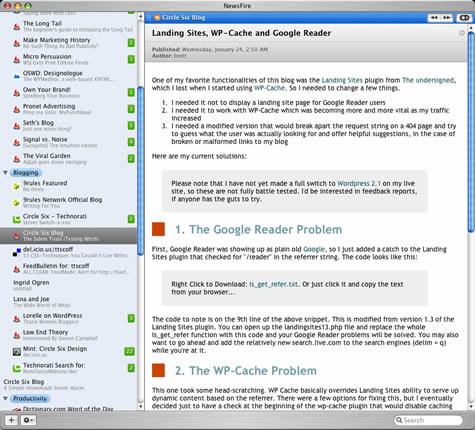
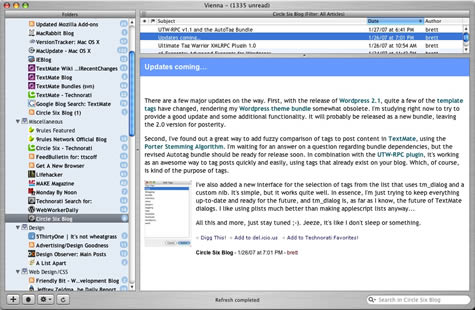
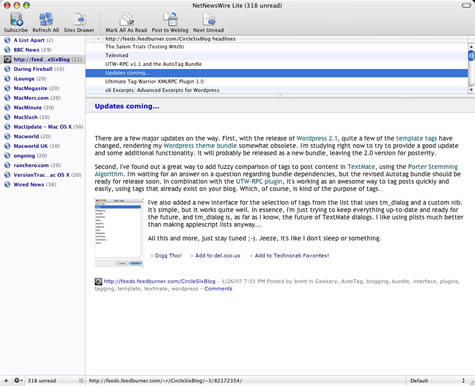
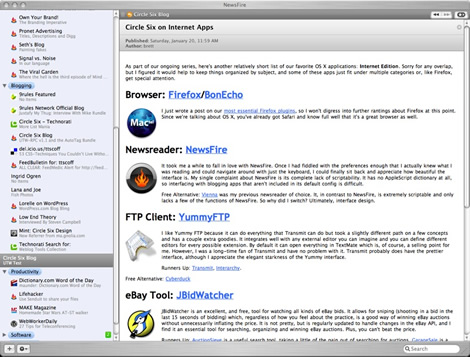
Here are several screenshots that show what Feed Styler can accomplish in feeds. Screenshots are courtesy of Brett Terpstra from Circle Six Design.
Features
Feed Styler has the following features:
- Images show up styled in feed readers that strip inline styles.
- Accepts nested CSS declarations. For example:
#ul li ul li .classname { css code } - Accepts multiple classnames per tag. For example:
- Cascades your styles.
- Works on all feed readers that do not strip inline styles.
- Allows you to keep inline styles out of your post content.
- Allows you to keep your site appearance and feed appearance separate.
- Allows you to test your styles on your post content for immediate feedback.
Installation
Installation is simple. Just follow these steps:
- Copy the “Feed Styler” folder into your /wp_content/plugins/ directory.
- Activate the plugin in the Plugins administration panel.
Interface
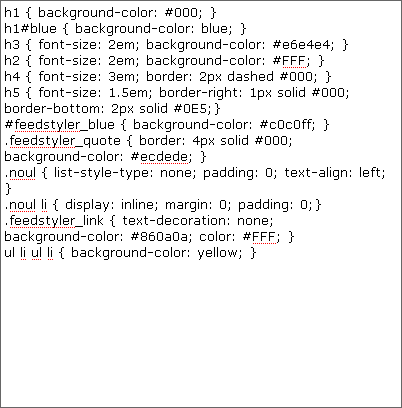
The admin interface for Feed Styler is a giant textarea that allows for the inputting of styles. People comfortable with CSS will feel right at home when entering CSS.
There are a few of things to remember when entering CSS:
- Styles must be enclosed in curly braces.
- Pseudo-classes are not supported. For example:
a:hover { code }will not work. - Make sure all CSS code ends with a semi-colon. For example: img { border: 1px solid #000; float: left; padding: 5px; padding-left: 0; }
- The plugin does not correct invalid CSS code. Make sure you test the CSS just like you would on a normal web site.
Plugin Limitations
The plugin will accept most CSS. There are several things it can’t do, however.
- The plugin cannot correct invalid CSS code.
- The plugin will not work if the content HTML is invalid (such as a hanging open or closed tag).
- The plugin cannot accept multiple CSS declarations per line. For example, the plugin cannot accept:
p, h1, h3, #id, .classname { style code}. Each declaration must be entered in separately. - CSS code must be on one line. I do have error checking to strip multi-line CSS to one line though.
- Invalid CSS code will be stripped out. Make sure you have a backup somewhere.
- Certain style attributes may cause your feed to invalidate. Here’s a list of acceptable attributes.
How the Plugin Works
Feed Styler uses HTML Parser to parse the content HTML. The parsed HTML is then styled.
For those curious what the plugin does in the back-end of things, here are three files that will give you a good idea of what the plugin does to your content. Please note that Feed Styler does not permanently modify your content.
- Sample HTML Code : This is sample HTML code with classes and IDs specified.
- Sample Styles : This is sample Feed Styler CSS code that will style the sample HTML code.
- Resulting Code : This shows what the Sample Code will look like after being run through Feed Styler.
The Sample Code is the type of code you might find in a regular blog post: headings, paragraphs, blockquotes, lists, etc… The plugin determines if the content being served to the user is a feed. If the content is a feed, the content is run through the Feed Styler filter. All IDs, Classes, and Tags that have styles specified in Feed Styler will have the appropriate inline style added. Any feed reader that doesn’t strip out inline styles (shame on you FeedDemon) will now show a styled feed.
Testing Feed Styler
I would recommend not testing with a feed at first. Feeds take a while to propagate and you can only ping FeedBurner once every thirty minutes.

To test your styles on the content and not the feed, select “Apply styles to post content.” The reason this is ideal is that you can tell right away whether a particular style is working for you or not.
When you are done testing and ready to apply the styles to a feed, select “Apply styles to feed.”
You may need to go back to an already-published blog post and save it again in order to update your feed. WordPress caches your feed everytime you publish. You need to re-cache the feed so that the feed will show up styled. If you do nothing, the feed will be styled after your next post.
Please keep in mind that online readers can be a lot slower to show updated feeds than desktop readers. A desktop aggregator (such as RSS Bandit) will typically show changes right away. Please note that the popular FeedDemon strips out inline styles.
If you still have IE6 and are using FeedBurner, you can just paste your FeedBurner URL into the address bar to see the changes.
Some Tips When Styling Your Feed
Not all feed readers support inline styles. For example, FeedDemon doesn’t support inline styles. So don’t fully rely on Feed Styler for the appearance of your feed.
Here are some more tips:
- Remember to keep feeds readable. Most feeds have a light background and dark text.
- Avoid pixels if possible. Use percentages or ems.
- Be wary of floats, especially towards the end of your content.
- Remember that people subscribed to your feed to read your content.
Bugs/Feature Requests/Feedback
Right now there is a consistent bug that creeps up when a tag isn’t closed properly. Sometimes WordPress inserts paragraphs and doesn’t close them. Other times WordPress inserts a closing paragraph tag when there is no open one. This causes the content to show up in the feed unstyled. At this time there is no fix.
If you have styled your feed with Feed Styler and like the results, please leave a comment with a link to your feed so we can check it out.
Version History
- v1.07 Released on 14/11/2007
- Small feature inclusion where styles and the various image attributes (width, align, etc) are included in the IMG tag.
- v1.02 Released on 02/09/2007
- Images now show up correctly in feed readers that strip styles.
- v1.0 Released on 02/03/2007